
What Is PaaS (Platform as a Service)? Examples, Types and How to Choose in 2026

Written by Muhammad Rizwan
November 5, 2026
16 min Read
Platform as a service (PaaS) is a cloud model where the provider runs the servers, network, operating system and runtime, and you build and run your own work on top. In 2026 that work is increasingly AI models: a PaaS gives your team notebooks, compute, training and fine-tuning jobs and a way to deploy the finished model, without anyone setting up or patching servers.
PaaS is also where cloud budgets are moving. IDC forecasts that public cloud spending will pass $1 trillion in 2026 and that PaaS will be the fastest-growing model, expanding more than 37% year over year, driven by demand for AI platforms and application development software, as reported from IDC's Worldwide Software and Public Cloud Services Spending Guide. Stixor AI Hub combines a PaaS for building and fine-tuning models with a model as a service (MaaS) API for using them, running inside your own data center or cloud, including sovereign and fully air-gapped deployments. Its no-code tuning means a business team, not only machine learning engineers, can adapt a model to its own data.
Definition: Platform as a service (PaaS)
PaaS is a cloud service model in which the provider manages the infrastructure and the platform stack (servers, storage, networking, operating system, middleware and runtime), while the customer builds, trains and deploys its own software, such as applications and AI models, and controls its data, settings and user access.
Key takeaways
- PaaS sits between IaaS (you rent raw servers or GPUs and run the rest) and SaaS (you use finished software).
- On a PaaS you bring your data, code and models. The provider runs the operating system, drivers, scheduling and hardware.
- For model work, a PaaS means hosted notebooks, training and fine-tuning jobs, experiment tracking and a model registry with one-click deployment to an API.
- PaaS is where you build and tune models; model as a service (MaaS) is where you call finished models. The two connect.
- Anyone can fine-tune on a good PaaS: engineers with their own code, data scientists with ready-made recipes, and business teams with no-code tuning.
- A tuned model should land in the same catalog as every other model, with the same keys, limits and budgets, and many tuned versions should share one base model so costs do not multiply.
- A sovereign PaaS keeps data, models and operations inside national borders, even fully offline, which is what governments, telecom operators and regulated industries increasingly ask for.
- Before you commit, check where the platform runs, which accelerators it supports and how usage is metered and capped.
What Is PaaS in Simple Terms?
PaaS is a fully equipped workshop: the building, power, machines and maintenance come with it, and you bring only what you make.
Without a PaaS, a team that wants to fine-tune a model has to rent GPU servers, install drivers and frameworks, set up storage, schedule jobs, track experiments and then build a way to serve the result. On a PaaS, the data scientist opens a notebook with a GPU attached, runs a fine-tuning recipe, and deploys the tuned model with one click. The platform handles everything underneath.
The formal definition comes from NIST SP 800-145, The NIST Definition of Cloud Computing. Under PaaS, the customer deploys what it builds using "programming languages, libraries, services, and tools supported by the provider." The customer does not manage the network, servers, operating systems or storage, but controls what it deploys and possibly some settings.
A quick test: if you choose and patch the operating system or the GPU drivers, you are on IaaS. If you open a notebook or submit a job and the platform runs it, you are on PaaS. If you just call a finished model or log in to finished software, it is MaaS or SaaS.
How Does PaaS Work?
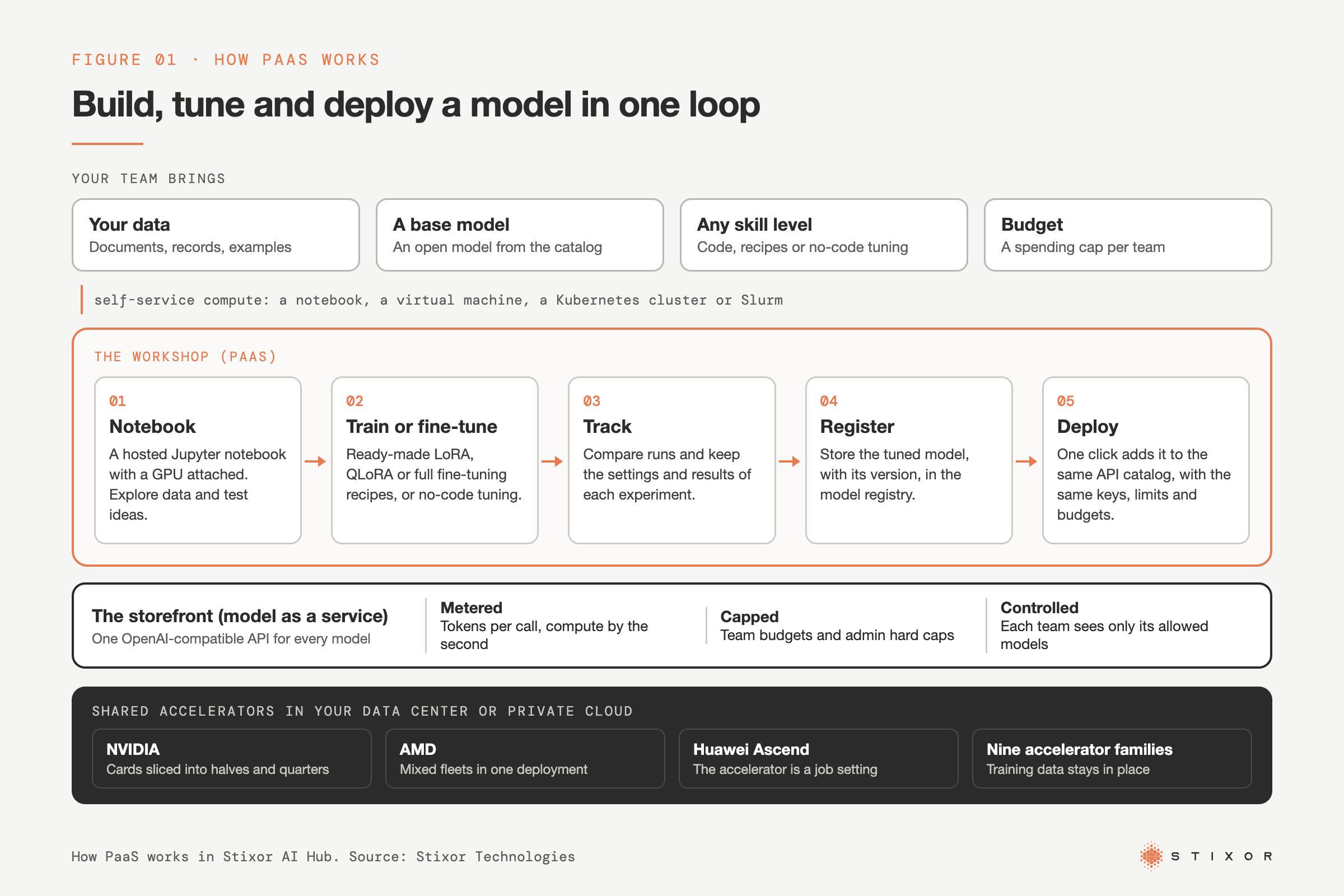
You bring data and a goal; the platform gives you a notebook, runs training and fine-tuning on shared GPUs, stores the result in a registry and deploys it to an API with one click.
It starts with self-service compute. Instead of filing a ticket and waiting for a server, a data scientist picks what the job needs from a portal: a notebook, a bare-metal GPU server, a virtual machine, a Kubernetes cluster, or a Slurm cluster (a job scheduler common in research computing) for large and distributed training runs. Each team or customer works in its own isolated space with its own quota. Some vendors call this layer a GPU PaaS.
From there, model work follows five steps:
- Notebook: a hosted Jupyter notebook with a GPU attached, where the team explores data and tests ideas.
- Train or fine-tune: training jobs that bring their own container, or ready-made fine-tuning recipes such as LoRA, QLoRA and full fine-tuning. No-code tuning lets teams without machine learning engineers adapt a model too.
- Track: experiment tracking keeps the settings and results of every run, so the team can compare them.
- Register: the chosen model goes into a model registry with its version.
- Deploy: one click puts the model behind an API that applications can call.
Underneath, the provider runs the operating system, drivers, scheduling, servers, network and data center. Lightweight fine-tuning methods such as LoRA run on a fraction of one card, which keeps the cost of experiments down.
Can Anyone Train or Fine-Tune a Model on a PaaS?
Yes: a good PaaS gives engineers their own code and containers, data scientists ready-made recipes, and business teams no-code tuning, all on the same platform.
Fine-tuning used to need a machine learning engineer, a GPU server and days of setup. On a PaaS built for model work, the skill needed depends on how much control you want.
<table><thead><tr><th>Who</th><th>How they work</th><th>What they need to know</th></tr></thead><tbody><tr><td><strong>ML engineers</strong></td><td>Training jobs that bring their own container, with any framework and full control</td><td>Code, frameworks and training methods</td></tr><tr><td><strong>Data scientists</strong></td><td>Notebooks plus ready-made LoRA, QLoRA or full fine-tuning recipes, with experiment tracking</td><td>Their data and how to judge results</td></tr><tr><td><strong>Business teams</strong></td><td>No-code tuning: choose a base model, add example data, start the run</td><td>What good answers look like for their task</td></tr></tbody></table>Whoever runs the job, the result goes to the same model registry and deploys to the same API. Lightweight methods such as LoRA run on a fraction of one card, and many tuned versions can share one base model, so letting more people experiment does not multiply hardware costs. What still matters is data quality: a model tuned on poor examples gives poor answers, whoever pressed the button.
What Is PaaS Used For?
Teams use PaaS to adapt models to their own data, run training without managing servers, share expensive GPUs fairly and, for providers, sell AI services to customers.
<table><thead><tr><th>Use case</th><th>What happens on the PaaS</th><th>Who it helps</th></tr></thead><tbody><tr><td><strong>Adapt a model to company data</strong></td><td>Fine-tune an open model on documents, tickets or records, then deploy it to an API</td><td>Teams that need answers in their own terms and formats</td></tr><tr><td><strong>Train custom models</strong></td><td>Run training jobs in your own containers on shared accelerators</td><td>ML engineering teams</td></tr><tr><td><strong>One tuned model per team or customer</strong></td><td>Serve many fine-tuned variants on one base model</td><td>Enterprises and providers with many users</td></tr><tr><td><strong>Share GPUs with chargeback</strong></td><td>Slice cards, set quotas and budgets, measure use by the second</td><td>IT and finance teams that pay for the hardware</td></tr><tr><td><strong>Sell AI services</strong></td><td>Offer notebooks, fine-tuning and model APIs to customers under your own brand</td><td>Data centers, telecom operators and cloud providers</td></tr><tr><td><strong>Keep regulated data in-house</strong></td><td>Run the whole platform inside your data center or private cloud</td><td>Banks, government and healthcare</td></tr></tbody></table>What Are the PaaS Trends in 2026?
In 2026, PaaS is shifting from hosting web code to hosting model work, and from one vendor's hardware to mixed fleets inside the buyer's own environment.
- Model work moves onto PaaS: IDC links PaaS growth to rising demand for AI platforms and application development software.
- No-code tuning: adapting a model is moving from ML engineers to the teams that own the data.
- Kubernetes underneath: many platforms for model work run on Kubernetes and add notebooks, training and serving on top.
- Mixed accelerators: buyers want platforms that run on more than one chip vendor, so supply and price do not depend on a single supplier.
- Sovereign AI clouds: governments, telecom operators and regulated buyers want the whole platform inside national borders, run under local control, sometimes fully offline.
- Usage-based billing: compute measured by the second and model calls by the token, with budgets enforced before work runs.
Who Manages What in IaaS, PaaS and SaaS?
With PaaS you always keep your data, settings and user access; you share responsibility for what you build and its network controls; the provider owns the operating system and everything physical.
Microsoft publishes one of the clearest public breakdowns. The table below follows its shared responsibility matrix, with "Provider" in place of "Microsoft." For model work, "applications" includes your training code and your models.
<table><thead><tr><th>Responsibility area</th><th>On-premises</th><th>IaaS</th><th>PaaS</th><th>SaaS</th></tr></thead><tbody><tr><td><strong>Customer data</strong></td><td>You</td><td>You</td><td>You</td><td>You</td></tr><tr><td><strong>Configurations and settings</strong></td><td>You</td><td>You</td><td>You</td><td>You</td></tr><tr><td><strong>Identities and users</strong></td><td>You</td><td>You</td><td>You</td><td>You</td></tr><tr><td><strong>Client devices</strong></td><td>You</td><td>You</td><td>You</td><td>Shared</td></tr><tr><td><strong>Applications</strong></td><td>You</td><td>You</td><td>Shared</td><td>Shared</td></tr><tr><td><strong>Network controls</strong></td><td>You</td><td>You</td><td>Shared</td><td>Provider</td></tr><tr><td><strong>Operating system</strong></td><td>You</td><td>You</td><td>Provider</td><td>Provider</td></tr><tr><td><strong>Physical hosts</strong></td><td>You</td><td>Provider</td><td>Provider</td><td>Provider</td></tr><tr><td><strong>Physical network</strong></td><td>You</td><td>Provider</td><td>Provider</td><td>Provider</td></tr><tr><td><strong>Physical data center</strong></td><td>You</td><td>Provider</td><td>Provider</td><td>Provider</td></tr></tbody></table>"Shared" has a specific meaning. Microsoft says that in PaaS it manages parts of the application stack, but you remain responsible for configuration, code security and access controls. In practice, who can open a notebook, which data a training job can read and who can deploy a model are still your decisions on a PaaS.
PaaS vs IaaS vs SaaS (and MaaS): What Is the Difference?
IaaS rents you raw servers or GPUs, PaaS gives you a managed place to build and tune models, MaaS lets you call finished models through an API, and SaaS gives you a finished application.
<table><thead><tr><th>Model</th><th>What you get</th><th>What you manage</th><th>Typical user</th><th>Examples</th></tr></thead><tbody><tr><td><strong>IaaS</strong></td><td>Raw servers, GPUs, storage and networks</td><td>Operating system, drivers, frameworks, job scheduling, your models and data</td><td>Infrastructure teams</td><td>Amazon EC2, Azure Virtual Machines, bare-metal GPU servers</td></tr><tr><td><strong>PaaS</strong></td><td>Self-service GPU compute and a managed place to build, train, fine-tune and deploy models</td><td>Your data, code, models, settings and user access</td><td>Data science and AI teams</td><td>Stixor AI Hub, Amazon SageMaker AI, Azure Machine Learning</td></tr><tr><td><strong>MaaS</strong></td><td>Finished models behind one API</td><td>API keys, usage limits and budgets</td><td>Developers building AI features</td><td>A model catalog behind an OpenAI-compatible API</td></tr><tr><td><strong>SaaS</strong></td><td>A finished application in the browser or an app</td><td>Users, settings and the data you put in</td><td>Business teams</td><td>Gmail, Microsoft 365</td></tr></tbody></table>Here is the same goal in each model. On IaaS, you rent a GPU server, install drivers and frameworks, and write your own job scripts. On PaaS, you open a notebook, run a fine-tuning recipe on your data and deploy the result with one click. On MaaS, you skip training and call a finished model through an API. On SaaS, you use a finished tool that already has AI built in.
One provider can sell several of these, which is why "Is AWS PaaS?" has no single answer. Amazon EC2 fits the NIST IaaS definition, while Amazon SageMaker AI, which AWS describes as a fully managed service to build, train and deploy machine learning models, fits PaaS.
What Are Examples of PaaS in 2026?
Examples of PaaS for model work include Stixor AI Hub, Amazon SageMaker AI and Azure Machine Learning; classic examples for web code include Heroku, Google App Engine and AWS Elastic Beanstalk.
Each description comes from the provider's own pages, checked on 5 November 2026.
<table><thead><tr><th>Platform</th><th>Where it runs</th><th>What you do on it</th><th>Worth knowing</th></tr></thead><tbody><tr><td><strong><a href="https://stixor.com/products/stixor-ai-hub" target="_blank">Stixor AI Hub</a></strong></td><td>Your own data center or private cloud</td><td>Notebooks, training and fine-tuning (LoRA, QLoRA, full, no-code), experiment tracking, model registry with one-click deploy to an API</td><td>Supports nine accelerator families, including NVIDIA, AMD and Huawei Ascend, in mixed fleets; a tuned model joins the same API catalog as every other model; training data stays in your environment.</td></tr><tr><td><strong><a href="https://docs.aws.amazon.com/sagemaker/latest/dg/whatis.html" target="_blank">Amazon SageMaker AI</a></strong></td><td>AWS cloud</td><td>Build, train and deploy machine learning models into a hosted environment</td><td>A fully managed service inside AWS; data and models sit in AWS regions.</td></tr><tr><td><strong><a href="https://learn.microsoft.com/en-us/azure/machine-learning/overview-what-is-azure-machine-learning" target="_blank">Azure Machine Learning</a></strong></td><td>Azure cloud</td><td>Train and deploy models and manage machine learning operations</td><td>Microsoft describes it as a service that manages the machine learning project lifecycle.</td></tr><tr><td><strong><a href="https://www.heroku.com/blog/an-update-on-heroku/" target="_blank">Heroku</a></strong></td><td>Public cloud</td><td>Deploy web apps from Git or Docker</td><td>A classic PaaS for web code; moved to a sustaining engineering model on 6 February 2026.</td></tr><tr><td><strong><a href="https://docs.aws.amazon.com/elasticbeanstalk/latest/dg/Welcome.html" target="_blank">AWS Elastic Beanstalk</a></strong></td><td>Your AWS account</td><td>Upload web app code; it provisions, load balances and scales</td><td>No extra charge; you pay for the AWS resources it creates.</td></tr><tr><td><strong><a href="https://docs.cloud.google.com/appengine/docs/the-appengine-environments" target="_blank">Google App Engine</a></strong></td><td>Google Cloud</td><td>Host web apps that scale with demand</td><td>Google now recommends Cloud Run for new users.</td></tr></tbody></table>The difference that matters most for regulated buyers is where the platform runs. A cloud PaaS keeps your training data in the provider's regions. A private PaaS runs inside your own environment.
What Are the Types of PaaS?
PaaS splits by where it runs (public, private or hybrid) and by what you build on it (models, web apps or integrations).
<table><thead><tr><th>Type</th><th>What it is</th><th>Choose it when</th></tr></thead><tbody><tr><td><strong>Public PaaS</strong></td><td>Runs in the provider's cloud, shared by many customers</td><td>You want the fastest start and the provider's regions meet your rules</td></tr><tr><td><strong>Sovereign PaaS</strong></td><td>The whole platform runs inside national borders, often fully offline, under local control</td><td>Regulation or national policy requires that data, models and operations stay in the country</td></tr><tr><td><strong>Private PaaS (on-premise)</strong></td><td>The platform runs in your own data center or private cloud</td><td>Data cannot leave your environment, or you want to use GPUs you already own</td></tr><tr><td><strong>Hybrid PaaS</strong></td><td>One platform spans your data center and public clouds</td><td>Sensitive training stays in-house while other work uses public capacity</td></tr><tr><td><strong>PaaS for models (GPU PaaS)</strong></td><td>Self-service GPU compute plus notebooks, training, fine-tuning, a model registry and deployment to an API</td><td>Your teams build or customize models, not just call them</td></tr><tr><td><strong>PaaS for web apps</strong></td><td>Hosting for web apps and APIs from source code</td><td>Your team ships web applications</td></tr><tr><td><strong>Integration PaaS (iPaaS)</strong></td><td>Hosted tools that connect apps and data</td><td>You need data to flow between systems</td></tr></tbody></table>What Are the Benefits of PaaS?
PaaS gets models from idea to API faster, lets anyone on the team tune a model, and keeps expensive GPUs busy instead of idle.
<table><thead><tr><th>Benefit</th><th>What it means in practice</th></tr></thead><tbody><tr><td><strong>Faster experiments</strong></td><td>Open a notebook with a GPU in minutes instead of waiting for a server</td></tr><tr><td><strong>No infrastructure work</strong></td><td>The provider handles drivers, scheduling, patching and upgrades</td></tr><tr><td><strong>Fine-tuning for any skill level</strong></td><td>Engineers use their own containers, data scientists use recipes, business teams use no-code tuning</td></tr><tr><td><strong>One path to production</strong></td><td>A tuned model goes from registry to a live API in one click</td></tr><tr><td><strong>Higher GPU use</strong></td><td>Slicing cards and filling quiet hours with batch work means more useful hours from the same hardware</td></tr><tr><td><strong>Spend you can see and cap</strong></td><td>Usage is measured per team, with budgets and hard caps enforced before work runs</td></tr><tr><td><strong>Data stays where it must</strong></td><td>A private PaaS keeps training data inside your own data center or cloud</td></tr><tr><td><strong>Built-in tracking</strong></td><td>Every run and model version is recorded, which helps audits and repeatability</td></tr></tbody></table>Is Kubernetes a PaaS?
Kubernetes is a container platform, not a PaaS; many PaaS products are built on top of it.
The Kubernetes documentation says Kubernetes "is not a traditional, all-inclusive PaaS." It schedules and scales containers, but it does not give a data scientist notebooks, fine-tuning recipes, experiment tracking or a model registry. A PaaS adds those on top. Stixor AI Hub, for example, is Kubernetes-based: if you already run Kubernetes, it deploys onto your cluster and pools your servers into one scheduled cluster.
How Much Does PaaS Cost?
PaaS for model work is billed on what you actually use: compute measured by the second for notebooks and training, and tokens for every call to a deployed model, with budgets and hard caps that stop spend before it happens.
There are two billing plans to choose from. Prepaid credits mean you buy usage up front and draw it down. On-demand billing means you pay for usage after the fact. Either way, every team or customer account gets a budget it sets for itself, plus a stricter hard cap set by the administrator that cannot be exceeded. The cap is enforced before a request runs, not reported on next month's invoice.
<table><thead><tr><th>What you pay for</th><th>How it is measured</th><th>How the platform keeps it down</th></tr></thead><tbody><tr><td><strong>Notebooks and training</strong></td><td>Accelerator time, measured by the second, plus memory</td><td>Cards are sliced into halves and quarters, so a notebook or a light fine-tuning job uses only part of one card; LoRA runs on a fraction of a card</td></tr><tr><td><strong>Batch work</strong></td><td>Accelerator time on spare capacity</td><td>Spot capacity is idle time sold cheaply; it can be reclaimed at short notice, which suits work that can wait</td></tr><tr><td><strong>Model calls</strong></td><td>Tokens in and out, per API key</td><td>Rate limits (requests and tokens per minute), budgets and hard caps per team or key</td></tr><tr><td><strong>Serving tuned models</strong></td><td>Shared hardware, not one card per model</td><td>Popular models stay always on, mid-demand models share cards, rarely used models load on request, and many fine-tuned variants run on one base model</td></tr></tbody></table>For enterprises, usage is metered per key: tokens in, tokens out, cost and time. Each team sees its own usage and remaining budget, and central IT sees spend per team in real time, which makes internal chargeback possible.
For data centers and cloud providers, cost is the other side of revenue. Pooling all servers, slicing accelerators, packing several models or notebooks onto one card and backfilling idle time with spot jobs means more billable hours from the same racks. Usage records per customer feed billing directly, and hard caps protect the provider from bad debt.
Build or buy? Teams that build this themselves typically spend a year or more on scheduling, metering and billing before they sell or charge back anything. That platform-team time is the hidden cost a ready-made PaaS removes.
When Should You Not Use PaaS?
Skip PaaS when you need control it will not give you, when you only need to call a finished model, or when your data cannot live where the platform runs.
<table><thead><tr><th>Situation</th><th>Better fit</th><th>Why</th></tr></thead><tbody><tr><td>Custom drivers, kernels or hardware research</td><td>IaaS or bare metal</td><td>A PaaS does not let you change the operating system or drivers</td></tr><tr><td>You only need to call a finished model</td><td>MaaS</td><td>There is nothing to train or tune</td></tr><tr><td>Data must stay in a country or your own data center</td><td>Private or hybrid PaaS</td><td>A public PaaS without a local region is ruled out</td></tr><tr><td>You only need email, payroll or CRM</td><td>SaaS</td><td>There is nothing to build</td></tr></tbody></table>How Do You Choose a PaaS Provider? A 10-Point Checklist
Test a PaaS against your data, your hardware and your path to production, not its feature list.
- Data location: can it run in your country, or inside your own data center?
- Hardware choice: does it support more than one accelerator vendor, and can it mix them in one fleet?
- Self-service compute: can teams get notebooks, virtual machines, Kubernetes clusters or Slurm clusters on their own, within a quota?
- Build tools: notebooks, bring-your-own-container training and fine-tuning recipes such as LoRA, QLoRA and full fine-tuning.
- No-code tuning: can a business team tune a model without writing training code?
- Serving included: does a tuned model go in one click to an OpenAI-compatible API, in the same catalog and under the same keys, limits and budgets as every other model? Some platforms stop at compute and leave serving to you.
- Serving cost: can many fine-tuned variants share one base model, or does each need its own cards?
- Sharing: can several teams share GPUs fairly, with slices of a card for small jobs, urgent work first and spare capacity for batch work?
- Spend control and billing: budgets and hard caps enforced before the work runs, compute measured by the second, and usage records you can export to billing or chargeback.
- Security and automation: single sign-on, separation between teams, audit logs, and setup through infrastructure as code and GitOps.
Then pilot one real use case: fine-tune a model on your data, deploy it, and check the usage report.
PaaS vs MaaS: How Do They Work Together?
PaaS is the workshop where you build and tune models; MaaS is the storefront where applications call them through one API.
In Stixor AI Hub the two connect. Once published, a fine-tuned model appears in the same catalog as every other model, with the same keys, rate limits, budgets and usage metering: tokens per call for each API key, compute by the second for notebooks and training. Models are served from one shared accelerator pool, and many fine-tuned variants can run on a single base model, so adapting models for each team does not multiply hardware costs. A team can call an open model through the API on day one, fine-tune it on its own data in week two, and swap in the tuned version without changing application code.
For more on the storefront side, see What Is Model as a Service?.
Sovereign PaaS in Pakistan and the Middle East
In Pakistan and the Gulf, data residency rules often decide between public, private and sovereign PaaS before features do.
Pakistan: entities regulated by the State Bank of Pakistan follow the SBP Framework on Outsourcing to Cloud Service Providers (BPRD Circular No. 01 of 2023). As reported by ProPakistani, regulated entities may use onshore cloud providers for material and non-material workloads, while banks may send only non-material workloads offshore unless SBP approves. For a bank training models on customer data, that points to onshore or private PaaS.
Saudi Arabia: the Personal Data Protection Law (PDPL) has been fully enforced since September 2024, and personal data leaving the Kingdom falls under its transfer rules. KSA teams look for a PaaS that runs in a Saudi region or inside their own environment.
When you compare options, ask each provider where training data, model files and backups sit, whether the platform runs on hardware you already own, and what audit trail your regulator will accept.
Stixor AI Hub: PaaS for Building and Tuning Models
Stixor AI Hub gives your teams a private PaaS: self-service compute, training and fine-tuning for any skill level, and one-click deployment to a metered API, on accelerators you control.
It sits between your teams and the machines that run your models, and works with open models on your own servers or with outside model providers. The table below lists what the platform covers, layer by layer.
<table><thead><tr><th>Layer</th><th>What Stixor AI Hub provides</th></tr></thead><tbody><tr><td><strong>Compute as a service</strong></td><td>Whole accelerators or slices of one, as bare-metal servers, virtual machines or managed Kubernetes clusters; Slurm for large training jobs; teams run their own container images</td></tr><tr><td><strong>Workbench</strong></td><td>Managed Jupyter notebooks with raw compute access</td></tr><tr><td><strong>Training</strong></td><td>Training jobs that bring their own container, including distributed training across many servers; spare-capacity runs borrow idle cards and pause when paid work needs them</td></tr><tr><td><strong>Fine-tuning</strong></td><td>LoRA, QLoRA and full fine-tuning recipes, plus no-code tuning so business teams can adapt a model; experiment tracking</td></tr><tr><td><strong>Serving</strong></td><td>Model registry with one-click deploy to an OpenAI-compatible API; tuned models join the same catalog as every other model; many fine-tuned variants share one base model; outside model providers can be offered through the same catalog</td></tr><tr><td><strong>Teams and governance</strong></td><td>An isolated space per team or customer, with quotas, model permissions, rate limits, budgets that warn and then cap, and approval for usage increases</td></tr><tr><td><strong>Metering and billing</strong></td><td>Training compute measured by the second and model calls by the token, priced per product with versioned price lists; prepaid balance or monthly invoice; statements and usage records for chargeback or customer billing</td></tr><tr><td><strong>Operations</strong></td><td>Cluster onboarding from the console; fleet management across sites with health and utilization monitoring, rolling upgrades, maintenance draining and capacity planning</td></tr><tr><td><strong>Hardware</strong></td><td>Nine accelerator families, including NVIDIA, AMD and Huawei Ascend, in mixed fleets; x86 and ARM servers; joins Kubernetes clusters you already run</td></tr><tr><td><strong>Security</strong></td><td>Single sign-on through your identity provider (including OIDC or LDAP), a tamper-evident audit trail, two-factor login for operators, secrets kept in a secret store with key rotation, encrypted backups and scanned container images</td></tr><tr><td><strong>Deployment</strong></td><td>Inside your own data center or cloud, including fully air-gapped installs with no outside connection; set up through infrastructure as code and GitOps</td></tr><tr><td><strong>Resale</strong></td><td>A white-label portal so data centers and cloud providers can sell notebooks, fine-tuning, GPU capacity and model APIs under their own brand</td></tr></tbody></table>Two things set it apart from platforms that only orchestrate compute. First, serving is built in: a model tuned on the platform is live behind the same metered API the next minute. Second, anyone can tune, from ML engineers with their own containers to business teams using no-code tuning, and many tuned versions share one base model, so adapting models does not multiply hardware costs.
Who it suits:
- Enterprises that want teams to build and customize models on shared GPUs, with spend tracked and capped per team.
- Data centers, neoclouds (GPU-first cloud providers) and telecom operators that want to turn GPU capacity into AI services they can sell, with more billable hours from the same racks.
- Sovereign AI clouds and regulated buyers that need the whole platform inside national borders, under local control, or fully offline.
Related reading: What Is Model as a Service?, GPU as a Service: A Complete Guide and What Is AI PaaS?.
The Bottom Line
PaaS takes the infrastructure work out of building with AI. List the models your teams want to build or customize, mark which ones use data that must stay in a specific country, and the choice between a public PaaS, a private PaaS and simply calling a finished model through MaaS becomes clear. If the answer is a private PaaS on hardware you control, look at Stixor AI Hub.

Build and Tune Models on a PaaS You Control
Stixor AI Hub gives your teams notebooks, training, fine-tuning and one-click deployment to an API, running in your own data center or private cloud.
Frequently Asked Questions
FAQs
Stixor AI Hub, Amazon SageMaker AI and Azure Machine Learning are examples of PaaS for building, training and deploying models. Heroku, AWS Elastic Beanstalk and Google App Engine are classic examples for web apps. In each case the provider runs the servers and operating system, and you bring your own code, data or models.
For viewers, Netflix works like SaaS: a finished application used through a browser or app, with nothing to manage underneath. Netflix itself is a cloud customer, not a platform seller. AWS's Netflix case study says Netflix uses AWS to deliver its service and run its analytics, so it consumes cloud services rather than offering a platform for others to build on.
Gmail is SaaS. NIST's definition of SaaS uses web-based email as its example: you use the provider's application, and the provider runs everything from servers to software. Developers can call Gmail through an API, but that does not make Gmail a platform for building and running your own software.
AWS is a provider, not one service model. Amazon EC2 virtual servers fit IaaS, while Amazon SageMaker AI and Elastic Beanstalk fit PaaS. Classify each service by what you control: if you manage the operating system and drivers, it is IaaS; if you only bring code, data or models and the platform runs them, it is PaaS.
PaaS is where you build, train and fine-tune models, using notebooks, training jobs and a model registry. Model as a service (MaaS) is where applications call finished models through an API, with keys, rate limits and budgets. In Stixor AI Hub the two connect: a model tuned in the PaaS deploys with one click to the MaaS API.
Not if the platform shares a base model. Methods such as LoRA store each tuned version as a small add-on to one base model, so many variants can be served from the same cards. Stixor AI Hub serves many fine-tuned variants on a single base model from one shared accelerator pool, so tuning a model per team or per customer does not mean buying hardware for each one.
SaaS gives you a finished application, such as email or CRM, and you control only users and settings. PaaS gives you a managed place to build your own software and models: you control the code, data and models, while the provider runs the servers, operating system, drivers and scheduling.
Yes. A private PaaS runs the platform software inside your own data center or private cloud, so teams get notebooks, training and one-click deployment while data stays in your environment. Stixor AI Hub runs this way, on Kubernetes and on accelerators you already own. Your team or a partner then operates the platform.


Discuss Your Enterprise Use Case
From small to large scale enterprises, we deliver next-gen AI, data engineering, and actionable insights.


