
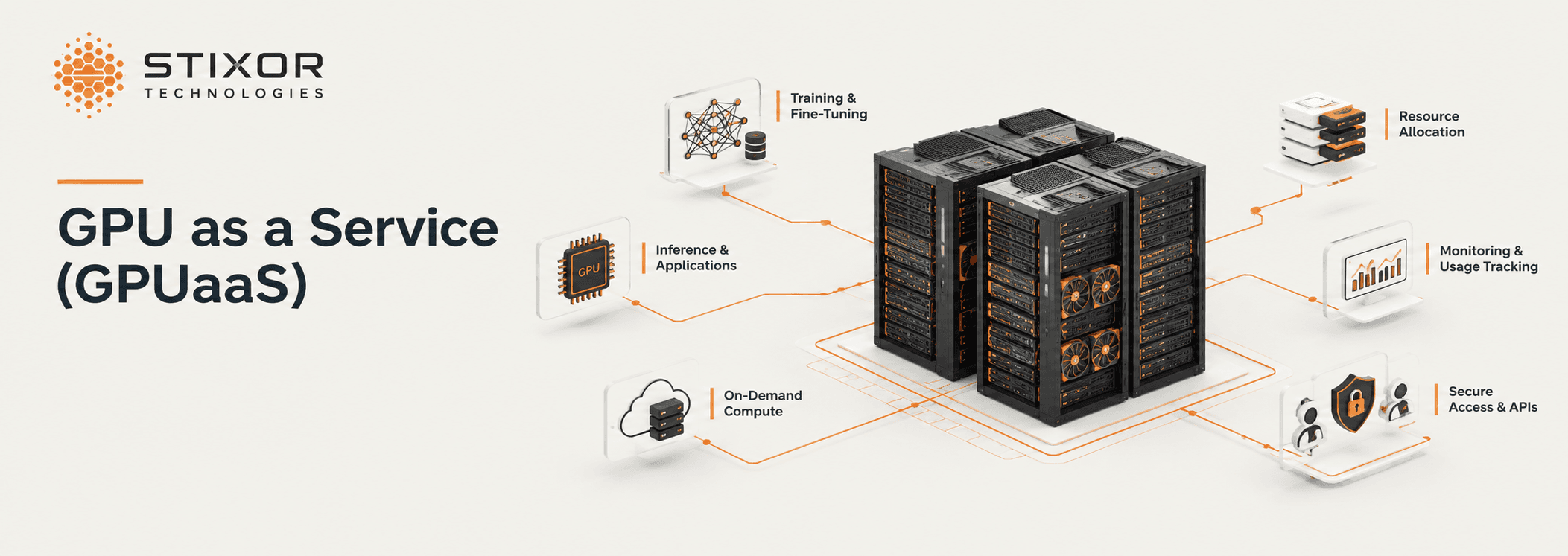
What Is GPU as a Service (GPUaaS)? How It Works, Platforms and How to Choose

Written by Muhammad Rizwan
November 6, 2026
15 min Read
GPU as a Service (GPUaaS) is a cloud computing model that lets you rent high-performance GPUs on demand instead of buying and maintaining physical hardware. You get GPU power in minutes, use it for as long as you need, and pay (or are charged back) for the time you use.
Behind every GPUaaS offer is a GPU as a Service platform: the software that pools the GPUs, hands them out to users, shares and schedules them, and meters every second for billing. Cloud providers run one to sell GPU time; enterprises run one to share their own GPUs across teams. Stixor delivers GPU as a Service through Stixor AI Hub, a platform that runs inside your own data center or cloud.
This guide explains what GPU as a Service is, how it works, how it is billed, who offers it, how the platform underneath works, when renting beats owning, and what to check before you choose.
What is GPU as a Service? GPUaaS stands for GPU as a Service. It is a cloud computing model in which a provider, or an internal IT team, offers GPUs on demand: users rent whole GPUs or slices of one for AI training, inference, rendering or scientific computing, and pay only for the time they use, without buying, installing or maintaining the hardware.
| GPU as a Service at a glance | Answer |
|---|---|
| What it is | A cloud computing model: rent GPUs on demand instead of buying and running hardware |
| Who uses it | AI teams, startups, researchers, studios, and enterprises sharing their own GPUs |
| Who offers it | Hyperscalers, GPU specialist clouds, local and sovereign clouds, and platforms you run yourself |
| How you get it | Notebooks, virtual machines, Kubernetes, bare metal or Slurm, as a whole GPU or a slice |
| How it is billed | On demand, reserved, spot, prepaid credits or monthly invoice; internal chargeback inside a company |
| Where it runs | Public cloud, a local data center, or your own servers, including air-gapped sites |
Key Takeaways
- GPU as a Service is a cloud computing model for renting GPUs on demand; a GPUaaS platform is the software that delivers it, to customers or to teams inside one company.
- The platform does four jobs: self-service access, sharing and scheduling, isolation between teams, and metering for billing or chargeback.
- Slicing GPUs and filling idle hours with lower-priority work is how a platform gets more useful hours from the same racks.
- Rent when demand is short or uneven; own when GPUs stay busy, and then run them as a service so they stay busy.
- In Pakistan and the Gulf, running the platform in-country keeps data local while giving teams cloud-like access.
What Is a GPU as a Service Platform, and What Does It Do?
A GPU as a Service platform is the software behind the model: it turns hardware into a service by handling access, sharing, isolation and billing, so nobody has to file a ticket to get a GPU.
Without a platform, GPUs are usually handed out by hand: a team asks, an engineer sets up a server, and the card sits reserved long after the job ends. A GPUaaS platform replaces that with four layers:
- Self-service access: users pick a GPU type and size from a portal or API and start a notebook, virtual machine, container or training job.
- Sharing and scheduling: the platform decides which job runs where, splits cards between small jobs, and queues work when the pool is full.
- Isolation and control: each team or customer gets its own space, quotas, roles and keys, so one team cannot see or starve another.
- Metering and billing: every second of GPU time is recorded against a team or customer, ready for an invoice or an internal chargeback.
What Are the Benefits of GPU as a Service?
GPU as a Service gives teams GPU power in minutes, without buying, racking or maintaining hardware, and keeps expensive GPUs busy instead of idle.
- No large upfront purchase: capacity becomes a running cost you can match to real demand.
- Speed: teams start a notebook or training job in minutes instead of waiting weeks for servers.
- Scale up and down: add GPUs for a training run, then release them when it ends.
- Less operations work: the provider or platform handles drivers, scheduling, upgrades and repairs.
- Higher utilization: sharing and slicing put idle GPU hours to work.
- Control when you need it: a platform running in your own data center keeps data and hardware under your rules.
What Is GPU as a Service Used For?
Mostly AI: training, fine-tuning and running models in production, plus scientific computing, rendering and data analytics.
- Training models: large jobs spread across many GPUs and servers.
- Fine-tuning: adapting open models to company data, often on one or a few GPUs.
- Inference: serving models to apps and users, where steady, low-latency GPU time matters.
- Notebooks and experiments: data scientists testing ideas on a slice of a GPU.
- Scientific and engineering computing: simulations, research and financial modeling.
- Rendering and media: 3D rendering, video processing and virtual workstations.
How Does a GPU as a Service Platform Work?
A request goes through the portal, the scheduler places it on the right GPU, and the meter records it until the job ends.
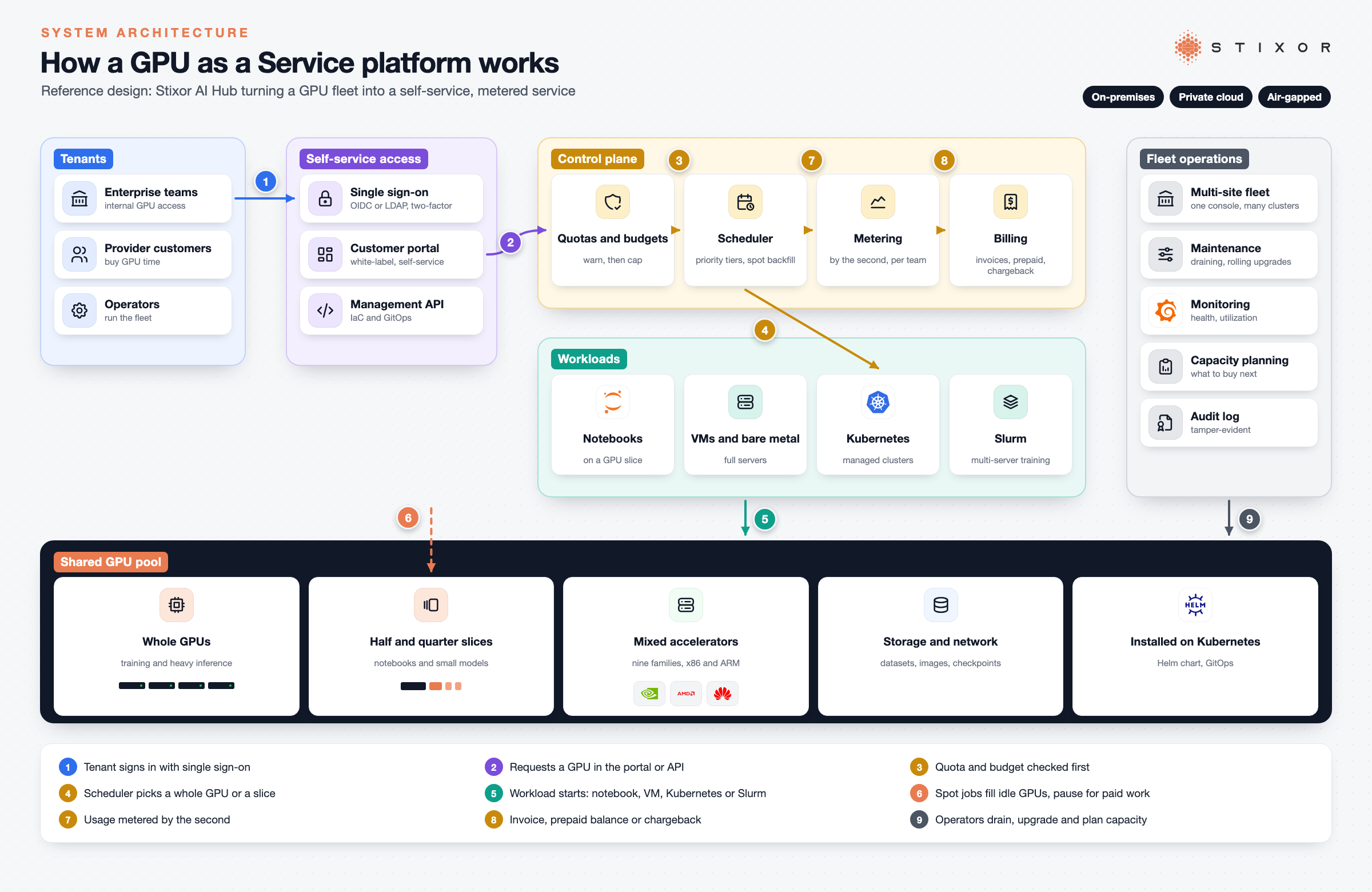
- A user asks for capacity in the portal or through the API: for example, a notebook on a half GPU or a training job on eight GPUs.
- The platform checks the rules: is the user allowed that GPU type, is the team within its quota, and is there budget left?
- The scheduler places the work. Urgent and paid work runs first; experiments and batch jobs fill whatever is idle.
- The workload runs in the form the user chose: bare-metal server, virtual machine, managed Kubernetes or a Slurm cluster for large training.
- The meter records usage by the second, per team or customer, until the job stops.
- Usage becomes a bill or chargeback. Providers invoice customers; enterprises charge each department for what it used.
Whole GPUs, Slices or Bare Metal: Which Delivery Option Fits?
Match the delivery option to the job: slices for small work, whole GPUs for heavy jobs, and bare metal or Slurm for large training.
| Delivery option | What the user gets | Best for |
|---|---|---|
| GPU slice | A half or quarter of one card | Notebooks, small models, inference for light traffic |
| Whole GPU | One or more dedicated cards | Fine-tuning, steady inference, larger models |
| Virtual machine | A full server environment with GPUs attached | Teams that want their own tools and drivers |
| Managed Kubernetes | A cluster to run containers on GPUs | Platform teams and production services |
| Bare metal and Slurm | Whole servers, scheduled as one cluster | Multi-server training of large models |
Most organizations need several of these at once. A good platform offers them from the same pool, so a card that served a notebook in the morning can join a training job at night.
How Do GPU Platforms Share One GPU Between Users?
There are three common ways: give each user a whole GPU, split a GPU in hardware, or take turns on it in software, each trading isolation against flexibility.
| Method | How it works | Isolation | Best for |
|---|---|---|---|
| Whole GPU (passthrough) | One workload gets the entire card | Full | Training and heavy inference |
| Hardware partitions (NVIDIA MIG) | The card is split into separate instances, each with its own memory and compute | Strong | Multi-tenant inference with predictable performance |
| Time-slicing | Workloads take turns on the same card in software | Weak; memory is shared | Notebooks, development and light jobs |
| Platform slices | The platform hands out halves or quarters of a card and packs small jobs together | Managed by the platform | Raising utilization across many teams |
According to Amazon's EKS documentation, data center GPUs such as the A100, H100, H200 and B200 can be split into up to seven MIG instances, each with dedicated memory and compute, while time-slicing shares a GPU without that isolation. MIG is an NVIDIA feature, so mixed fleets with other accelerators need the platform to handle sharing too.
Who Runs a GPU as a Service Platform?
Two groups: data centers and cloud providers that sell GPU capacity, and enterprises that share their own GPUs across teams.
Data centers, neoclouds, telcos and sovereign clouds
For a provider, GPUs only make money when someone is paying to use them. A platform lets the provider sell capacity by the slice or by the server, put customers on self-service, enforce credit limits so unpaid usage never runs up, and produce invoices automatically. A white-label portal lets the provider sell under its own brand.
Enterprises with their own GPUs
Inside a company, the problem is different: one team hoards cards while another waits. Running owned GPUs as an internal service gives every team fair, measured access, shows who uses what, and lets finance charge costs back to departments. It also gives IT one place to apply security, single sign-on and audit rules.
How Is GPU as a Service Billed?
By time on the GPU, under one of a few models: on demand, reserved, spot, prepaid credits or a monthly invoice, and by chargeback when the GPUs are your own.
- On demand: pay for GPU time as you use it, with no commitment.
- Reserved or committed capacity: agree to use a set amount over a period for a lower rate.
- Spot or pre-emptible: use spare capacity at a discount, accepting that the job can be paused when paid work needs the GPU.
- Prepaid credits: buy a balance up front; usage draws it down and stops when it runs out.
- Monthly invoice: pay at the end of each billing month for what you used.
- Internal chargeback: inside a company, each team is charged for its own GPU time.
What you pay depends on the GPU model, how long you use it, the pricing model and the provider, so compare current price lists against your real usage before you commit.
Should You Rent GPUs, Own Them or Run Your Own GPUaaS?
Rent when demand is short or uneven, own when your GPUs will be busy most of the time, and run owned GPUs as a service so they stay busy.
The deciding number is utilization: the share of hours a GPU does useful work. Work out the hourly cost of owning one GPU (hardware over its useful life, plus power, cooling, space, networking and staff), then compare it with the hourly rental price. The ratio is your break-even utilization. Busy above it, owning is cheaper; busy below it, renting is cheaper.
| How busy your GPUs will be | What that usually looks like | Cheaper option |
|---|---|---|
| Well below break-even | Short projects, experiments, uneven demand | Rent |
| Around break-even | A mix of steady and bursty work | Either; decide on control, data rules and support |
| Well above break-even | Steady training and inference every day | Own, and run the GPUs as an internal service |
Measure before you decide. Check GPU monitoring over at least 30 days and count only the hours real work ran. Many teams find their owned GPUs sit idle far more than expected, which is exactly what sharing and scheduling fix: slicing cards, packing small jobs together and letting low-priority work use idle hours all raise utilization without buying more hardware.
What Should You Look For in a GPU as a Service Platform?
Check hardware support, sharing, isolation, metering, deployment options and day-two operations before you choose.
- Hardware choice: does it support more than one GPU vendor, so you can buy whatever is available and best value?
- Sharing: can it slice cards, pack several workloads on one GPU and fill idle time with lower-priority jobs?
- Scheduling: does it support priority tiers, queues and multi-server jobs, on both Kubernetes and Slurm?
- Isolation: does each team or customer get its own space, roles, quotas and keys?
- Spend control: are budgets enforced before work starts, or only reported after?
- Metering and billing: is usage recorded by the second, per team, with invoices or chargeback reports you can hand to finance?
- Deployment: can it run on-premise, in a private cloud and fully offline (air-gapped)?
- Operations: does it handle upgrades, maintenance draining, health monitoring and capacity planning across sites?
- Identity and audit: does it plug into single sign-on and keep a tamper-evident audit trail?
- Beyond raw GPUs: can the same platform give users notebooks, fine-tuning and a model API, so they do not need three more tools?
Which Companies Offer GPU as a Service?
Four kinds of provider: hyperscalers, GPU specialist clouds, local and sovereign clouds, and platforms you run on your own GPUs.
- Hyperscalers: Amazon Web Services, Microsoft Azure and Google Cloud offer GPU instances alongside the rest of their cloud.
- GPU specialist clouds (neoclouds): providers such as CoreWeave, Lambda and RunPod focus on GPU capacity for AI.
- Local and sovereign clouds: data centers in a country, such as Pakistan or Saudi Arabia, offering GPUs where data must stay in-country.
- Platforms you run yourself: software such as Rafay or Stixor AI Hub that turns your own GPUs, or a data center's, into a GPU as a Service.
GPU as a Service, PaaS and MaaS: How Do They Fit Together?
GPU as a Service rents the compute, PaaS gives teams a place to build and tune models on it, and MaaS serves finished models through an API.
- GPU as a Service: raw or sliced GPU capacity, delivered as servers, VMs, clusters or notebooks.
- PaaS: a managed workshop on top: notebooks, training jobs, fine-tuning recipes and a model registry. See What Is PaaS?
- MaaS: finished models behind one API, with keys, limits and per-token metering. See What Is Model as a Service?
The three work best on one shared pool, so a GPU that trains a model in the afternoon can serve it in the evening.
GPU as a Service in Pakistan and the Middle East
Local GPU platforms let regulated organizations get cloud-like GPU access while keeping data inside the country or their own data center.
Pakistan
Pakistan now has several local GPU clouds, and banks and government bodies face rules on where data is processed: the State Bank of Pakistan's cloud outsourcing framework for banks and the Cloud First Policy for government. A GPU as a Service platform running in a Pakistani data center or a company's own facility lets these organizations share GPUs across teams without sending data abroad. For where to run AI workloads locally, see AI Inference in Pakistan and Sovereign AI in Pakistan.
Saudi Arabia and the Gulf
In Saudi Arabia, the Personal Data Protection Law (PDPL) governs how personal data is handled and moved, and many organizations prefer to keep AI workloads in-country. A platform that runs on-premise or inside your own environment, including fully offline, lets operators and enterprises offer GPU access under their own control and their own brand.
How Stixor Delivers GPU as a Service
Stixor delivers GPU as a Service through Stixor AI Hub, which shares, schedules, meters and bills GPUs inside your own data center or cloud, and adds PaaS and MaaS on the same GPUs.
Stixor AI Hub rents whole GPUs or slices of one (halves and quarters) and packs several models or notebooks onto a single card. Workloads run as bare-metal servers, virtual machines, managed Kubernetes clusters or Slurm for large training jobs, across multiple servers. Priority tiers mean urgent work runs first, while spot jobs borrow idle capacity and pause when paid work needs it.
Every team or customer gets its own isolated space, quotas and roles, with single sign-on through your identity provider. Compute is measured by the second, budgets warn and then cap, and usage turns into monthly invoices or prepaid balances with statements per team. Data centers can sell all of this under their own brand through a white-label portal.
The platform supports nine accelerator families, including NVIDIA, AMD and Huawei Ascend, in mixed fleets on x86 and ARM servers. It installs on Kubernetes through a Helm chart, supports infrastructure as code and GitOps, manages fleets across sites, and runs fully offline when needed. To see how the parts connect, read How Stixor AI Hub Works.
If you need GPU capacity rather than a platform, Stixor also provides it through Data Center Consultancy and GPU Services.
Related reading: What Is an AI Token Factory?, What Is PaaS?
The Bottom Line
GPUs only pay back when they are busy and fairly shared. Start by measuring how much of each card's time does real work, then decide whether to rent, own, or own and run as a service. Talk to our team about turning your GPUs into a service with Stixor AI Hub.

Turn Your GPUs Into a Service
Share, schedule and bill every GPU in your data center with Stixor AI Hub, or get GPU capacity from Stixor for your AI work.
Frequently Asked Questions
FAQs
GPU as a Service (GPUaaS) is a cloud computing model that lets you rent high-performance GPUs on demand instead of buying and maintaining physical hardware. You choose a GPU or a slice of one, use it for AI training, inference or other heavy computing, and pay only for the time you use.
It is software that pools GPUs and offers them as a self-service product. Users request GPU power through a portal or API, the platform shares and schedules the cards, keeps teams isolated, and meters usage for billing or chargeback. It can run in a public cloud, a data center or your own servers.
GPUaaS stands for GPU as a Service. It means getting GPU computing power on demand from a provider or an internal platform, instead of buying, installing and running the hardware yourself, and paying or being charged back for the time you use.
It depends on the GPU model, how long you use it, the pricing model (on demand, reserved, spot or prepaid) and the provider. Compare current price lists against your own usage, and if you already own GPUs, compare that with the cost of running them as an internal service.
CUDA is NVIDIA's software platform for running code on its GPUs. Most AI frameworks, such as PyTorch, use it behind the scenes, so you rarely touch it directly. On Huawei Ascend, the equivalent layer is called CANN, which is why a mixed-fleet platform must support both.
It can be. Look for separate spaces per team or customer, single sign-on, role-based access, isolation between workloads and a tamper-evident audit log. For sensitive data, run the platform in your own data center or a local cloud so data never leaves your control.
Not quite. Renting a server gives you one machine for a fixed period. GPU as a Service adds self-service, sharing, scheduling and usage-based billing on top, so many users can use the same pool, pay for what they use, and get capacity in minutes instead of days.
Yes. A GPU as a Service platform can run inside your own data center or private cloud, including fully offline (air-gapped) sites. That gives regulated organizations cloud-like access to GPUs while keeping data and hardware under their own control.
GPU slicing splits one physical GPU into smaller parts, such as halves or quarters, so several small workloads can run on one card at the same time. It raises utilization for notebooks, small models and light inference that do not need a whole GPU.
Two groups: data centers, neoclouds, telcos and sovereign clouds that sell GPU capacity to customers, and enterprises that share their own GPUs across teams. Both need self-service access, isolation between users, and accurate metering for billing or internal chargeback.
Yes, if it treats the accelerator as a setting on each job. Stixor AI Hub supports nine accelerator families, including NVIDIA, AMD and Huawei Ascend, in mixed fleets, so teams can run work on whichever hardware is available.


Discuss Your Enterprise Use Case
From small to large scale enterprises, we deliver next-gen AI, data engineering, and actionable insights.


