
Local LLM: What It Is and How to Run LLMs on Your Own Servers

Written by Muhammad Rizwan
November 7, 2026
15 min Read
A local LLM is a large language model that runs on hardware you control, such as your own laptop, a workstation or a server in your data center, instead of on a provider's cloud. Your prompts and documents stay on your machines, the model works without an internet connection, and you are not charged per message or per token.
Running one on a laptop takes minutes. Running one for a whole company is a different job: many users at once, access control, monitoring and budgets. This guide covers both. Stixor AI Hub is built for the second job, serving open models on your own GPUs through one governed API.
You will learn what a local LLM is in plain English, how it compares with ChatGPT, which open models to use, how much memory you need, how to run one today, and what changes when you move from one laptop to a server that a whole team relies on.
What is a local LLM? A local LLM is an AI language model, such as Qwen, Gemma, Llama or gpt-oss, that you download and run on your own computer or servers. The model's files sit on your hardware, every prompt is processed there, and no data has to leave your device or network.
| Local LLM at a glance | Answer |
|---|---|
| What it is | An open AI model that runs on your own laptop, workstation or servers |
| Also called | Self-hosted LLM, on-premise LLM, private LLM |
| Popular models | Qwen, Gemma, gpt-oss, Llama, DeepSeek, Mistral |
| Popular tools | Ollama and LM Studio for one person; vLLM, SGLang and llama.cpp for servers |
| Main benefit | Data stays with you; works offline; no per-token charges |
| Main limit | Your hardware sets the model size, speed and number of users |
Key Takeaways
- A local LLM is an open model running on your own hardware. Nothing you type is sent to an AI provider.
- Memory decides everything. At the common 4-bit setting, small models need a few gigabytes; a 70-billion-parameter model needs about 40 GB before you add room for long conversations.
- Ollama and LM Studio are the easiest way to start on one computer. They are built for one person, not for a team.
- For many users, switch to a serving engine such as vLLM or SGLang, then add a gateway for keys, limits, budgets and logs.
- Local models are now good enough for many business tasks, but the largest cloud models still lead on the hardest reasoning. Test on your own work before you decide.
What Is a Local LLM in Simple Terms?
In simple terms, a local LLM is like cooking in your own kitchen instead of ordering from a restaurant: you need your own equipment, but you control the ingredients and nobody else sees what you make.
When you use ChatGPT or Claude, your message travels over the internet to the provider's data center, a model there writes the answer, and the answer comes back. With a local LLM, the model itself lives on your machine. You download a file once (often a few gigabytes), and from then on your computer does the work.
That is why people choose local models: privacy, because the text never leaves the device; offline use, because no connection is needed; and predictable cost, because you are not billed per message. The trade-off is that your hardware has to be strong enough to run the model you want.
Key terms in plain English
| Term | What it means |
|---|---|
| LLM | Large language model: the AI that reads and writes text |
| Open-weight model | A model whose files you can download and run yourself |
| Parameters (B) | The model's size, in billions of learned numbers; 8B means 8 billion |
| Quantization | Shrinking a model by storing each number with fewer bits, for example 4-bit instead of 16-bit |
| VRAM | The memory on a graphics card (GPU); models run fastest when they fit in it |
| Unified memory | Memory shared by the processor and graphics, as on Apple Silicon Macs |
| Context window | How much text the model can consider at once, measured in tokens |
| Inference engine | The software that loads the model and generates answers, such as Ollama or vLLM |
Local LLM vs ChatGPT and Other Cloud Models
A local LLM wins on privacy, offline use and control; cloud models such as ChatGPT win on peak quality, zero setup and the ability to serve huge numbers of users without your own hardware.
| Local LLM | Cloud LLM (ChatGPT, Claude, Gemini) | |
|---|---|---|
| Where data goes | Stays on your device or network | Sent to the provider's servers |
| Internet needed | No, after download | Yes |
| How you pay | Hardware and power you own | Subscription or per-token usage |
| Model quality | Strong open models, limited by your hardware | The largest frontier models |
| Setup | Install a tool and download a model | Sign up and start |
| Many users | Needs a server, serving engine and access controls | Handled by the provider |
Is a local LLM better than ChatGPT? For the hardest reasoning, research and very long tasks, the top cloud models are generally still ahead. For everyday work, such as summarizing documents, drafting, answering questions over your own files, classifying text and many coding tasks, today's open models are often good enough, and they keep your data at home. The honest answer is to run the same ten real tasks through both and compare.
Is It Worth Running a Local LLM?
Running a local LLM is worth it when your data cannot leave your control, when you need AI without internet access, or when steady, high usage makes owning the hardware sensible; it is usually not worth it for occasional use or when you need the very best model.
Good reasons to go local:
- Sensitive data. Legal files, health records, bank data, source code or government documents that policy says must stay in-house.
- Offline or isolated sites. Field offices, factories, ships, or air-gapped networks with no internet by design.
- Steady, heavy use. When teams use AI all day, owned hardware that stays busy can make more sense than paying per token. Work out your own usage before deciding.
- Control. You pick the model version, nothing changes without your say, and nobody can switch it off.
- Customization. You can fine-tune an open model on your own data and run it next to the original.
Reasons to stay with the cloud:
- You use AI a few times a week.
- You need the strongest model available for complex reasoning.
- You have nobody to run servers, apply updates and handle failures.
Many companies end up with both: local models for sensitive and high-volume work, cloud models for the rest, behind one gateway that applies the same rules to each. Our guide to AI gateways explains that layer.
Which LLMs Can You Run Locally?
The most popular local LLMs are open-weight families such as Qwen, Gemma, gpt-oss, Llama and DeepSeek, each released in several sizes so you can match the model to your hardware.
The table shows real download sizes from the Ollama model library at the time of writing. New versions arrive every few months, so check the model card for the latest release before you download. These are the default versions, which are already compressed (quantized), so they are a good guide to the memory each one needs.
| Model family | Sizes offered | Example download size | Good for |
|---|---|---|---|
| Qwen 3.5 (Alibaba) | 0.8B to 122B | 4B: 3.3 GB · 27B: 17 GB | General use, long context (256K), many languages |
| Gemma 4 (Google) | E2B to 31B | 12B: 7.7 GB · 31B: 19 GB | Laptops and single GPUs, text and images |
| gpt-oss (OpenAI) | 20B and 120B | 20B: 14 GB · 120B: 65 GB | Reasoning, agents, tool use |
| DeepSeek-R1 | Full model 671B; smaller distilled versions 1.5B to 70B | 14B: 9 GB · 70B: 43 GB | Step-by-step reasoning |
| Llama 3.3 (Meta) | 70B | 43 GB | Strong general model for servers |
The smaller DeepSeek-R1 versions are distilled models: DeepSeek trained smaller Qwen and Llama models to copy R1's reasoning, so they are not the full 671B model. Licenses differ. OpenAI publishes gpt-oss under the permissive Apache 2.0 license, according to its model card on Hugging Face, while other families come with their own terms. Check the license of the exact model before using it in a product.
Which model should you start with? On a typical laptop, try a 4B to 12B model. On a single strong GPU, try a 20B to 32B model. For a shared server, 70B-class and larger models become practical. Our guide to choosing the right open-source LLM goes deeper on picking a model for a business use case.
How Much Hardware Do You Need for a Local LLM?
The hardware you need depends mainly on memory: the model must fit in your GPU's VRAM or your Mac's unified memory, plus extra room for the conversation, so count gigabytes before anything else.
A simple rule of thumb: memory for the model is roughly parameters × bytes per parameter. At full 16-bit precision each parameter takes 2 bytes; at 8-bit, 1 byte; at 4-bit, about half a byte. So an 8B model needs about 16 GB at 16-bit but only about 4 to 5 GB at 4-bit, and a 70B model drops from about 140 GB to about 40 GB. The Ollama download sizes above match this.
| Model size | Memory at 4-bit (approx.) | Hardware that fits |
|---|---|---|
| 1B to 4B | 1 to 3.5 GB | Most laptops, even without a separate GPU |
| 7B to 14B | 5 to 9 GB | Laptop with 16 GB, or a GPU with 8 to 12 GB |
| 20B to 35B | 14 to 22 GB | GPU with 24 GB, or a Mac with 32 GB or more |
| 70B class | about 40 to 45 GB | Two 24 GB GPUs, one 48 to 80 GB GPU, or a Mac with 64 GB or more |
| 100B and up | 65 GB and more | Data-center GPUs (80 GB and up) or several GPUs |
Don't forget the conversation memory
The model is not the only thing in memory. Each conversation keeps a running record of the text so far, called the KV cache, and it grows with every token. For Llama 3.3 70B at 16-bit, that record takes about 0.33 MB per token, which works out to roughly 43 GB for a single 128K-token conversation, as much as the compressed model itself. Our H100 vs H200 vs B200 vs B300 guide shows the full calculation. Long documents and many users at once multiply this, which is why servers need far more memory than a laptop running the same model.
Does quantization hurt quality?
A little, and less than you might expect. Research such as GPTQ (ICLR, peer-reviewed) showed that large models can be compressed to 3 or 4 bits per weight with small accuracy loss, and AWQ (MLSys Best Paper) improved 4-bit quality further by protecting the most important weights. In practice, Ollama's default downloads are 4-bit versions (for example, Llama 3.1 8B downloads as a 4.9 GB Q4_K_M file), 4-bit is common in other local tools too, and 8-bit is a safe choice when you have the memory and need maximum accuracy.
How to Run a Local LLM on Your Computer
The fastest way to run a local LLM is to install Ollama or LM Studio, download a model that fits your memory, and start chatting; it takes a few minutes and no coding.
With Ollama:
- Download and install Ollama from ollama.com.
- Open a terminal and run a model, for example
ollama run qwen3.5. The first run downloads it. - Type your question. Everything runs on your machine.
- To use it from other apps, Ollama also serves an OpenAI-compatible API on your computer, so many existing tools work by pointing them at it.
With LM Studio, you do the same through a desktop app: search for a model, download it, and chat. It can also run a local server with OpenAI-compatible endpoints.
Two cautions. First, some tools now offer cloud-hosted models next to local ones. Ollama's own FAQ says it does not see your prompts when you run locally, but cloud models are processed on its servers, so check which kind you picked. Second, a laptop setup is for one person. Sharing it with your team is where things change.
From a Laptop to a Server: Running a Local LLM for Many Users
To serve a local LLM to a team, move from a desktop tool to a serving engine built for many requests at once, then put a gateway in front for access control, limits and monitoring.
Desktop tools are designed mainly for one user. Ollama's documentation, for example, sets each model to process one request at a time by default, with more parallel requests needing more memory (Ollama FAQ). That is fine for one person and slow for fifty.
Server engines solve this by batching many users' requests together on the GPU. vLLM introduced PagedAttention, which manages conversation memory the way an operating system manages RAM. Its research paper (SOSP, peer-reviewed) reports 2 to 4 times higher throughput than earlier systems at the same latency.
| Tool | Best for | Users |
|---|---|---|
| Ollama | Quick start on a laptop or workstation | One person or a small test |
| LM Studio | Desktop app with a visual interface | One person |
| llama.cpp | Lightweight server, runs on CPUs and many GPUs | Small teams, edge devices |
| vLLM | High-throughput serving on GPUs | Many users, production |
| SGLang | High-throughput serving that reuses shared prompt text (prefix caching) | Many users, production |
How big is the gap in practice? In a test published by Red Hat (a vendor that sells vLLM-based products), one NVIDIA A100 40 GB GPU served Llama 3.1 8B to between 1 and 256 simultaneous users. vLLM reached a peak of 793 tokens per second against Ollama's 41, with much lower worst-case delays, even after Ollama was tuned for parallel requests (Red Hat Developer). Treat it as one test on one setup, but the direction is clear: desktop tools for one person, serving engines for many.
All five can expose an OpenAI-compatible API, so you can start on a laptop and move to a server without rewriting your applications.
How many users can one GPU serve?
Work it out from memory. Take the GPU's memory, subtract the model, and divide what is left by the memory each conversation needs. An illustrative example: Llama 3.1 8B at 16-bit takes about 16 GB. Its conversation memory is about 0.13 MB per token (32 layers × 8 key-value heads × 128 values × 2 × 2 bytes). On an 80 GB GPU, roughly 60 GB is left after the model and some overhead, enough for about 450,000 tokens in flight: around 55 conversations of 8,000 tokens each at the same moment, or far fewer with long documents. Speed limits come into play too, so test with your real prompts, but this sum tells you quickly whether one GPU is enough.
When to move to the next stage
- Laptop to team server: more than one person needs it, people start sharing one machine, or answers slow down when two people ask at once.
- Team server to company platform: several teams or apps depend on it, someone asks who is using how much, sensitive data needs an audit trail, or you have more than one GPU server to share.
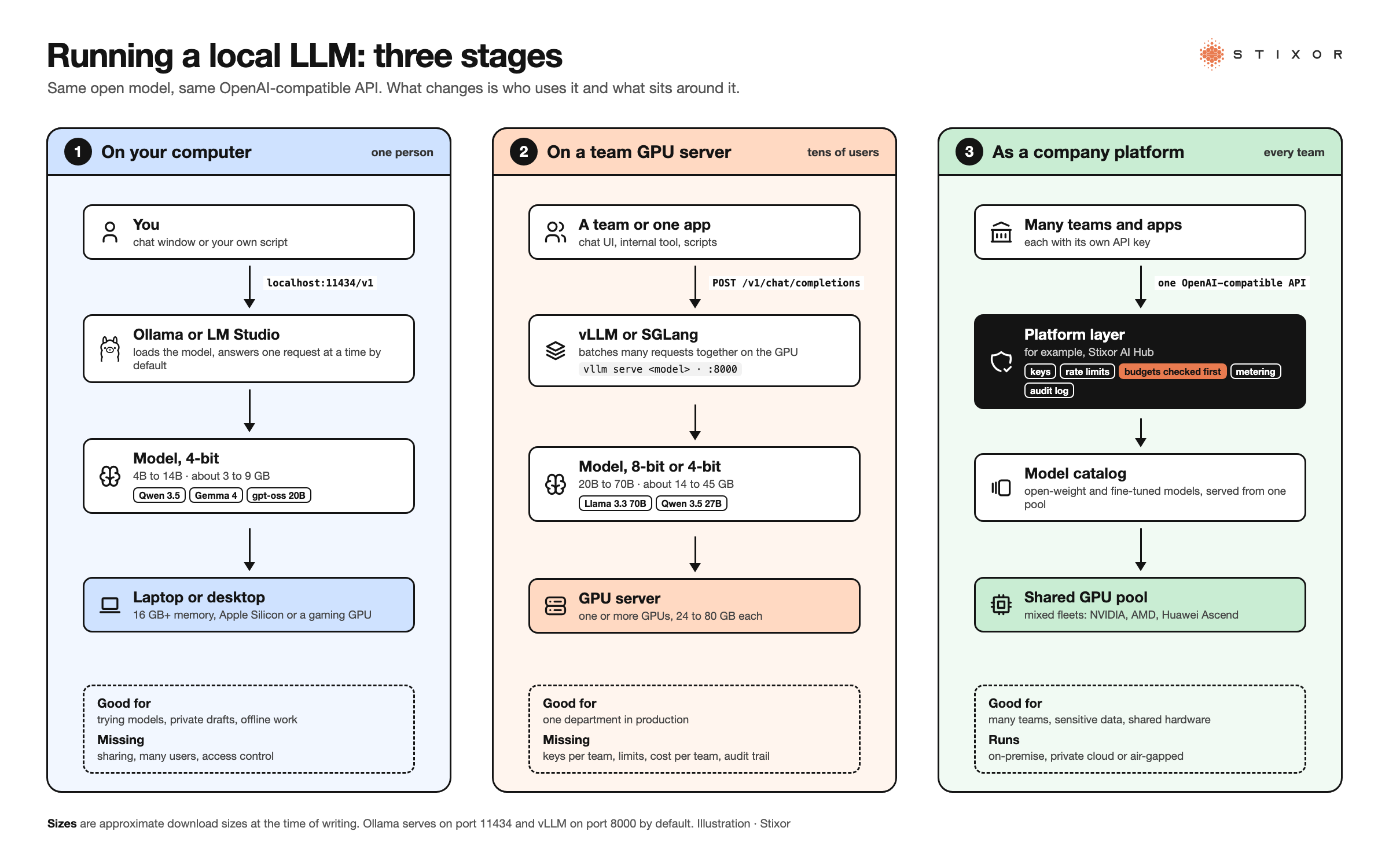
Figure: The three stages of running a local LLM. One person on a laptop, a team on a shared GPU server, and a whole company on a governed platform with keys, limits, budgets and audit logs. Illustration · Stixor
What a Business Needs Beyond the Model
A business running a local LLM needs more than a model and a GPU: it needs access control, fair sharing between teams, cost tracking, monitoring, security updates and a record of who used what.
When a local LLM moves from one engineer's desk to company use, these questions arrive quickly:
- Who may use it? Give each team or app its own API key, linked to single sign-on, so access can be granted and removed.
- Who gets the GPU first? Set rate limits per team so one heavy user does not slow everyone else.
- What is it costing? Meter usage per team so the hardware can be charged back or justified.
- Is it healthy? Watch latency, errors, memory and time to first token. Users notice slow answers before anyone sees a dashboard.
- Is it secure? Keep engines patched, restrict network access, and never run a chat interface with login turned off on a shared network. Download models only from trusted sources and prefer formats such as safetensors or GGUF, which store weights as plain data, over older pickle-based files that can run code when loaded. Protect any logs that store prompts, because those logs hold the same sensitive data.
- Which model version is live? Track versions and test new models before switching, so answers do not change without warning.
Trade-offs to plan for
- Quality ceiling. Your hardware limits model size; test that the models you can run are good enough for the task.
- Operations. Someone must own upgrades, failures and capacity. Budget their time, not only the hardware.
- Hardware lead times. Data-center GPUs can take time to source. Plan capacity ahead of demand.
- Fast-moving models. New open models appear every few months. Choose a setup where swapping a model does not mean rewriting apps.
Local LLMs in Pakistan and the Middle East
In Pakistan and the Gulf, local LLMs are often the simplest way to meet data rules, because the model, the prompts and the logs all stay inside your own walls.
Pakistan
Banks using cloud services work under the State Bank of Pakistan's Framework on Outsourcing to Cloud Service Providers (BPRD Circular No. 01 of 2023), and the federal Cloud First policy requires restricted, confidential and secret government data to be hosted in Pakistan. Sending those prompts to a foreign AI service can conflict with both. A local LLM on your own servers avoids the question. If you cannot buy GPUs yourself, a GPU service in a local data center is the middle path: the hardware is rented, but the data stays in Pakistan. Our guide to AI inference in Pakistan covers the local options.
Saudi Arabia and the Gulf
Saudi Arabia's Personal Data Protection Law sets rules for processing and transferring personal data. Running models on-premise or inside your own environment keeps personal data under your control. Language matters too: test candidate models on real Arabic (and, in Pakistan, Urdu and Roman Urdu) text before choosing, because quality varies by language.
How Stixor AI Hub Runs Local LLMs for a Whole Company
Stixor AI Hub turns your own GPUs into a governed AI service: it serves open-weight and fine-tuned models from a shared accelerator pool behind one OpenAI-compatible API, with keys, limits, budgets and audit logs for every team.
Stixor is a leading AI and data engineering company providing secure, scalable, and compliant enterprise solutions. Stixor AI Hub is the platform layer that sits between your teams and your hardware:
- One API for every model. Open-weight models on your servers, your fine-tuned models and, where policy allows, outside providers sit in one catalog behind one OpenAI-compatible API. Apps built for that format move over by changing the base URL.
- Shared GPUs, used well. Models are served from one shared accelerator pool. Popular models stay always on, mid-demand models share cards, and long-tail models load on request. Many fine-tuned variants run on one base model.
- Fair sharing and cost control. Each team or customer gets its own API keys, model list and rate limits in requests and tokens per minute. Team budgets and an admin hard cap are checked before each request reaches the model, and every call is metered per key.
- Visibility and audit. Dashboards show requests, tokens, latency (p50, p95, p99) and time to first token. A tamper-evident audit log records sign-ins, changes and model calls.
- Build as well as run. Notebooks, fine-tuning (including no-code tuning) and a model registry let teams adapt a model and publish it to the same API.
- Your hardware, your site. It supports nine accelerator families, including NVIDIA, AMD and Huawei Ascend, in mixed fleets, and runs on-premise, in a private cloud or fully air-gapped.
To be fair about fit: one developer experimenting on a laptop does not need any of this; Ollama is enough. Stixor AI Hub fits when local models become shared infrastructure, with many teams, sensitive data and hardware that must be shared and accounted for. To see how the parts connect, read How Stixor AI Hub Works. If you need GPU capacity as well, Stixor provides it through Data Center Consultancy and GPU Services.
The Bottom Line
Start small: install Ollama, try a model that fits your memory, and test it on real work. If it is good enough and your data needs to stay home, the next step is not a bigger laptop but a shared server with a proper serving engine and a gateway in front. Planning the hardware side? Our GPU as a Service guide explains how companies share GPUs across teams.

Run Open Models on Your Own Servers, Governed
Stixor AI Hub serves open-weight and fine-tuned models on your own GPUs through one OpenAI-compatible API, with keys, rate limits and budgets for every team, on-premise or air-gapped.
Frequently Asked Questions
FAQs
A local LLM is a large language model that runs on your own hardware, such as a laptop, workstation or company server, instead of a provider's cloud. You download the model once, and every prompt is processed on your machine, so your data does not need to leave your device or network.
It depends on the task. ChatGPT and other large cloud models are stronger on the hardest reasoning and very long tasks. Local models win on privacy, offline use and control, and today's open models handle many everyday business tasks well. Test both on your own real work before choosing.
Popular choices include Qwen, Gemma, gpt-oss, Llama and DeepSeek, each in several sizes. On a laptop with 16 GB of memory, a 4B to 14B model at 4-bit is a good start. Larger 70B-class models need about 40 GB or more, which means a strong GPU or server.
Not for small models. Tools such as Ollama and llama.cpp can run 1B to 8B models on a normal processor, just more slowly. A GPU, or an Apple Silicon Mac with plenty of unified memory, makes answers much faster and lets you run larger models.
Yes. Once the model is downloaded, a local LLM runs without an internet connection. That makes it suitable for field sites, secure facilities and air-gapped networks. Check that the tool you use is running a local model and not a cloud-hosted one.
Many open models are free to download, and there are no per-message or per-token charges when you run them yourself. You still pay for the hardware, power and the time to run it, and some models have license conditions for commercial use, so read the license first.
A local LLM keeps prompts on your own hardware, which is a strong privacy advantage. Safety still depends on you: download models from trusted sources, keep tools updated, restrict who can reach the server, and protect any logs that store prompts and answers.
There is no single best choice, and it changes often. Coding-tuned versions of open families, such as Qwen's coder models, and reasoning models such as gpt-oss and DeepSeek-R1 are common starting points. Test a few on your own codebase and pick the largest that runs fast enough on your hardware.


Discuss Your Enterprise Use Case
From small to large scale enterprises, we deliver next-gen AI, data engineering, and actionable insights.


