
What Is an AI Gateway? How LLM Gateways Work and When You Need One

Written by Muhammad Rizwan
November 6, 2026
16 min Read
An AI gateway is a single front door that sits between your applications and the AI models they call. Every request passes through it, so one place decides who may call which model, how much they may use, what data may leave, where the request goes, and what gets recorded. Without one, each app talks to models directly, and keys, costs and logs end up scattered across teams.
You will also hear it called an LLM gateway (LLM means large language model, the kind of AI behind chatbots) or an AI proxy. Stixor AI Hub includes this layer: one OpenAI-compatible API in front of every model, with keys, rate limits and budgets checked before each call, running inside your own data center or cloud.
This guide explains AI gateways in plain English first, then goes deeper: how one request flows through a gateway, which features matter, how it differs from an API gateway, an MCP gateway and a router like OpenRouter, and how to decide whether you need one.
What is an AI gateway? An AI gateway is a proxy layer between applications and AI models that gives every caller one endpoint and applies shared rules to each request: it authenticates the caller, enforces model access, rate limits and budgets, can filter sensitive data, routes the call to the right model, and meters and logs the result for cost and audit.
| AI gateway at a glance | Answer |
|---|---|
| What it is | One front door between your apps and every AI model they use |
| Also called | LLM gateway, AI proxy, model gateway |
| Core jobs | Access control, rate limits, budgets, routing, metering, logging |
| Common extras | Guardrails, caching, fallbacks, agent and MCP tool traffic |
| Who needs one | Any company with several teams, apps or model providers |
| Where it runs | As a cloud service, or self-hosted in your own data center or cloud |
Key Takeaways
- An AI gateway puts one endpoint and one set of rules in front of all your AI models, so apps stop holding their own provider keys.
- The checks that matter most happen before the model runs: identity, model access, rate limits and budget. A budget checked only after the call is a report, not a limit.
- An AI gateway is not a normal API gateway: it counts tokens instead of requests, handles streaming answers and can read prompts for sensitive data.
- A router such as OpenRouter is a hosted service you send traffic to; a gateway is a control point you own and set policy in. Some products do both.
- Every prompt passes through the gateway, so where it runs is a data-residency decision. Regulated firms in Pakistan and the Gulf should look at self-hosted options.
What Is an AI Gateway in Simple Terms?
In simple terms, an AI gateway is the reception desk for your company's AI: every request checks in at one desk, which knows who you are, what you are allowed to use, how much you have left, and writes it all down.
Think of an office building. Without a reception desk, every visitor walks in through any door, nobody knows who went where, and the bill for the meeting rooms arrives at the end of the month with no names on it. With a desk, visitors show a badge, are sent to the right floor, and every visit is logged.
An AI gateway does the same for model calls. Your chatbot, your coding assistant and your document tool all send requests to the gateway instead of straight to a model. The gateway checks the request, sends it on, and records what happened. Another useful picture is an electricity meter with a circuit breaker: it counts every unit used and cuts the supply before a team overspends.
Key terms in plain English
| Term | What it means |
|---|---|
| LLM | Large language model: the AI model behind chatbots, such as GPT, Llama or Qwen |
| API | The way one program asks another for something; apps call models through an API |
| API key | A secret string that identifies who is calling, like a badge |
| Token | A small piece of text (about part of a word) that models read and write; usage is counted in tokens |
| RPM / TPM | Requests per minute and tokens per minute: the two common rate limits |
| OpenAI-compatible API | An API that uses the same request format as OpenAI's, so existing code and SDKs work by changing one URL |
| Guardrails | Checks on prompts and answers, for example hiding personal data or blocking harmful text |
| MCP | Model Context Protocol: an open standard for connecting AI apps and agents to tools and data |
Why Do Companies Need an AI Gateway?
Companies need an AI gateway when AI use spreads beyond one app: without a shared control point, keys leak, spending surprises finance, and nobody can say which team sent which data to which model.
The problems usually show up in this order:
- Keys everywhere. Each team signs up for its own provider account and pastes keys into code, scripts and laptops. When someone leaves, nobody knows which keys to revoke.
- Bills without owners. The invoice arrives as one number. Finance cannot split it by team, product or customer, so nobody is accountable for usage.
- Runaway usage. An AI agent stuck in a loop, or a script left running over a weekend, keeps calling a model with nothing to stop it. The OWASP Top 10 for LLM Applications lists this as "Unbounded Consumption" (LLM10:2025) and recommends rate limiting and user quotas as a defense (OWASP GenAI Security Project).
- Sensitive data leaving. Staff paste customer records into prompts. With no checkpoint, that data goes to whichever model the app points at.
- Every app rebuilding the same plumbing. Retries, logging, model switching and cost tracking get written again in each codebase, slightly differently each time.
- No audit trail. When security or a regulator asks who used which model with what data, there is no single record to show.
A gateway fixes these in one place instead of in every app. The aim is to centralize the rules and keep the apps simple.
How Does an AI Gateway Work?
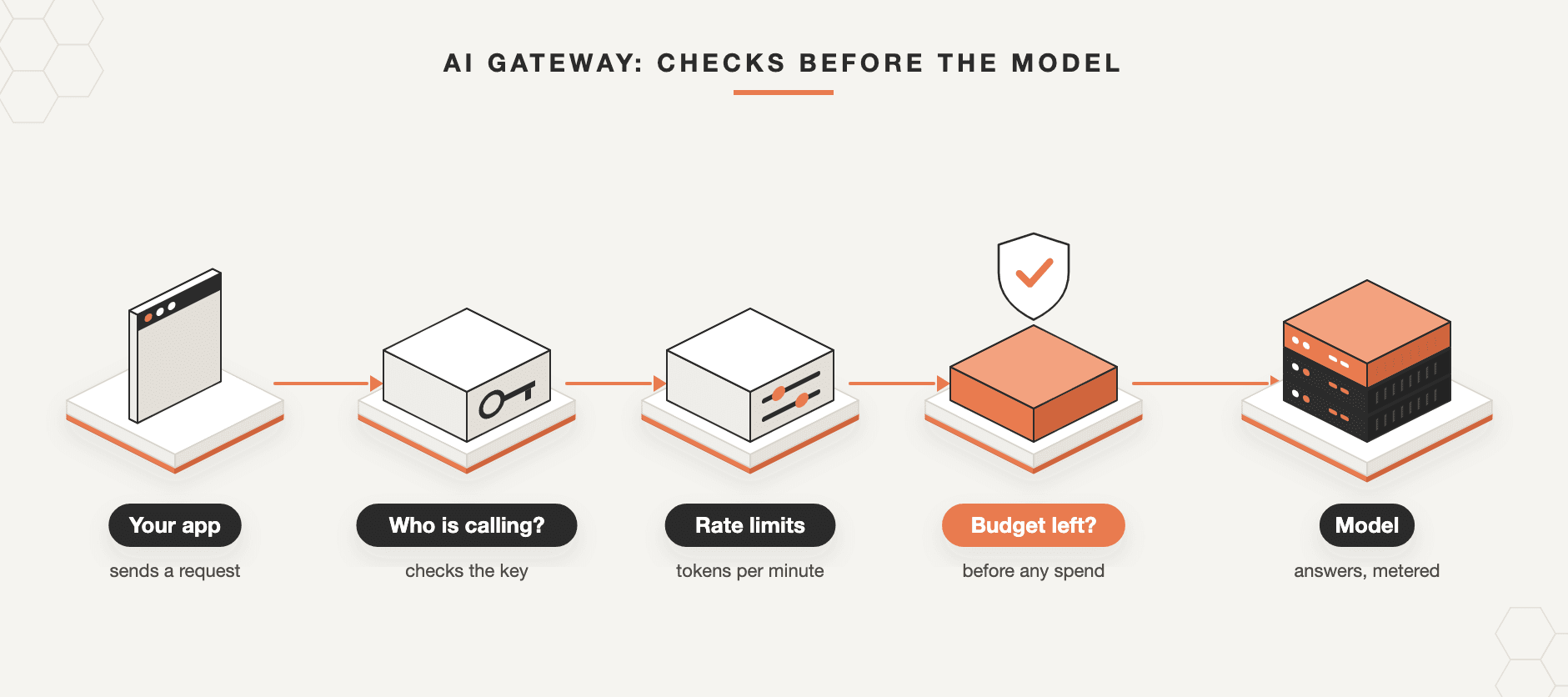
An AI gateway works as a checkpoint on every model call: the request arrives with a key, passes a series of checks, is routed to a model, and the answer streams back while the gateway counts tokens and writes a log.
Here is what happens to a single request, step by step:
- The call arrives. An app sends a normal API request with its key and the model it wants. If the gateway speaks the OpenAI-compatible format, the app uses the same SDK as before and only the base URL changes.
- Who is calling? The gateway checks the key, or a sign-in token, and maps it to a team, an app or a customer.
- Is this model allowed? Each team has a list of models it may use. A request for anything else is refused.
- Within rate limits? The gateway checks requests per minute, tokens per minute and, on some gateways, how many requests may run at once.
- Budget left? The gateway estimates the cost of the call and checks the team's remaining budget before anything is spent.
- Guardrails (optional). Some gateways scan the prompt to mask personal data or block prompt-injection attempts.
- Cache (optional). If the same or a very similar question was answered recently, the saved answer can be returned without calling the model.
- Routing. The gateway sends the request to the right place: an open model on your own GPUs, a fine-tuned model, an outside provider, or a tool server for an agent. Some gateways retry or switch to a backup model when one fails.
- Answer, meter, log. The answer streams back to the caller. The gateway counts tokens in and out, records latency, and writes the call to the log that feeds dashboards, chargeback and audit.
If any check fails, the request is refused with a clear reason and nothing is spent. That is why the order matters: checks first, model second.
What Features Should an AI Gateway Have?
An AI gateway needs a core set of controls that every company uses (keys, model access, limits, budgets, metering and logs) and a set of extras that matter only for some workloads (guardrails, caching, fallbacks and agent traffic).
| Feature | What it does | Must-have or depends |
|---|---|---|
| One endpoint, OpenAI-compatible | All apps call one URL in a format they already support | Must-have |
| Keys per team, app or customer | Ties every call to an owner; revoke one key without breaking others | Must-have |
| Model access lists | Decides which team may use which model | Must-have |
| Rate limits (RPM, TPM) | Stops one caller from crowding out the rest | Must-have |
| Budgets checked before the call | Turns a spending report into a spending limit | Must-have |
| Metering and logs | Tokens, cost, latency and errors per key, for chargeback and audit | Must-have |
| Guardrails | Masks personal data, blocks harmful prompts and answers | Depends on data and users |
| Caching | Reuses answers to repeated questions | Depends on how repetitive traffic is |
| Retries and fallbacks | Moves traffic when a model or provider fails | Depends on uptime needs |
| Agent and MCP traffic | Applies the same rules to tool calls made by agents | Depends on agent use |
Most buyers over-weight the extras and under-check the core. A gateway with clever routing but budgets that only show up in next month's report will not stop the weekend runaway script. Ask every vendor the same question: at what point in the request is the budget enforced?
Budgets Before or After the Call: Why It Matters
A budget that is checked before each request reaches the model is a limit; a budget that is tallied after the call is only a report, and by the time you read it the money is spent.
Many tools say they "track spend". That usually means they add up costs after each call and show a dashboard or send an alert. Useful, but it does not stop anything. Pre-call enforcement means the gateway looks at the team's remaining budget and the likely size of the request, and refuses the call if it would go over.
An illustrative example: a team ships an agent on Friday. A bug makes it retry the same task in a loop. With after-the-fact tracking, the loop runs all weekend and the overspend appears in Monday's dashboard. With a pre-call cap, the first request that would cross the team's budget is refused, the agent gets a clear error, and the on-call engineer gets an alert instead of finance getting a surprise.
How can a gateway check a budget before it knows how long the answer will be? A common pattern is to estimate, reserve, then settle: count the tokens in the prompt, hold back enough budget for the longest answer the request allows, refuse the call if that would cross the limit, and then settle the real count once the answer has finished streaming. Microsoft's Azure API Management documentation, for example, describes counting prompt tokens in advance so that a request that already exceeds the limit is refused before it reaches the model (Microsoft Learn).
Two layers work best together:
- A team budget that the team sets for itself, so it can plan its own use.
- An admin hard cap that the team cannot raise, so the company's exposure has a ceiling.
The same logic applies to rate limits. Limits on tokens per minute matter more than limits on requests, because one long request can use as many tokens as hundreds of short ones.
AI Gateway vs API Gateway: What Is the Difference?
An API gateway manages ordinary web traffic counted in requests; an AI gateway is built for model traffic, which is counted in tokens, streams its answers, varies hugely in cost per call and carries text that may contain sensitive data.
| API gateway | AI gateway | |
|---|---|---|
| Unit of usage | Requests | Tokens (input and output), plus requests |
| Cost per call | Roughly the same every time | Varies with prompt length, answer length and model |
| Responses | Usually one reply | Often streamed word by word |
| Content checks | Headers and schemas | Prompt and answer text: personal data, injections |
| Routing | By path or service | By model, provider, cost, latency or availability |
Another way to see it: an API gateway usually guards traffic coming in to your own services, while an AI gateway mostly governs traffic going out from your apps to models, whether those models run on your servers or at an outside provider.
The two are related, and several API-management products, such as Kong, Apache APISIX and Azure API Management, now add AI features on top of their API gateways. Microsoft's documentation, for example, describes token-based limits and quotas, semantic caching and load balancing across AI backends. If your company already runs an API gateway, check whether its AI features cover tokens, streaming and budgets before buying something separate.
AI Gateway vs LLM Gateway, MCP Gateway and LLM Router
"AI gateway" and "LLM gateway" mean the same thing in practice; an MCP or agent gateway governs the tools that agents call rather than the models; and a router such as OpenRouter is a hosted service that forwards your calls to many providers.
- AI gateway vs LLM gateway. Same idea, different names. "LLM gateway" is common with developers, "AI gateway" with vendors and analysts. Some products use "AI gateway" to mean they also cover image, speech and embedding models, not only text.
- AI gateway vs MCP gateway (or agent gateway). The Model Context Protocol is an open standard that lets AI apps and agents connect to tools and data sources. When agents call tools, those calls need the same treatment as model calls: who may use which tool, with what limits, and with a log. An MCP gateway does that for tool traffic. Some products, such as the open-source agentgateway, handle model, tool and ordinary API traffic in one place.
- AI gateway vs an LLM router like OpenRouter. OpenRouter offers one API for hundreds of models run by many providers, with model fallbacks. It is a hosted service: your prompts go to OpenRouter and then on to the provider. A gateway you run yourself is a control point inside your own network where you set the rules. Is OpenRouter an AI gateway? It covers part of the job (one API, routing, fallbacks); it is not where your company sets its own access, budget and data policies.
Examples of AI Gateways
AI gateways come in four broad kinds: managed cloud services, AI features added to API-management products, open-source proxies you host yourself, and platforms that include a gateway alongside model serving.
Gartner's Market Guide for AI Gateways groups vendors into three archetypes: API management platforms adding AI extensions, AI platforms with built-in gateways, and purpose-built open-source or open-core solutions. The same guide separates a true AI gateway from adjacent tools such as API management platforms, model routers and LLM observability tools (summary on IBM's site). The table below adds a fourth group, managed cloud services, because many teams meet their first gateway that way.
| Type | Examples | Good fit when |
|---|---|---|
| Managed cloud service | Cloudflare AI Gateway, Vercel AI Gateway, Databricks AI Gateway | Your apps already live on that platform and prompts may leave your network |
| API management with AI features | Kong AI Gateway, Azure API Management, Apache APISIX | You already run that API gateway and want one tool |
| Open-source proxy, self-hosted | LiteLLM, Portkey Gateway, agentgateway | You have engineers to run, secure and upgrade it |
| Platform with a built-in gateway | Stixor AI Hub, TrueFoundry | You also serve your own models and need tenants, billing or chargeback |
LiteLLM's documentation, for instance, describes a self-hosted server that gives apps one OpenAI-compatible endpoint, with virtual keys that each carry their own models, budgets and rate limits. Cloudflare describes its gateway as a way to gain visibility and control over AI apps, with analytics, logging, caching and rate limiting. Features change quickly, so check each product's current documentation rather than a comparison list.
What Does the Research Say About Routing and Caching?
Research shows that sending each request to the cheapest model that can handle it, and reusing answers to repeated questions, can cut model costs sharply, but both need care to avoid quality loss and data leaks.
Three studies are worth knowing:
- Routing between models. The FrugalGPT paper (Stanford, arXiv preprint) tested sending queries first to cheaper models and escalating only when needed. It reports matching the performance of the best single model at a much lower cost.
- Learned routers. RouteLLM (arXiv preprint) trained routers that choose between a stronger and a weaker model per request, and reports cutting costs significantly without hurting answer quality on standard benchmarks.
- Semantic caching. GPT Semantic Cache (arXiv preprint) stored embeddings of past questions and reused answers to similar ones. On repetitive customer-service style queries it reports cutting API calls by up to 68.8%, with more than 97% of cache hits judged correct.
What this means for a gateway buyer: routing and caching are real levers, but they are workload-specific. Caching suits repeated questions (help desks, FAQs); it is risky for answers that depend on the user, the date or private data, and a shared cache must never return one customer's answer to another. Routing to smaller models needs testing on your own tasks first. Start with the core controls; add these once you have usage data.
Do You Need an AI Gateway?
You need an AI gateway once more than one team, app or model provider is involved, or as soon as you must prove who sent what data to which model; a single prototype calling one provider usually does not need one yet.
Use this quick check:
- One app, one provider, a small team: you can wait. Keep keys in a secrets manager and set a spending alert with the provider.
- Several teams or apps, or more than one provider: yes. Without a gateway you will rebuild keys, limits and logs in each app.
- Agents in production: yes, and make sure budgets are enforced before each call. Agents make many calls without a human watching.
- Personal, financial, health or government data: yes, and run it where the data is allowed to be. The gateway sees every prompt.
- You serve your own open models, or sell AI to customers: you need more than a gateway: model serving, tenants, metering and billing. Look at a platform that includes the gateway layer.
Build, use open source, or buy?
Open-source proxies are a fast way to start, and many teams do. The work comes later: high availability (the gateway is now on every request path, so if it goes down, every AI feature goes down), upgrades, security patches, single sign-on, audit retention and billing. Count that as an ongoing platform job, not a one-off install. Managed services remove the operations work but send your traffic through someone else's network. A self-hosted commercial platform sits in between.
Trade-offs to plan for
- One more hop. A gateway adds a small delay to each call. Run it close to your apps and models, and watch time to first token.
- A single point of failure. Run more than one copy and test what happens when one fails.
- Logs are sensitive. If the gateway stores prompts, the log itself becomes a store of sensitive data. Decide what to keep, mask and delete.
- Lock-in moves, it does not vanish. An OpenAI-compatible endpoint keeps apps portable, but policies and dashboards live in the gateway you choose.
AI Gateways in Pakistan and the Middle East
In Pakistan and the Gulf, the main question is not which gateway has the most features but where it runs, because every prompt and answer passes through it.
Pakistan
Banks and financial institutions using cloud services work under the State Bank of Pakistan's Framework on Outsourcing to Cloud Service Providers (BPRD Circular No. 01 of 2023), and the federal Cloud First policy requires restricted, confidential and secret government data to be hosted in Pakistan. For these organizations, a gateway that runs as a foreign SaaS sends every prompt abroad, even when the model itself is hosted locally. A self-hosted gateway inside a local data center keeps the whole path, from app to gateway to model, in the country. Remember the logs too: if the gateway stores prompts and answers, those records hold the same sensitive data and need the same residency, access control and retention rules. Our guide to AI inference in Pakistan covers the model side.
Saudi Arabia and the Gulf
Saudi Arabia's Personal Data Protection Law sets rules for processing and transferring personal data. A gateway that masks personal data in prompts and runs on-premise or inside your own environment gives compliance teams one place to enforce and prove those rules. Arabic support matters too: check that guardrails and data masking work on Arabic text, not only English.
How Stixor AI Hub Works as an AI Gateway
Stixor AI Hub includes the AI gateway layer, one OpenAI-compatible API with keys, limits and budgets checked before every call, and adds model serving, fine-tuning, metering and billing on the same platform.
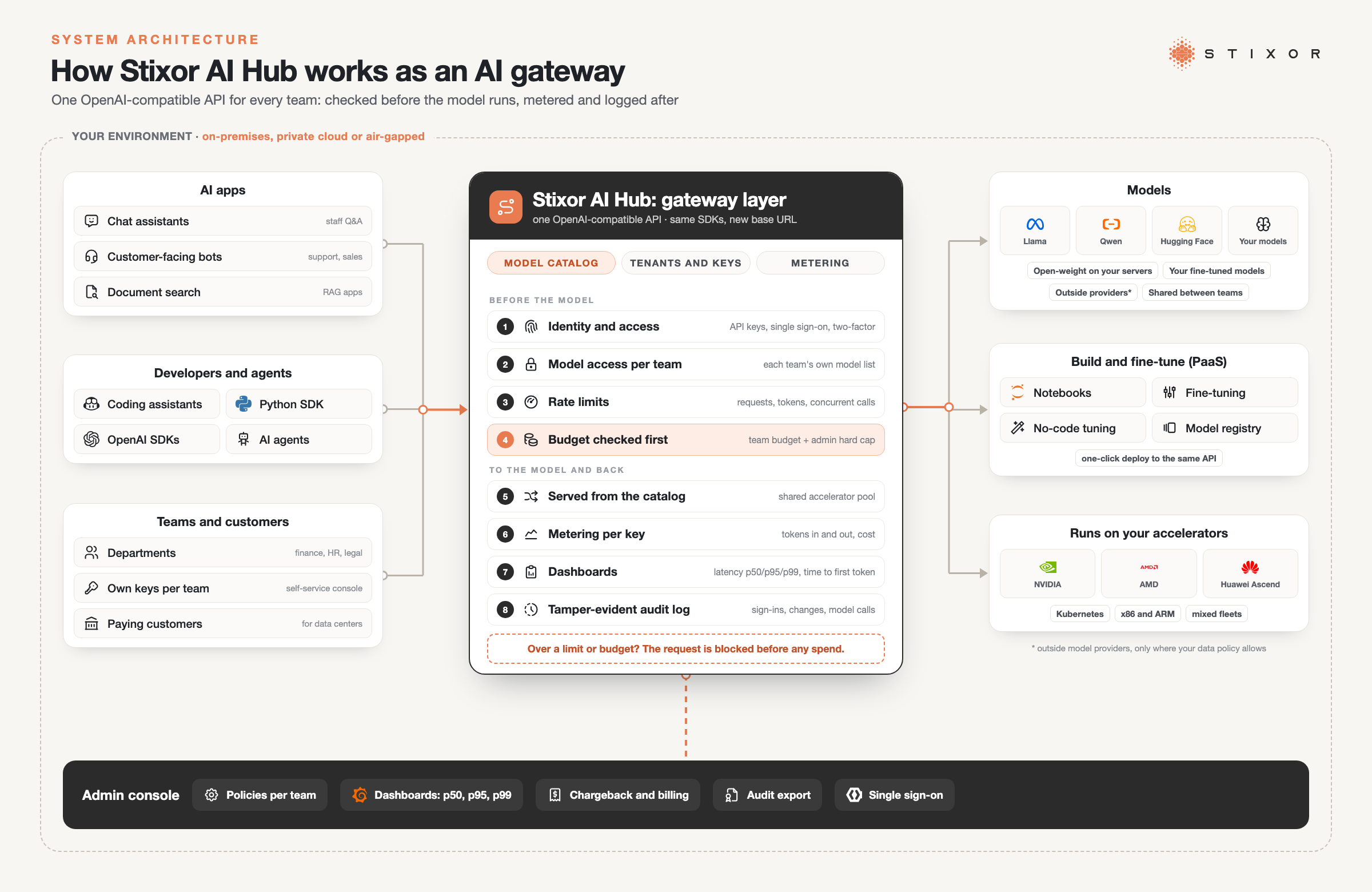
Figure: How Stixor AI Hub works as an AI gateway. Apps, agents and teams call one OpenAI-compatible API; keys, model access, rate limits and budgets are checked before the model runs, then each call is served, metered and logged inside your own environment. Illustration · Stixor
Stixor is a leading AI and data engineering company providing secure, scalable, and compliant enterprise solutions. Stixor AI Hub is its platform for running AI models as a governed service. On the gateway side:
- One API for every model. Open models on your own servers, your fine-tuned models and, where your policy allows, outside providers all sit in one catalog behind one OpenAI-compatible API. Existing apps move over by changing the base URL.
- Keys and access per team or customer. Each department, app or customer gets its own account with API keys it creates from a web console, a list of models it may use, and rate limits in requests per minute, tokens per minute and maximum concurrent requests.
- Budgets before the call. Each team sets its own budget; an administrator sets a hard cap it cannot exceed. Both are checked before the request reaches the model, and requests are blocked once spend reaches the budget.
- Metering and visibility. Every call is metered per key. Dashboards show requests, tokens, cost, latency (p50, p95, p99) and time to first token, with spend by model.
- Audit and access. A tamper-evident audit log records sign-ins, changes and model calls, with each event chained to the one before. Users and admins log in with single sign-on and two-factor authentication.
Behind the gateway, the platform serves models from a shared accelerator pool, runs many fine-tuned variants on one base model, and supports nine accelerator families, including NVIDIA, AMD and Huawei Ascend, in mixed fleets. It runs inside your own data center or cloud, or fully air-gapped. Data centers can use it to sell model access to their own customers with prepaid credits or on-demand billing. For the full picture, read How Stixor AI Hub Works and What Is Model as a Service?.
To be fair about fit: if you only need one front door to a couple of outside providers and nothing else, a lightweight gateway is enough. Stixor AI Hub fits when several needs arrive together: many teams or customers, your own models on your own GPUs, budgets that must hold, and data that must stay in your environment.
The Bottom Line
The first question about an AI gateway is not which features it lists, but where its rules are enforced and where it runs. Get those two right (checks before the model, and a location your data is allowed to be) and the extras can come later as your usage grows. If you are planning the model side too, start with our guide to choosing the right open-source LLM.

Put One Governed Gateway in Front of Every Model
Stixor AI Hub gives every team one OpenAI-compatible API with its own keys, rate limits and budgets checked before each call, running inside your own data center or cloud.
Frequently Asked Questions
FAQs
An AI gateway is used to control and track how a company uses AI models. It gives every app one endpoint, checks who is calling and what they may use, applies rate limits and budgets, can mask sensitive data, routes each call to the right model, and logs usage for cost reports, chargeback and audits.
In practice, yes. Both terms describe a proxy that sits between applications and AI models and applies shared rules. "LLM gateway" is more common among developers. Some vendors use "AI gateway" to signal that they also handle image, speech, embedding or agent tool traffic, not only text models.
Partly. OpenRouter is a hosted service that gives you one API for many models and providers, with fallbacks. It does the routing part of a gateway's job. It is not a control point inside your own network where you set company-wide access, budget, data and audit rules, which is what most enterprises mean by an AI gateway.
An LLM gateway governs calls to models: prompts in, answers out, counted in tokens. An MCP gateway governs calls that AI agents make to tools and data sources through the Model Context Protocol. Agents need both, and some products now handle model and tool traffic in one gateway.
It adds a small extra hop to each request, usually far less than the time the model takes to answer. Run the gateway close to your apps and models, avoid heavy checks on every call unless you need them, and measure time to first token before and after adding it.
Only if it enforces budgets before each call. Many tools tally cost after the request and show it on a dashboard, which tells you about overspending after it happens. Look for per-team budgets plus an admin hard cap that the gateway checks before the request reaches the model.
Yes. Open-source proxies such as LiteLLM and agentgateway, and commercial platforms such as Stixor AI Hub, can run on your own servers or private cloud. Self-hosting keeps prompts inside your network, which matters for regulated data, but you take on availability, upgrades and security.
Not always. One app with one provider and a small team can manage with a secrets manager and the provider's spending alerts. You need a gateway once several teams or apps share that provider, when agents run unattended, or when you must prove who sent which data to the model.


Discuss Your Enterprise Use Case
From small to large scale enterprises, we deliver next-gen AI, data engineering, and actionable insights.


