
How to Choose an Enterprise AI Assistant: A Buyer's Checklist

Written by Muhammad Rizwan
November 26, 2026
12 min Read
To choose an enterprise AI assistant, test every option on your own documents and real employee questions, then score it on ten things: answer accuracy with citations, permission-aware access, connectors to your systems, language support, where it runs, security and audit, admin control, work beyond Q&A, ease of use, and the vendor's support. Demos run on clean sample data. Your files are messier, your permissions stricter and your staff ask questions in their own words, so the only fair comparison is a side-by-side pilot on your content.
This guide is for IT heads, CIOs, digital transformation leads and knowledge managers at banks, telecoms, manufacturers, retailers and service firms, especially in Pakistan and the Middle East, where language and data residency weigh more than in most buyer's guides.
Key Takeaways
- Decide the type of assistant first: built into your office suite, a standalone knowledge assistant, a custom build, or a self-hosted platform.
- Score every option on the same 10 criteria, weighted for your business.
- Run a side-by-side pilot with the same 50 questions on your own files.
- Walk away from red flags: no citations, "everyone sees everything", or a vague answer on where data is processed.
- In Pakistan and the Gulf, put Urdu or Arabic and in-country or on-premise deployment near the top of the list.
What Is an Enterprise AI Assistant?
An enterprise AI assistant is an AI tool that answers employees' questions and helps with their work using the company's own documents, emails and data, while respecting who is allowed to see what.
Unlike a public chatbot, it connects to systems such as SharePoint, Google Drive, email and databases, retrieves the relevant passages and writes an answer with citations. Some also draft documents, run research across many files or watch for changes. For a full introduction, read our guide to enterprise AI knowledge assistants.
What Types of Enterprise AI Assistants Are There?
There are four main types of enterprise AI assistant: assistants built into an office suite, standalone knowledge assistants, custom builds on an AI model API, and self-hosted platforms that run on your own servers.
| Type | Best for | Check carefully |
|---|---|---|
| Built into your office suite | Teams whose work lives almost entirely in one suite, such as Microsoft 365 | How well it reaches systems outside that suite, such as databases or another cloud drive; where data is processed |
| Standalone knowledge assistant (cloud) | Companies with content spread across many apps | Connector coverage for your actual systems; data location; language support |
| Custom build on an AI model API | Teams with strong engineering capacity and a narrow use case | Who builds and maintains permissions, connectors, citations and security over time |
| Self-hosted platform (on-premise or air-gapped) | Banks, government, defence, telecom and others with strict data rules | Hardware needs, who runs updates, and whether features match the cloud versions |
Most mid-size and large organizations in Pakistan and the Gulf end up choosing between a standalone assistant and a self-hosted one, because their content sits in more than one system and their data rules limit what can leave the building or the country.
What Should You Check Before Choosing an Enterprise AI Assistant?
Check ten things: answer accuracy with citations, permission-aware access, connectors, languages, deployment and data location, security and audit, admin control, capabilities beyond Q&A, ease of use, and vendor support.
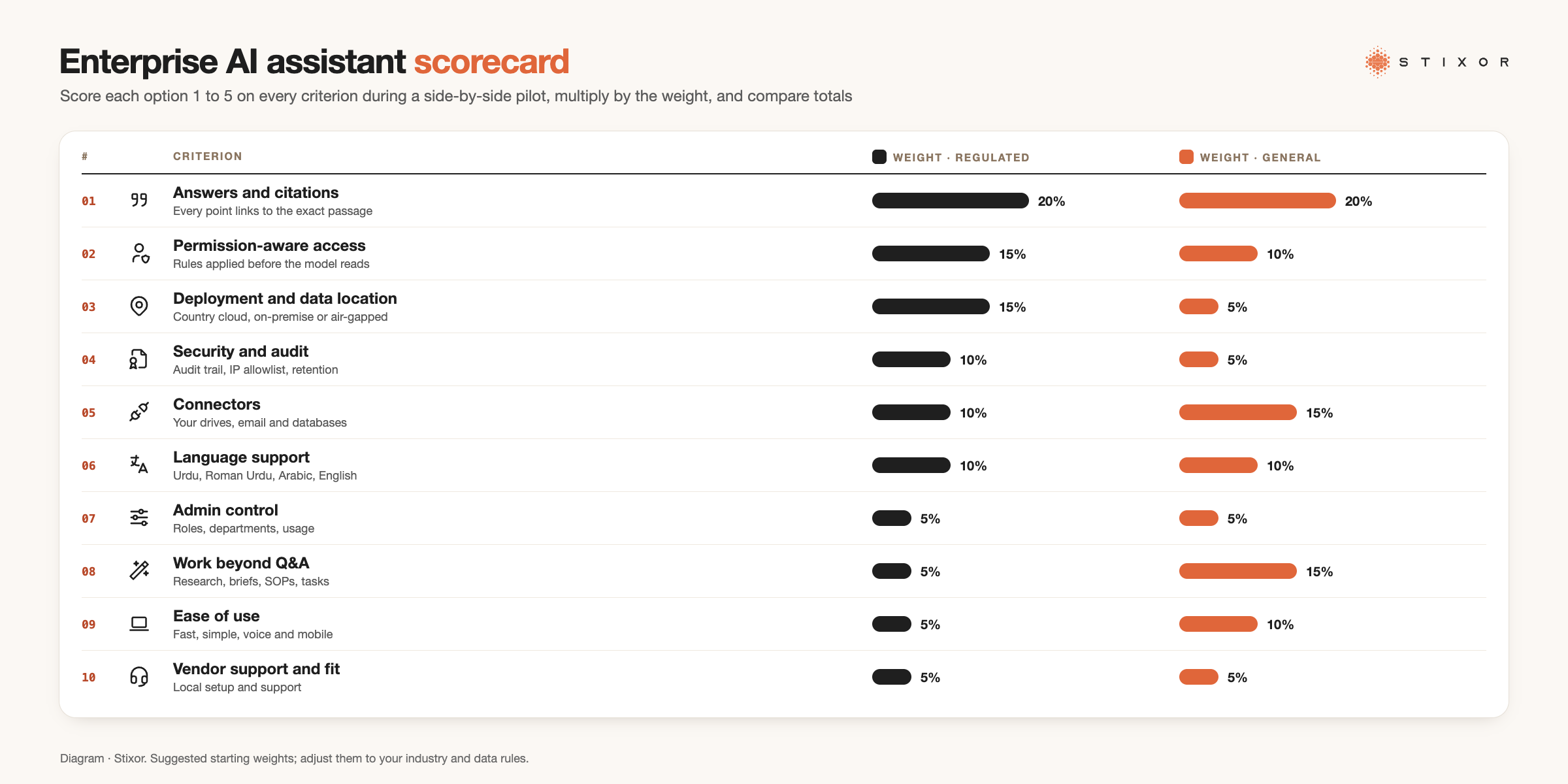
Figure: A 10-point scorecard for comparing enterprise AI assistants, with suggested weights. Adjust the weights to your industry and data rules. Diagram · Stixor
1. Answer accuracy and citations
The assistant should answer from your documents, not from general internet knowledge, and show the source for every point. The best ones open the exact passage, not just the file. This method, retrieval-augmented generation (RAG), comes from a peer-reviewed NeurIPS paper that found answers grounded in retrieved documents were more specific and more factual.
2. Permission-aware access
An employee must never get an answer drawn from a file they cannot open. Ask whether permissions are applied before the AI model reads the content, and whether the assistant follows your existing access rules or needs them rebuilt.
3. Connectors to your systems
List where your knowledge actually lives, such as SharePoint, OneDrive, Google Drive, Outlook, Gmail and your SQL databases, and check each one. Ask how often content syncs, whether you can choose folders, and what happens when a file is deleted.
4. Language support
Test the languages your staff actually use. In Pakistan that usually means English, Urdu and Roman Urdu; in the Gulf, English and Arabic. Check whether a question in one language finds a document in another. Our guide to the Urdu AI assistant explains what to test.
5. Deployment and data location
Ask where documents, the search index, questions, answers, logs and the AI model are stored and processed. Options range from vendor cloud, to cloud hosted in your country, to on-premise, to fully air-gapped with no internet connection.
6. Security and audit
Look for an audit trail that cannot be edited, network restrictions such as an IP allowlist, data retention settings, and protection against prompt injection and sensitive information disclosure, which the OWASP Top 10 for LLM applications lists as leading risks. The NIST AI Risk Management Framework is a useful, voluntary reference for structuring your review.
7. Admin control
Admins should manage users, roles, departments and which features each group can use, and see usage: active users, questions answered, documents indexed.
8. Work beyond questions and answers
Many teams soon want more than search: deep research across many documents, drafting briefs or SOPs, building spreadsheets or decks, and scheduled tasks such as daily briefings or alerts when new documents arrive.
9. Ease of use
If the assistant is slow, hard to reach or confusing, people go back to asking colleagues. Watch real staff use it during the pilot, including on mobile and with voice if that matters to them.
10. Vendor support and fit
Ask who sets it up, who helps your team clean and connect content, how fast support responds in your time zone, and whether the vendor has worked with organizations under similar rules.
How Should You Weight the Criteria?
Weight the criteria by risk: regulated organizations should weight permissions, deployment and audit highest, while companies with less sensitive data can weight connectors, ease of use and capabilities more.
| Criterion | Regulated (bank, telecom, government) | General enterprise |
|---|---|---|
| Answer accuracy and citations | 20% | 20% |
| Permission-aware access | 15% | 10% |
| Deployment and data location | 15% | 5% |
| Security and audit | 10% | 5% |
| Connectors | 10% | 15% |
| Language support | 10% | 10% |
| Admin control | 5% | 5% |
| Work beyond Q&A | 5% | 15% |
| Ease of use | 5% | 10% |
| Vendor support and fit | 5% | 5% |
These weights are a starting point. Score each option from 1 to 5 on each criterion during the pilot, multiply by the weight, and compare totals.
What Questions Should You Ask Vendors?
Ask vendors where your data goes, how permissions are enforced, how answers are sourced, which of your systems they connect to, how they handle your languages, and what you can audit and export.
- Where are documents, the index, questions, answers, logs and the AI model stored and processed?
- Can it run in our country, on our servers, or fully air-gapped?
- Is our data used to train any model? Can we get that in writing?
- Are permissions applied before the model sees content, and do they follow our existing access rules?
- Does every answer cite the exact passage it came from?
- What happens when no document answers the question?
- Which of our systems does it connect to today, and how often does it sync?
- How does it perform in Urdu, Roman Urdu or Arabic on our own files?
- Can a question in one language find a document in another?
- Is there an audit trail that cannot be edited, and can we export it?
- Can we limit access by network, and set how long conversations and logs are kept?
- How is it tested against prompt injection and data leakage?
- What can admins control per role and per department?
- Can we see usage: active users, questions answered, documents indexed?
- If we leave, how do we get our data and configuration out?
How Do You Run a Fair Pilot Between Assistants?
Run a fair pilot by giving every shortlisted assistant the same documents, the same permissions and the same 50 real questions, then scoring answers, citations and access control side by side.
- Pick one team with frequent, checkable questions, such as HR, operations or compliance.
- Collect 50 real questions with the correct answer and source for each, in every language the team uses.
- Load the same content into each assistant, with the same folder permissions.
- Run the questions and score each answer: correct, partly correct or wrong, plus whether the citation really supports it.
- Test permissions by asking the same questions as two users with different access.
- Test security with attempts to extract restricted information.
- Let real users try it for two to four weeks and collect feedback.
- Fill in the weighted scorecard and compare totals.
What Are the Red Flags When Choosing an Enterprise AI Assistant?
The biggest red flags are answers without sources, everyone seeing everything, a vague answer on where data is processed, demos only on the vendor's sample data, and no way to export your data.
- No citations, or citations that point to a whole folder instead of a passage.
- "Permissions coming soon" or access rules that must be rebuilt by hand.
- A vague data answer, such as "it's secure" without naming where data is stored and processed.
- Demo-only evaluation: the vendor will not test on your files.
- English only, or "Urdu and Arabic work fine" without a test on your content.
- No audit trail or no control over retention.
- No exit path for your data and configuration.
What Matters Most for Companies in Pakistan and the Middle East?
For companies in Pakistan and the Middle East, the deciding factors are usually language support for Urdu or Arabic, the option to keep data in the country or on-premise, and a vendor that can support the deployment locally.
- Language. Staff ask in Urdu, Roman Urdu or Arabic while many policies are in English. Cross-language answers with citations are essential, not a bonus.
- Data location. Banks, telecoms, energy companies and government-linked organizations often need data to stay in the country or inside their own data center. Check whether the assistant can run on-premise or air-gapped.
- Local support. Connecting content, mapping permissions and training staff go faster with a team in your region.
For more on data rules in the region, see our enterprise AI knowledge assistant guide, and for the public sector, the AI assistant for government departments checklist.
How Does Vizier AI Score on This Checklist?
Vizier AI is an enterprise AI knowledge assistant built for organizations with strict data rules: it answers in English, Urdu, Roman Urdu and Arabic with citations to the exact passage, follows each user's access rights, and runs on-premise, air-gapped or in a cloud hosted in Pakistan.
| Criterion | What Vizier AI offers |
|---|---|
| Answers and citations | Numbered citations that open the exact passage; reasoning steps shown |
| Permissions | Roles (Admin, Member, custom), departments and org hierarchy, applied to every answer |
| Connectors | SharePoint, OneDrive, Google Drive, Outlook, Gmail, PostgreSQL, MySQL, SQL Server, MariaDB, MCP servers; sync scope, schedule, history and re-index |
| Languages | English, Urdu, Roman Urdu and Arabic; an Urdu question can match an English document |
| Deployment | On-premise, fully air-gapped, or cloud hosted in Pakistan |
| Security and audit | Append-only audit trail with CSV export, IP allowlist, data retention settings |
| Admin control | User invites, custom roles with per-module access, usage dashboard |
| Beyond Q&A | Deep Research, skills (executive brief, SOP, Excel tracker, slide decks), tasks and watchers, shared libraries |
| Ease of use | Chat with file and photo attachments, voice input, temporary chats |
The fairest way to judge it is the same way you judge any option: on your own files and your own 50 questions. To prepare your content for any assistant, read how to build an AI knowledge base for employees.
The Bottom Line
Every enterprise AI assistant looks good in a demo. The one to choose is the one that still gives the right answer, from the right page, to the right person, when it runs on your files, in your languages, under your data rules. Put each option through the same 50 questions and let the scorecard decide.

Put Vizier AI Through Your Own Scorecard
Run your 50 real questions on your own files, in English, Urdu or Arabic, and score the answers, citations and permissions yourself. On-premise, air-gapped or hosted in Pakistan.
Frequently Asked Questions
FAQs
The best enterprise AI assistant is the one that scores highest on your own documents and questions. Weight answer accuracy, permissions, connectors, languages and data location for your business, and run a side-by-side pilot before deciding.
List where your knowledge lives, shortlist assistants that connect to those systems, then test each on 50 real questions with known answers. Score answers, citations and permissions, and check where data is processed.
A public chatbot answers from general knowledge and does not know your internal files. An enterprise AI assistant answers from your company's documents, cites them, and follows your access rules.
Build only if you have the engineering team to maintain connectors, permissions, citations and security over time. Most organizations buy, then customize, because those parts take more effort than the first prototype suggests.
Some can. Vizier AI runs on-premise or fully air-gapped with no internet connection, or as a cloud service hosted in Pakistan. Ask every vendor which components run where.
Two to four weeks of real use is usually enough to compare answer quality, citations and adoption, after a short setup to connect content and map permissions.
It is another name for an enterprise AI assistant: an AI tool for employees that answers questions and helps with tasks using company data. Some vendors also use it for assistants that handle IT or HR requests.
Permissions, deployment and data location, and security and audit. Regulated organizations should weight these highest and confirm that no data leaves approved locations.


Discuss Your Enterprise Use Case
From small to large scale enterprises, we deliver next-gen AI, data engineering, and actionable insights.


