
What Is an Enterprise AI Knowledge Assistant? A Complete Guide

Written by Muhammad Rizwan
October 11, 2026
3 min Read
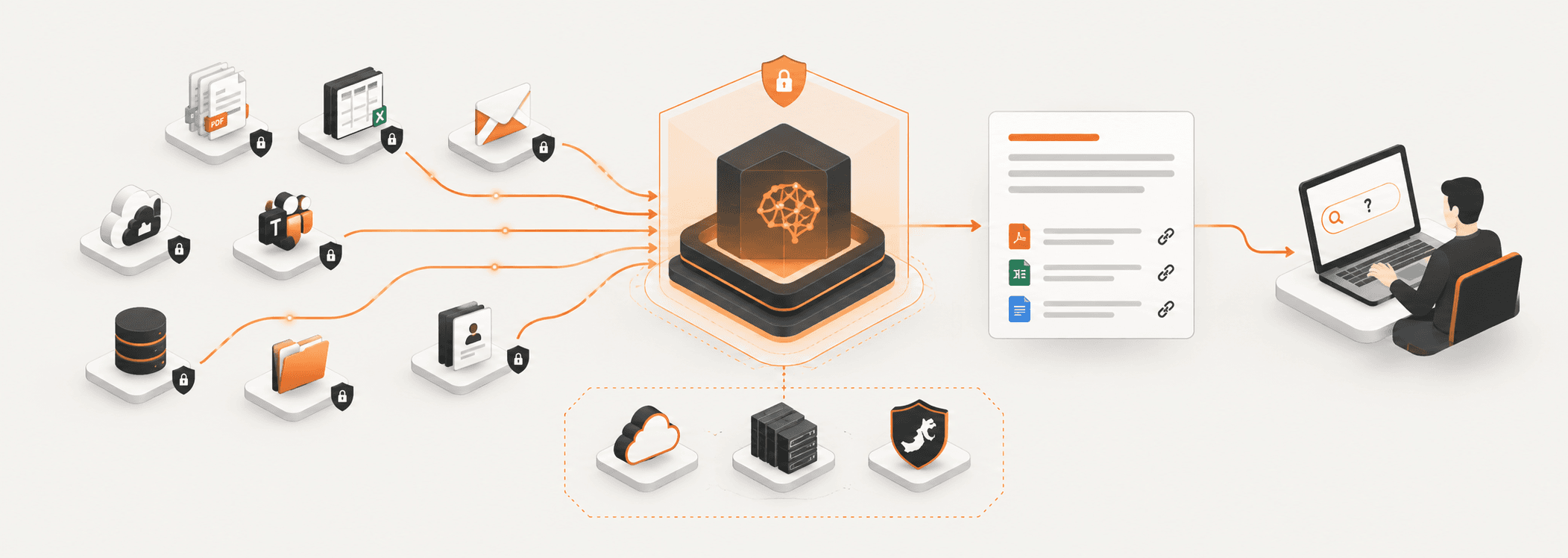
An enterprise AI knowledge assistant lets employees ask questions in plain language and get answers drawn from their own company's documents, emails and systems, with the source attached and with access limited to what each person is allowed to see. Vizier AI, built by Stixor, is one example: it connects SharePoint, Google Drive, Outlook, Gmail, Slack, Teams and company databases, and answers from all of them in one place.
Most organisations already have the answers their people need. The policy exists, the last proposal is in a shared drive, the procedure was emailed months ago. The hard part is finding it, trusting it, and knowing you are allowed to use it.
This guide explains what a knowledge assistant is, how it works, how it differs from enterprise search and public chatbots, what to look for when you buy one, and what changes when your data has to stay in Pakistan or the Gulf.
What Is an Enterprise AI Knowledge Assistant?
An enterprise AI knowledge assistant is software that connects to an organisation's internal content, finds the parts relevant to a question, and uses a language model to write an answer from them, citing each source and respecting each user's access rights. You may also see it called a company knowledge assistant, a workplace AI assistant or an internal AI assistant.
Three things separate it from a general chatbot:
- It answers from your content, not the open internet. The answer is built from your policies, contracts, reports and messages.
- It shows its sources. Each answer links back to the document, email or record it came from, so people can check before acting.
- It respects permissions. If someone cannot open a file in SharePoint or Google Drive, the assistant will not use that file to answer them.
It does not replace your existing systems. Documents stay in SharePoint, Drive or your database. The assistant sits across them and gives people one place to ask.
Why Do Companies Need a Knowledge Assistant?
Because the information employees need usually exists, but it is spread across too many places to find quickly. In a survey of 1,001 US workers by Panopto and YouGov, employees reported losing 5.3 hours a week waiting for information from colleagues or recreating knowledge that already existed, and six in ten said they struggle to get the information they need to do their jobs well.
The pattern is familiar in most organisations:
- Knowledge is scattered. Policies live in SharePoint, proposals in Google Drive, decisions in email and Slack, numbers in a database.
- Search only matches words. Typing "leave policy for contract staff" returns forty files, not an answer.
- The same questions come back. HR, IT and finance answer the same queries every week.
- New joiners don't know where to look. They ask a colleague, who stops their own work to help.
- Trust is low. When nobody knows which version is current, people hesitate to act on what they find.
A knowledge assistant addresses all five at once. Instead of searching several systems, an employee asks once and gets an answer with a link to where it came from.
How Does an Enterprise AI Knowledge Assistant Work?
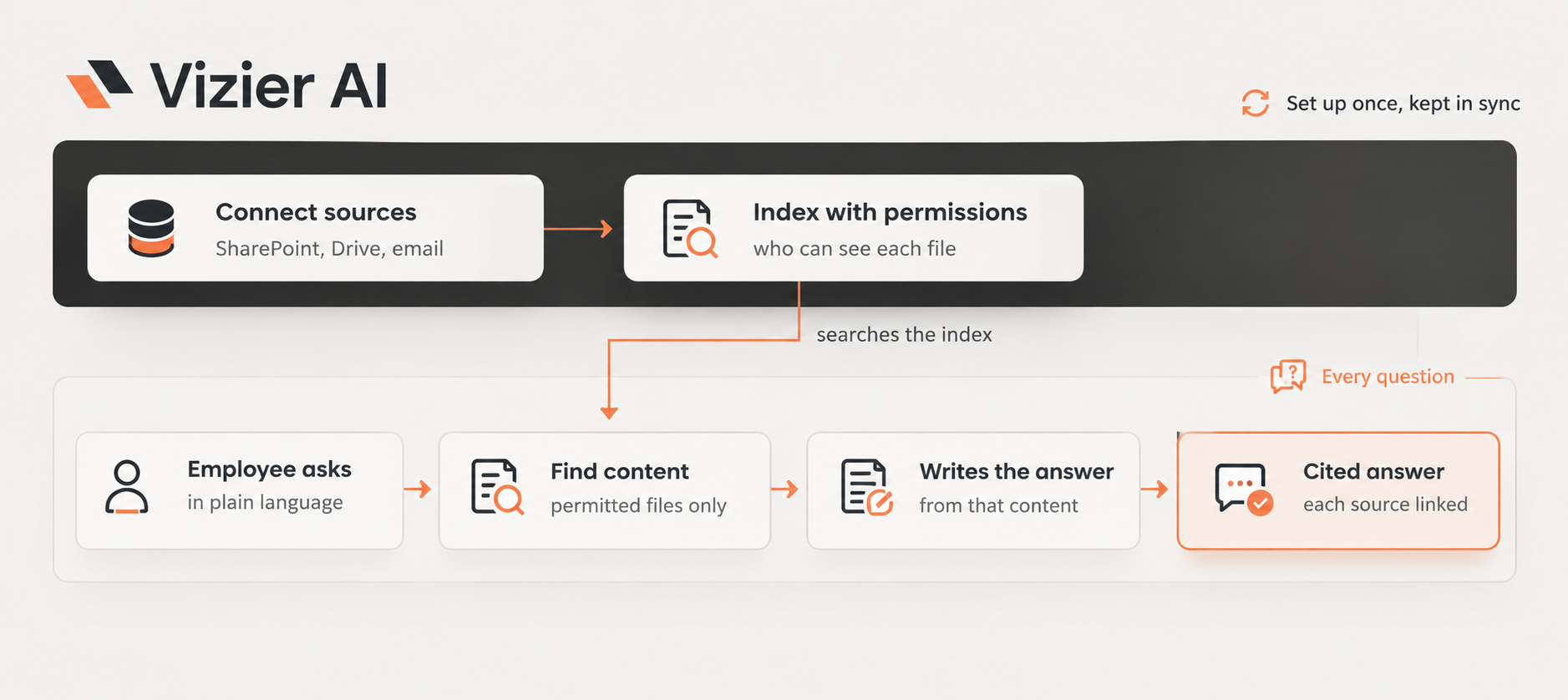
It works in two phases: a setup phase that connects and indexes your content along with its permissions, and an answer phase that runs every time someone asks a question. The method behind the answer phase is called retrieval-augmented generation, or RAG: find the relevant content first, then let the language model write from it.
Setting up
The assistant connects to each source, such as SharePoint, Google Drive, Outlook, Gmail or a database. It reads the documents, including PDFs, Office files, scans and charts, and breaks them into searchable pieces. Alongside each piece it records who is allowed to see the original. Connections sync on a schedule, so new files and permission changes are picked up.
Answering a question
When an employee asks a question, the assistant searches the index for the most relevant pieces, using only content that person can open. It then passes those pieces to the language model, which writes an answer from them and adds citations. Some sources, such as Slack and Microsoft Teams in Vizier AI, are searched live at the moment of the question rather than indexed in advance.
Because the answer is built from retrieved content, a well-designed assistant can also say when it does not know, and it can ask a clarifying question when a request is ambiguous
Knowledge Assistant vs Enterprise Search vs Public AI Chatbots
Enterprise search returns a list of files, a public AI chatbot answers from general internet knowledge, and a knowledge assistant answers from your own content with sources and permissions. Each has its place, but only the last one is built for questions about your organisation.
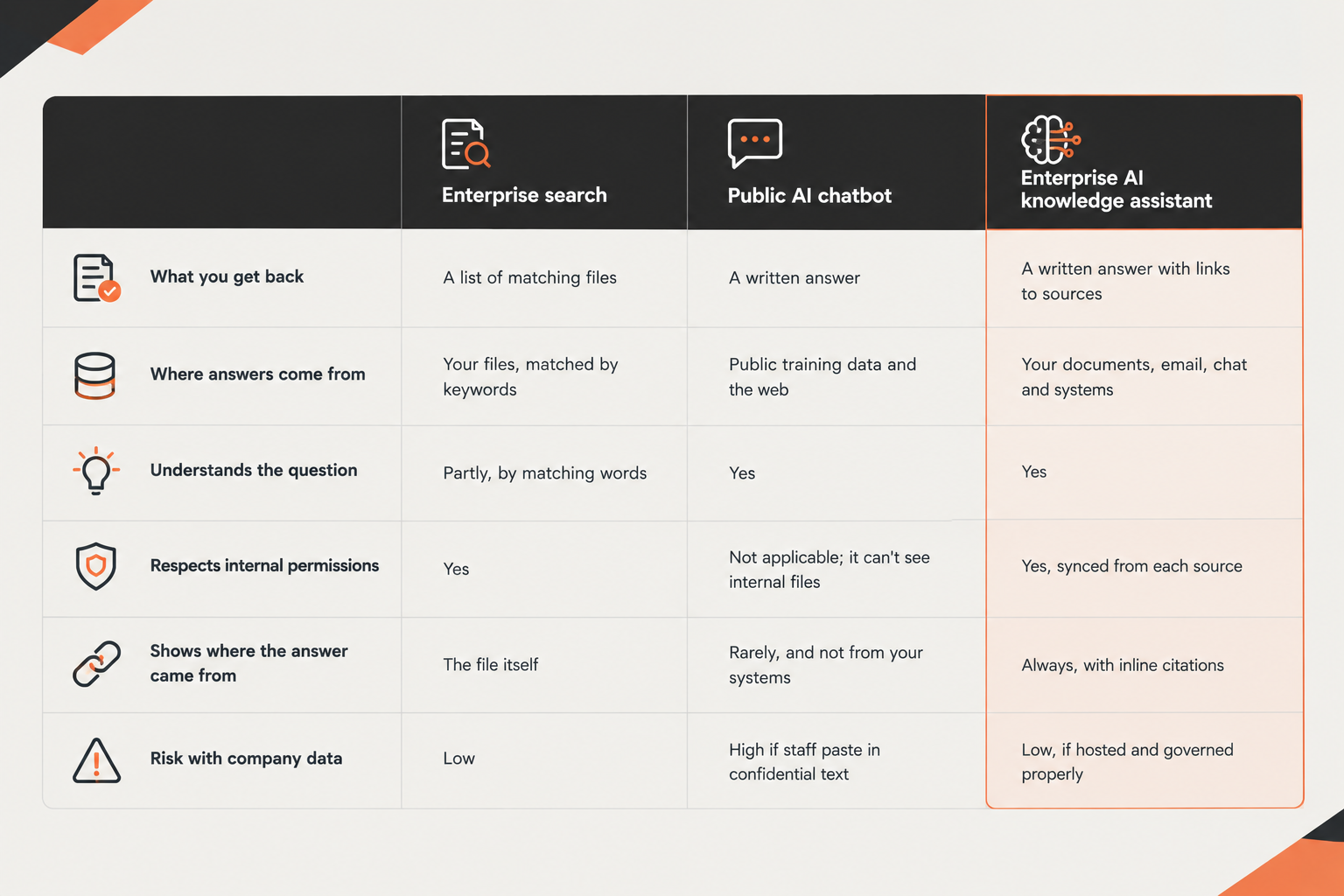
The last row matters more than it looks. When no approved tool exists, staff often paste internal documents into public chatbots to get quick answers. A governed knowledge assistant gives them the same speed without sending company data outside.
What Should You Look For in an Enterprise AI Knowledge Assistant?
Check eight things: permissions, citations, connectors, document handling, data location, model choice, usage controls and admin oversight. The demo will always look good. These questions show how the assistant behaves with real data and real users.
- Does it sync permissions from each source? Ask how it learns who can see what in SharePoint, Drive or email, and how quickly it reflects a change. If a file is unshared at 2 p.m., the assistant should stop using it for that person soon after, not next week. Vizier AI syncs permissions from each connected source, so people only get answers from content they are entitled to see.
- Does every answer cite its sources? Answers without links can't be checked. Look for inline citations that open the exact document.
- Which systems does it connect to? List your real sources and check each one. Vizier AI indexes SharePoint, Google Drive, Outlook, Gmail and PostgreSQL databases, and searches Slack and Microsoft Teams live.
- Can it read your documents as they really are? Scanned PDFs, spreadsheets, slides, charts and images are common in practice. Ask what happens to a scanned contract or a chart inside a report.
- Where are documents, indexes and chat history stored? This decides your compliance position. More on this below.
- Which AI model does it use, and can you change it? A model-agnostic assistant lets you choose a locally hosted model for sensitive work, or bring your own provider, and switch later without rebuilding.
- Can you control usage and cost? Look for per-user and per-team limits, warnings before limits are reached, and dashboards that show who is using what.
- What do administrators get? Role-based access, audit logs you can export, data retention settings and usage reports should all be standard.
What Do Teams Use a Knowledge Assistant For?
Most teams start with the questions they answer over and over, then move on to drafting and research. Here is how different departments typically use one.
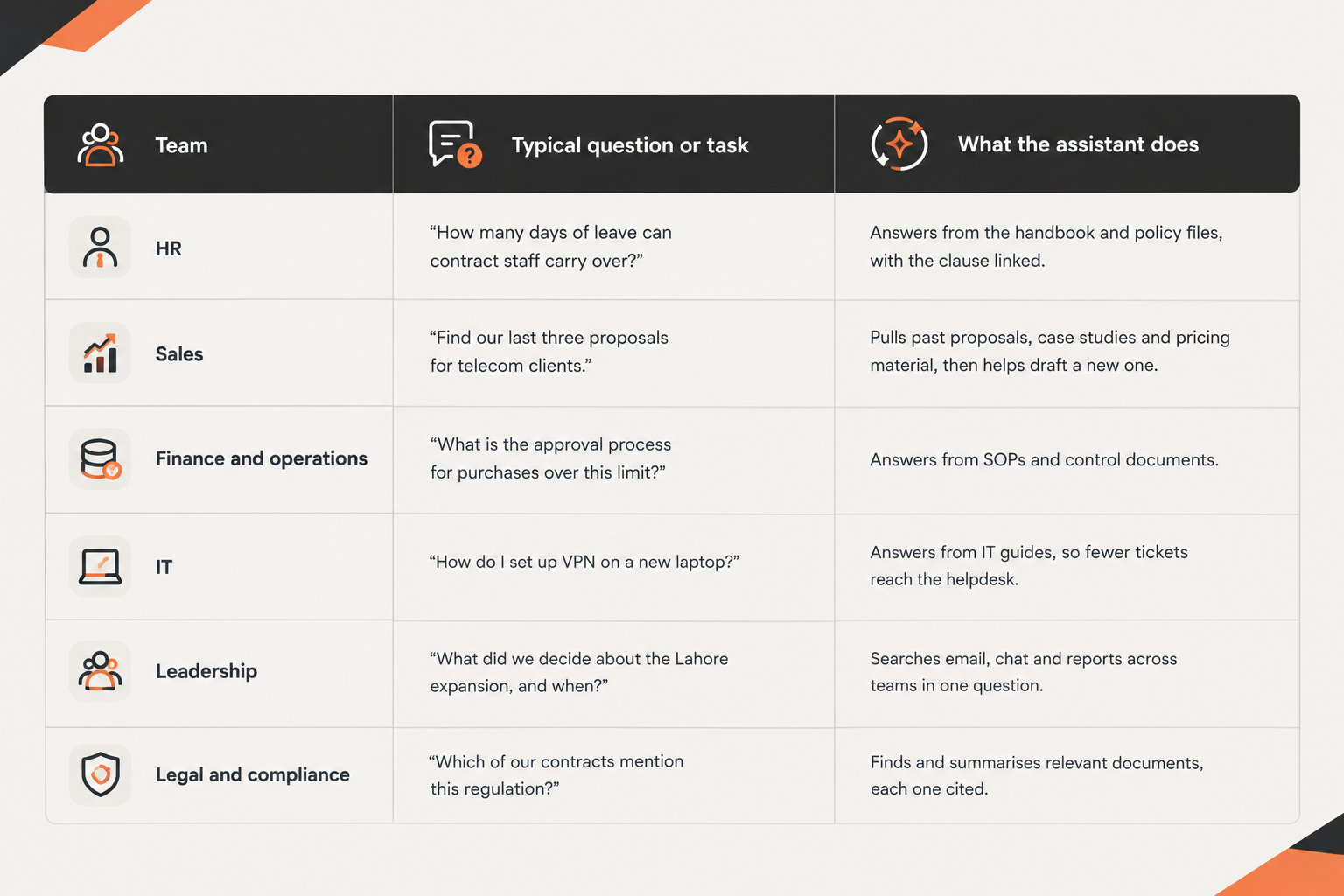
Beyond answering questions, Vizier AI can analyse spreadsheets, query a connected database in plain language (on the Enterprise edition), draft documents and export them to Word, run multi-step Deep Research that produces a report, and repeat tasks on a schedule, such as a weekly summary of new policies.
Where Does Your Data Live? Pakistan and the Middle East
For many organisations in Pakistan and the Gulf, where the assistant stores documents and processes questions matters as much as how well it answers. Every question sends company content to a language model, so the location of that model and of the stored index is a compliance decision.
In Pakistan
Fintechs, EMIs and digital banks face the SBP's cloud localisation mandate, with a Q4 2026 deadline for hosting core workloads domestically, and government data has its own residency rules. In Pakistan, Vizier AI is hosted on Sky47's sovereign cloud. Documents, indexes, chat history, usage records and backups stay in the country, and the default language model runs on Sky47 too, so no question or answer leaves Pakistan. (If an organisation chooses to connect its own outside model provider instead, stored data stays on Sky47, but questions and answers go to that provider.) Organisations can run on a shared service or a dedicated single-tenant instance.
In Saudi Arabia, the UAE and the wider region
Saudi Arabia's Personal Data Protection Law tightly restricts sending sensitive personal data outside the Kingdom, and banks are expected to keep customer data inside the country. For these markets, Vizier AI deploys inside the customer's own environment, on-premise or fully air-gapped, so documents and questions stay within their walls.
Language
In both regions, people rarely work in English alone. Vizier AI handles questions and documents in English, Urdu, and Arabic, so a staff member can ask in the language they think in.
Where Are Knowledge Assistants Heading? Know, Do, Anticipate
Knowledge assistants are moving from answering questions to doing work, and eventually to offering information before anyone asks. Vizier AI's roadmap describes this in three stages.
- Know. Find and understand information across the organisation. This is the stage most companies are in today: ask a question, get a cited answer.
- Do. Turn that knowledge into action within the working day. Drafting a document, running research, analysing a spreadsheet and scheduling recurring tasks are early examples, and they are already part of Vizier AI.
- Anticipate. Surface relevant knowledge before it is requested, as the assistant learns the organisation's context. For example, pointing a manager to the policy that applies before a decision is made.
For buyers, the practical point is to choose a platform that does the first stage well now, with permissions and citations you trust, because every later stage builds on that foundation.
Related reading: How to Choose the Right Open-Source LLM and Custom AI vs Off-the-Shelf AI.
The Bottom Line
An enterprise AI knowledge assistant turns the documents, emails and systems you already have into answers people can check and trust. The technology is mature enough today for most organisations. What separates a good choice from a risky one is how it handles permissions, whether it cites its sources, and where your data ends up. Get those three right, and the rest becomes a question of which team to start with.

See Vizier AI on your own documents
Connect SharePoint, Google Drive, Outlook and Slack, ask questions in English, Urdu or Arabic, and get answers with the source attached. Hosted in Pakistan on Sky47, or inside your own environment across the Middle East.
Frequently Asked Questions
FAQs
It is software that answers employees' questions from the company's own documents, email and systems. It finds the relevant content, writes an answer with a language model, links each source, and only uses content the person is allowed to see.
A public chatbot answers from general training data and can't see your internal files. A knowledge assistant answers from your own content, shows where each answer came from, respects your access rights, and can run on infrastructure you control.
It shouldn't, if it syncs permissions from each source system. A well-built assistant only retrieves content the person asking could open themselves. Check how quickly it reflects permission changes before you buy.
Look for cited answers. When every answer links to its source, employees can check the original before acting, and administrators can see which documents are being used.
It shouldn't. Vizier AI does not use customer data to train models; the content is used only to answer that organisation's questions.
Yes. In Pakistan, Vizier AI is hosted on Sky47's sovereign cloud, with documents, indexes, chat history and the default language model all kept in the country.
Vizier AI supports questions and documents in English and Urdu.,Arabic and many other languages.
Outside Pakistan, Vizier AI can be deployed on-premise or fully air-gapped inside the customer's environment, which suits regulated organisations in Saudi Arabia, the UAE and elsewhere in the region.


Discuss Your Enterprise Use Case
From small to large scale enterprises, we deliver next-gen AI, data engineering, and actionable insights.


