
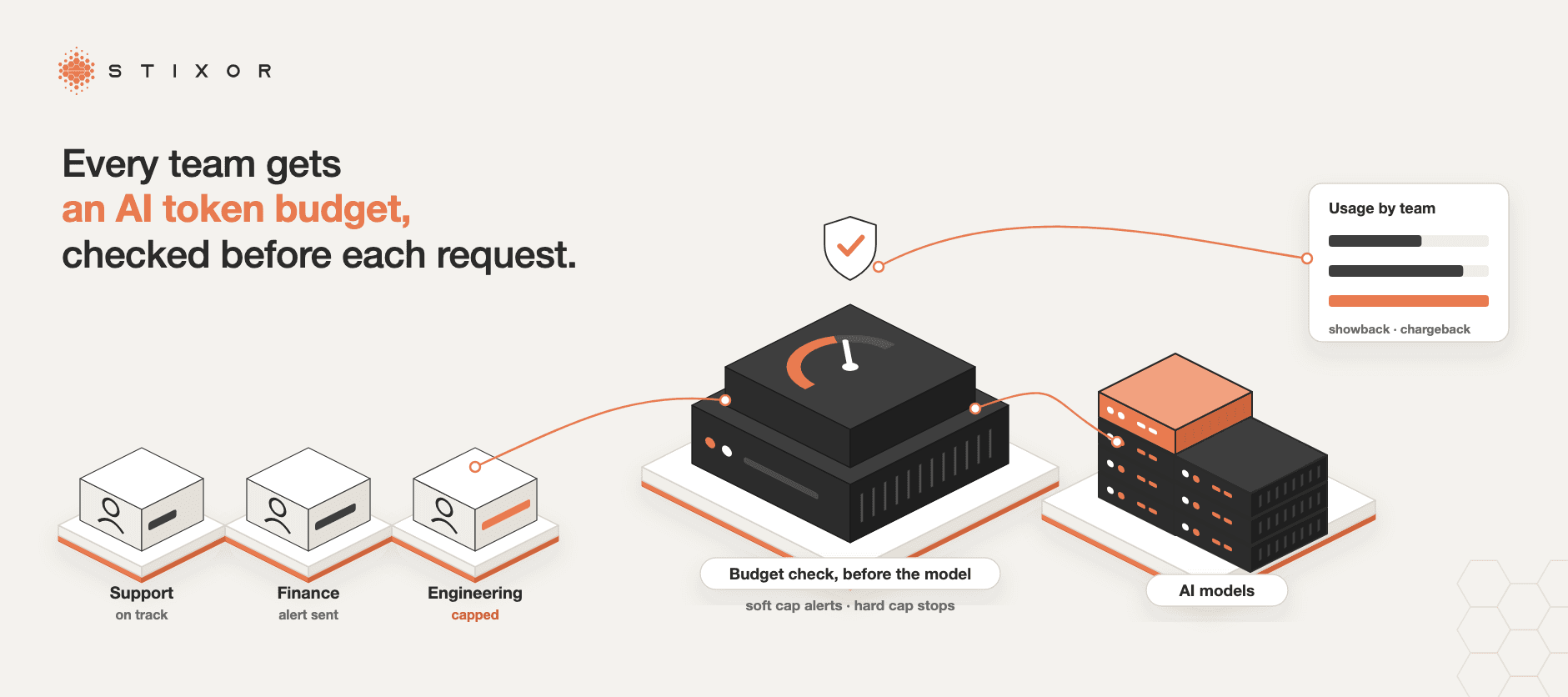
AI Token Budgets: How Companies Control AI Spending Per Team

Written by Muhammad Rizwan
November 7, 2026
14 min Read
An AI token budget is a limit on how much a team, application or person can spend on AI models in a given period, measured in tokens or in money, and enforced so that usage stops or slows when the limit is reached. It turns AI from an open tab into a planned cost that each team owns.
Token budgets have become urgent as AI coding assistants and agents spread through companies, because each of them can make hundreds of model calls for a single task. Stixor AI Hub is built around this problem: it checks each team's budget before every request reaches the model.
This guide explains tokens in plain English, why AI bills are so hard to predict, the ways companies set budgets (per team, per app, per person), soft vs hard caps, how to spend fewer tokens without hurting results, and a step-by-step plan to roll budgets out.
What is an AI token budget? An AI token budget is a spending limit for AI model usage, set per team, application, project or user over a period such as a day or a month. Every request is counted in tokens, the units models are billed in, and when the budget runs out the system warns, slows or blocks further requests.
| AI token budgets at a glance | Answer |
|---|---|
| What it limits | AI model usage, counted in tokens or money |
| Who gets one | Teams, applications, API keys, projects or individual users |
| Typical period | Per day, per week or per month |
| Soft cap | Sends a warning; work continues |
| Hard cap | Blocks new requests until the budget resets or is raised |
| Where it should be checked | Before each request reaches the model, not in next month's invoice |
Key Takeaways
- AI bills grow with usage, not with seats. Agents, coding assistants and long documents multiply the tokens behind each task.
- Give budgets to the people who can change the usage: a team, an application or a project, each with its own key.
- Use two layers: a soft cap the team sets to plan its own use, and a hard cap finance or IT sets that cannot be exceeded.
- A budget only protects you if it is checked before the request runs. A dashboard that tallies spend afterwards is a report, not a limit.
- Track cost per outcome (per resolved ticket, per merged code change, per report), not just total tokens.
What Is a Token, in Simple Terms?
A token is a small piece of text, roughly three-quarters of a word in English, and it is the unit AI models read, write and charge for.
OpenAI's own guide gives the rule of thumb: about 4 characters, or three-quarters of a word, per token, so 100 tokens is roughly 75 English words (OpenAI Help Center). Other languages, including Urdu and Arabic, can use more tokens for the same meaning.
Think of tokens like units on a prepaid electricity meter. Every appliance you switch on uses units; some use far more than others. A token budget is the meter plus the circuit breaker: it counts what each team uses and cuts the supply before the bill gets out of hand.
Key terms in plain English
| Term | What it means |
|---|---|
| Input tokens | The text you send: your question, instructions and any documents |
| Output tokens | The text the model writes back; usually priced higher than input |
| Reasoning tokens | Hidden "thinking" a reasoning model does before answering; billed as output |
| Context | Everything the model reads for one request, including chat history |
| Rate limit | How many requests or tokens are allowed per minute |
| Showback | Showing each team what it used, without billing it |
| Chargeback | Billing each team's AI use to its own budget |
Why Is AI Spending So Hard to Budget?
AI spending is hard to budget because cost depends on how much text every request reads and writes, and new ways of using AI, such as agents, coding assistants and reasoning models, quietly multiply that text many times over.
Five things drive the surprise:
- Agents and coding assistants make many calls per task. One request like "fix this bug" can trigger dozens of model calls as the tool reads files, plans, edits and tests.
- Context grows with every turn. In a long chat or coding session, the whole history is often sent again with each new message, so each turn costs more than the last.
- Reasoning tokens are invisible. OpenAI notes that reasoning tokens are not shown as answer text but are billed as output tokens, so "a short visible answer can therefore use more tokens than its displayed text suggests" (OpenAI Help Center).
- Loops and retries. A misconfigured agent can repeat the same step all night. The OWASP Top 10 for LLM Applications calls this "Unbounded Consumption" and recommends rate limits and quotas (OWASP).
- Cheaper per token is not cheaper overall. When each token costs less, people use far more of them: longer documents, more agents, more experiments. The total bill can rise even as unit prices fall.
How Are Big Companies Handling AI Token Budgets?
Large companies are moving from unlimited AI use to measured, capped use: per-person limits on AI coding tools, budget targets per division, and cheaper default models, after spending ran ahead of plans.
- Uber set usage caps on AI tools for staff, limiting each employee's monthly token spending per AI coding tool, after the company used up its AI budget faster than planned, according to Bloomberg, which confirmed the policy with an Uber spokesperson.
- Microsoft told its engineers that "tokenmaxxing is not what we are optimizing for", according to an internal message reported by 404 Media: the goal is value from tokens, not volume.
- Across companies, engineering leaders interviewed by The Pragmatic Engineer described two paths: let usage run and measure it, or rein it in with cheaper default models and caps. One said changing the default model cut costs by about 30%.
The pattern is the same everywhere: first visibility, then limits per person or team, then a push to get more value from each token.
How Is AI Usage Priced?
AI usage is priced in one of four ways: per token through an API, per seat through a subscription, from a prepaid balance, or as the cost of running models on your own GPUs; token budgets matter most for the first, third and fourth.
- Per-token API pricing. You pay for input and output tokens separately, at a rate that depends on the model. Larger and reasoning models cost more per token; cached input (text the provider has seen recently) is often cheaper.
- Per-seat subscriptions. A fixed fee per user for a tool. Predictable, but heavy users may hit usage limits, and some tools add usage-based charges on top.
- Prepaid credits. You buy a balance and usage draws it down. Good for control: when it reaches zero, usage stops.
- Your own GPUs. You pay for hardware, power and operations instead of tokens. Budgets are then set in GPU time and tokens per team, so the shared hardware is divided fairly.
Because prices change often and vary by model and provider, check current price lists for the models you use, and build budgets in tokens as well as money so they survive price changes.
How Do Companies Set AI Token Budgets?
Companies set token budgets at the level where someone can change the usage: per team for planning, per application or key for control, per project for accounting, and per user only for heavy individual tools such as coding assistants.
| Budget level | Good for | Watch out for |
|---|---|---|
| Per team or department | Planning, ownership, chargeback | One heavy app can use the whole team's budget |
| Per application or API key | Stopping runaway apps and agents | Needs a key per app, not one shared key |
| Per project or feature | Knowing what each product feature costs | Requires tagging every request |
| Per user | Coding assistants and personal AI tools | Can feel like policing; set it generously and review |
Most companies combine levels: a monthly budget per team, split across keys for each application, with a separate allowance per developer for coding tools. Set the period to match how fast things can go wrong. A daily cap on an agent stops an overnight loop; a monthly budget on a team supports planning.
Soft Caps vs Hard Caps: Where Should Limits Be Enforced?
Use soft caps to warn and hard caps to stop, and enforce both before the request reaches the model; a limit checked after the call only tells you how much you have already overspent.
| Soft cap | Hard cap | |
|---|---|---|
| What happens at the limit | Alert to the team and its manager | New requests are refused |
| Who sets it | Usually the team, for its own planning | Finance or IT, as a ceiling |
| Good for | Planning and early warning | Protection from runaway costs |
| Risk | Alerts get ignored | Blocks important work if set too low |
Before vs after. Many tools show spending on a dashboard and send an alert after the money is spent. A pre-call check is different: before each request, the system looks at the remaining budget and the likely size of the request and refuses it if it would go over. A common way to do this is to estimate the prompt's tokens, hold back room for the longest answer allowed, and settle the real count when the answer finishes. Our guide to AI gateways explains this in more detail.
Avoid blocking critical work. Give urgent systems their own key and budget, let teams request a temporary increase with a quick approval, and let running work finish when a cap is hit rather than cutting it off mid-answer.
Showback vs Chargeback: Who Pays for AI?
Showback tells each team what its AI use cost; chargeback actually moves that cost into the team's budget. Start with showback to build awareness, then move to chargeback once the numbers are trusted.
Both depend on the same thing: every request must be tied to a team, an application and a key. The FinOps Foundation's guidance for AI is to map each API key to one team, application and cost center, and to report through showback first, because "visibility alone often changes behavior" (FinOps Foundation). Shared keys make this impossible, which is why per-team keys are step one of any budget. With clean usage records, finance can see spend by team, by model and by application, and teams can see their own remaining budget at any time.
How to Spend Fewer Tokens Without Hurting Results
The biggest savings come from sending each task to the smallest model that can handle it, keeping prompts and context short, capping output and reasoning length, reusing answers to repeated questions, and stopping agent loops early.
- Route by difficulty. Send simple tasks to small, cheaper models and only hard ones to the largest. The FrugalGPT research (arXiv preprint) showed that sending queries to cheaper models first and escalating only when needed can match the best single model at a much lower cost.
- Limit reasoning length. The Token-Budget-Aware LLM Reasoning study (arXiv preprint) found that model reasoning is often unnecessarily long and can be shortened by giving the model a token budget, cutting token costs with only a slight drop in accuracy.
- Trim the context. Send the relevant part of a document, not the whole file, and summarize long chat histories instead of resending them.
- Cap the output. Set a maximum answer length for each application.
- Cache repeated answers. For help-desk style questions, reuse answers to questions already asked. Never share a cache between customers or teams.
- Stop loops. Give agents a maximum number of steps and a per-task budget, and alert when a task exceeds it.
Budget for Outcomes, Not Just Tokens
Total tokens tell you what AI cost; cost per outcome tells you whether it was worth it, so track spend per resolved ticket, per merged code change, per processed invoice or per report.
A team that doubled its token use while halving its cost per resolved ticket is doing well. A team whose token use is flat but whose results have not improved is not. Agree on one outcome per use case, divide spend by that outcome every month, and use the trend to decide which teams get more budget. Pair it with a quality bar: as the FinOps Foundation puts it, "cost targets mean little without the quality they must preserve."
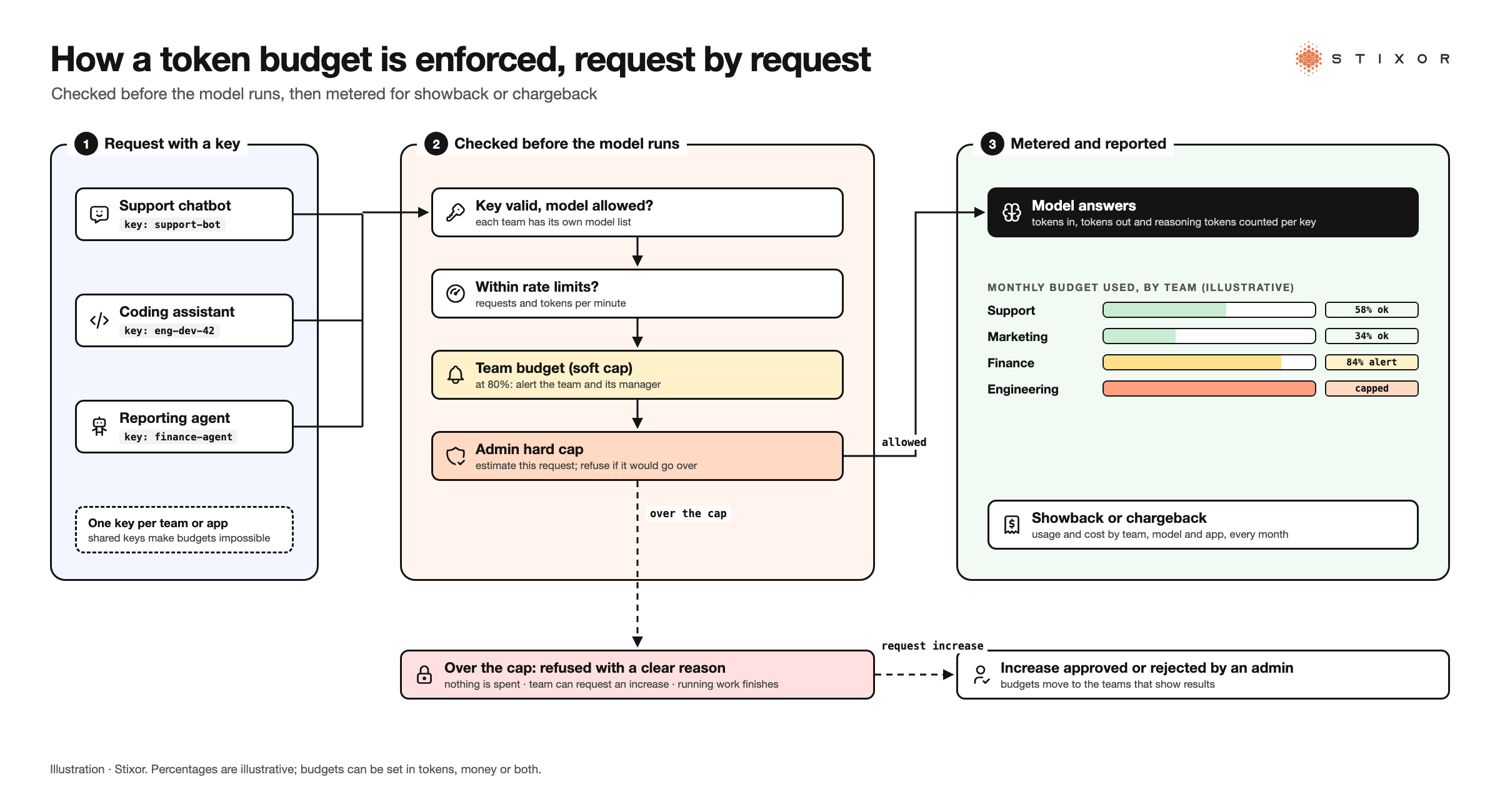
Figure: How a pre-call token budget works: each request carries a team key, the remaining team budget and the admin hard cap are checked before the model runs, then usage is metered for showback or chargeback. Illustration · Stixor
How to Roll Out AI Token Budgets: A Step-by-Step Plan
Roll out token budgets in six steps: give every team and app its own key, measure a month of real usage, set soft caps from that baseline, add hard caps, publish showback reports, and review budgets against outcomes every month.
- Separate the keys. One key per team and per application. Retire shared keys.
- Measure first. Run for a few weeks with metering only, so budgets are based on real usage, not guesses.
- Set soft caps. Start a little above each team's normal use, with alerts to the team and its manager.
- Add hard caps. Set ceilings that protect the company, with a fast approval path for temporary increases.
- Publish showback. Send each team its usage and cost every month, by model and application.
- Review against outcomes. Each month, compare spend with the outcome it bought, then raise, lower or move budgets.
Token Budgets When You Run Your Own Models
When you run models on your own GPUs, token budgets still matter: they divide shared hardware fairly between teams, stop one team from crowding out the rest, and let you charge each team for its share.
Owning GPUs changes the cost from per-token fees to hardware, power and operations, but the capacity is finite. Without budgets and rate limits, the busiest team takes it all. Metering tokens per key, and GPU time per team for training and notebooks, gives you the same showback and chargeback you would get from a cloud bill. Our guide to GPU as a Service explains how companies share GPUs across teams.
AI Token Budgets in Pakistan and the Middle East
In Pakistan and the Gulf, token budgets also solve two local problems: billing AI usage in local currency on your own platform, and keeping prompts and usage records inside the country.
Pakistan
Foreign AI services bill in foreign currency, which makes department budgets harder to plan. When models run on your own platform, usage can be priced and charged back in rupees, and prompts never leave your network. For banks, this also simplifies questions under the State Bank of Pakistan's cloud outsourcing framework.
Saudi Arabia and the Gulf
Large organizations rolling out AI across many departments need the same controls at scale: per-department budgets, approvals for increases and full usage records. Where prompts contain personal data, Saudi Arabia's Personal Data Protection Law also favors keeping processing on-premise or inside your own environment.
How Stixor AI Hub Enforces AI Token Budgets
Stixor AI Hub enforces token budgets at the API itself: every team gets its own keys and limits, budgets are checked before each request reaches the model, and every token is metered for showback, chargeback or customer billing.
Stixor is a leading AI and data engineering company providing secure, scalable, and compliant enterprise solutions. Stixor AI Hub gives each department, application or customer:
- Its own keys and limits. Teams create API keys from a web console. Administrators set rate limits in requests per minute, tokens per minute and maximum concurrent requests, and decide which models each team may use.
- Two-layer budgets, checked first. Each team sets its own budget; an administrator sets a hard cap it cannot exceed. Both are checked before a request reaches the model, and requests are blocked once spend reaches the budget. Budgets warn first, then cap; at a zero balance new requests stop while running work finishes.
- Metering per key. Every call is metered with tokens in and out and cost. Dashboards show requests, tokens, cost, latency and spend by model.
- Billing that fits. Prepaid credits or on-demand plans, per-team model prices, billing months that close and become final, and invoices per billing cycle. Prices and currency are set on the platform, so usage can be charged back in local currency.
- A path to more budget. Teams can request a higher budget or rate limit, and an administrator approves or rejects it.
It runs inside your own data center or cloud, or fully air-gapped, in front of open models on your servers and, where policy allows, outside providers. See How Stixor AI Hub Works for the full picture.
The Bottom Line
Token budgets are not about saying no to AI. They let you say yes to more teams safely, because every team knows its limit and every request is checked before it costs anything. Start by giving every team its own key this month; the rest of the plan builds on that. If you are deciding where those limits should live, read our guide to AI gateways.

Give Every Team an AI Budget That Actually Holds
Stixor AI Hub checks each team's budget and an admin hard cap before every AI request, meters every token per key, and turns usage into chargeback-ready records.
Frequently Asked Questions
FAQs
An AI token budget is a limit on how much a team, application or user can spend on AI models over a period, counted in tokens or money. When the budget is reached, the system warns the team (a soft cap) or blocks further requests (a hard cap) until it resets or is raised.
It depends on the model and provider. Larger and reasoning models cost more per token, output tokens usually cost more than input, and cached input can be cheaper. Check each provider's current price list, and budget in tokens as well as money so your limits survive price changes.
Not much. Using OpenAI's rule of thumb that 100 tokens is about 75 English words, 2,000 tokens is roughly 1,500 words, a few pages of text. A long document or a coding session can use many times that in a single request.
With a soft cap, the team and its manager get an alert and work continues. With a hard cap, new requests are refused until the budget resets or an administrator approves an increase. Good systems let work already running finish instead of cutting it off.
Because usage grows faster than prices fall. Agents and coding assistants make many model calls per task, reasoning models add hidden tokens, and long contexts are resent with each turn. Cheaper tokens also encourage more and bigger uses, so the total bill can rise.
Give each team and application its own API key, meter every request per key, and report usage and cost by team, model and application. Start with showback, where teams see their costs, then move to chargeback, where the cost is billed to their budgets.
Yes, especially those that act as agents. A single coding task can trigger many model calls as the tool reads files, edits code and runs tests. Per-developer allowances, a team budget and a hard cap keep heavy use from surprising finance.
Both. Money is what finance plans with; tokens are what engineers can control and what stays stable when prices change. Many teams set the budget in money and track tokens per task to see why spending moved.


Discuss Your Enterprise Use Case
From small to large scale enterprises, we deliver next-gen AI, data engineering, and actionable insights.


