
Is ChatGPT Safe for Confidential Company Information?

Written by Muhammad Rizwan
November 27, 2026
5 min Read
ChatGPT is not built for confidential company information by default: on the free and personal plans, OpenAI may use what you type to train its models unless you switch that off, and on any plan your data is processed on the provider's systems, not yours. Business plans add real protections, but for regulated or sovereign data the question is not only "is it secure?" but "where does it go, and who controls it?"
That distinction matters more than most staff realise. An employee who pastes a draft contract into a personal ChatGPT account to "tidy the wording" has moved company data to an outside service, under that service's terms, possibly into its training data. Nobody meant harm. It just happened in ten seconds.
This guide explains what happens to what you type, how the free and business plans differ, what should never be pasted into a public chatbot, and what organizations in Pakistan and the Middle East can use for confidential work instead.
Key Takeaways
- On Free, Plus and Pro, OpenAI says it may use your content to train its models; you can opt out in settings.
- On Business, Enterprise, Edu and the API, OpenAI says it does not train on your data by default, and admins get retention controls.
- Temporary Chat is not used for training, but OpenAI may keep a copy for up to 30 days for safety.
- Whatever the plan, data is processed on the provider's systems, which matters for regulated data and in-country rules.
- For confidential work, use an approved tool with access controls, audit and a deployment that fits your data rules.
What Happens to What You Type Into ChatGPT?
What happens to your data depends on the plan: personal plans may use conversations to train models unless you opt out, while business plans exclude your data from training by default and let admins control retention.
OpenAI's help centre states that when you use its services for individuals (Free, Plus, Pro), it may use your content to train its models, and that you can turn this off under Settings, Data controls, "Improve the model for everyone", or through its privacy portal. For business customers, OpenAI's enterprise privacy page says it does not train its models on business data by default.
| Free, Plus, Pro (personal) | Business, Enterprise, Edu, API | |
|---|---|---|
| Used to train models? | May be, unless you opt out | Not by default |
| Who controls settings | Each user | Workspace admins |
| Retention control | User deletes chats | Admins can set retention (Enterprise, Edu) |
| Security reports | General service controls | SOC 2 audit, encryption at rest and in transit |
| Where data is processed | Provider's systems | Provider's systems |
What about Temporary Chat?
OpenAI says a temporary chat is not used to improve its models, but that it may keep a copy for up to 30 days for safety purposes. That is better for one-off questions, but it does not turn a personal account into an approved company tool.
Is ChatGPT Enterprise Safe for Company Data?
ChatGPT Enterprise and Business add meaningful protections, including no training on your data by default, admin-controlled retention, encryption and a SOC 2 audit, but they still run on the provider's infrastructure, which may not satisfy every data rule.
According to OpenAI's enterprise privacy page, business data is encrypted at rest (AES-256) and in transit (TLS 1.2 or higher), and the service has completed a SOC 2 audit. Those are solid controls, and for many companies with ordinary business data they may be enough.
Three questions remain for regulated organizations:
- Where is the data processed and stored? Check whether the provider can keep your data in a location your regulator accepts.
- Does it know your access rules? A general chatbot does not know that a junior officer should not see a board paper. Uploading files into it puts that judgement on each user.
- What can you audit? Check what logs your admins can see and export, and for how long.
What Are the Real Risks of Putting Confidential Data Into ChatGPT?
The real risks are staff using personal accounts outside company control, data being used for training on personal plans, data leaving the country, no link to your access rules, and the rare but real chance of a service bug.
- Personal accounts ("shadow AI"). Staff using their own free accounts at work is the most common risk. The company has no visibility, no retention control and no record of what was shared.
- Training on personal plans. Unless the user has opted out, conversations on personal plans may be used to train future models.
- Data leaving the country. Questions, files and answers are processed on the provider's systems. For some organizations that alone rules it out.
- No access control over company files. Once a document is pasted in, the chatbot cannot tell who should or should not see it.
- Service bugs. In March 2023, OpenAI reported a bug that let some users see titles from another active user's chat history and exposed payment-related details of 1.2% of Plus subscribers active during a nine-hour window. OpenAI fixed it and said full card numbers were not exposed, but it shows that any shared service can fail.
- Manipulated inputs. The OWASP Top 10 for LLM applications lists prompt injection and sensitive information disclosure among the leading risks for AI tools that handle company data.
What Should Employees Never Paste Into a Public AI Chatbot?
Employees should never paste customer personal data, passwords or keys, unreleased financial results, contracts under negotiation, legal or HR case files, source code that is not public, or anything marked confidential or restricted into a public AI chatbot.
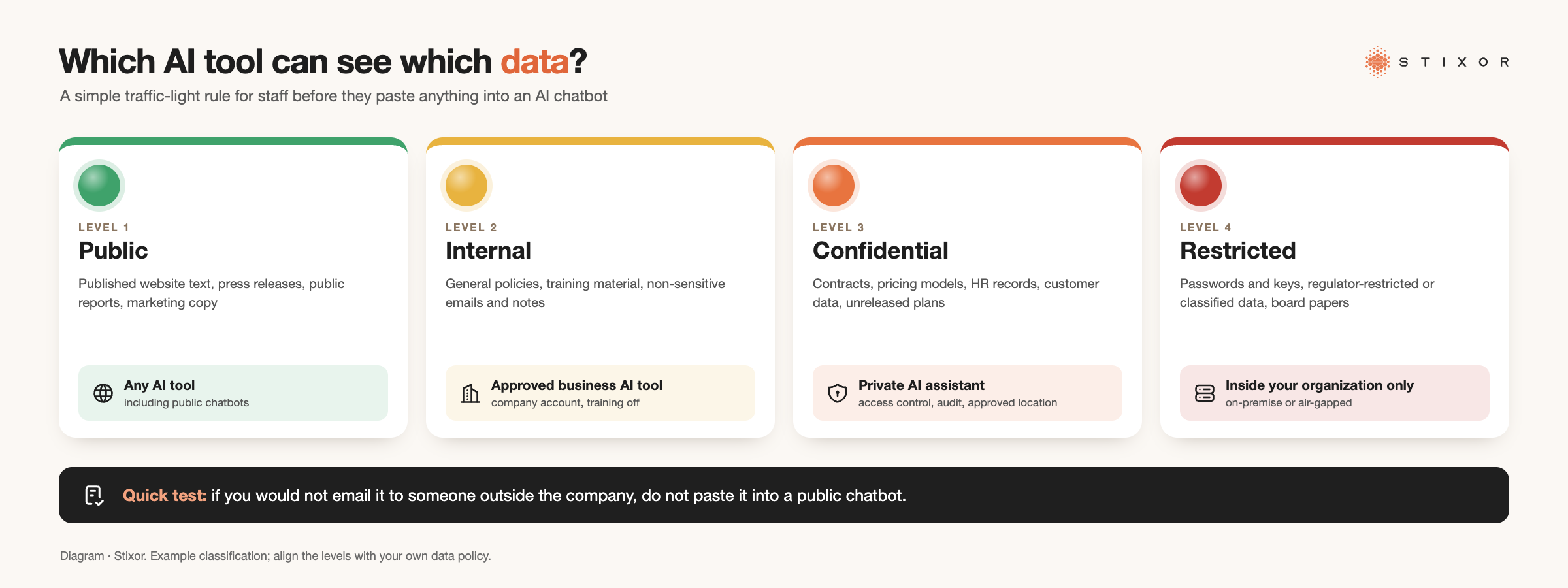
Figure: A simple traffic-light rule for staff: which kinds of information can go into a public chatbot, an approved business AI tool, or only a private assistant that runs inside the organization. Diagram · Stixor
| Data class | Examples | Where it can go |
|---|---|---|
| Public | Published website text, press releases, public reports | Any AI tool |
| Internal | General policies, training material, non-sensitive emails | An approved business AI tool |
| Confidential | Contracts, pricing models, HR records, unreleased plans, customer data | A private assistant with access control and audit, inside approved locations |
| Restricted | Passwords and keys, classified or regulator-restricted data, board papers | Only systems inside your organization, often on-premise or air-gapped |
A quick test for staff: if you would not email it to someone outside the company, do not paste it into a public chatbot.
How Can a Company Use ChatGPT Safely?
Use ChatGPT safely by approving specific tools and plans, turning off training where it applies, classifying data, training staff with clear examples, and giving them a safe option for confidential work so they do not improvise.
- Write a short AI use policy. One page: which tools are approved, for what data, and who to ask.
- Use business plans for work, not personal accounts, so admins control settings and retention.
- Turn off training on any personal plans that remain in use, and use Temporary Chat for one-off tasks.
- Classify your data with the four classes above, and put the rule in the policy.
- Train staff with real examples from your business: "this contract clause, yes; this customer list, no".
- Give people a safe option. Staff paste confidential files into public tools when they have no approved alternative. A private assistant for confidential documents removes the temptation.
- Review usage regularly, and update the policy as tools change.
What About Data Rules in Pakistan and the Middle East?
In Pakistan and the Middle East, sensitive and regulated data is increasingly expected to stay in the country, so the location of processing matters as much as the provider's security controls.
In Pakistan, the government's position under the Cloud First Policy and its cloud provider accreditation is that sensitive data should be stored on servers in the country, with public sector bodies directed to use accredited cloud services, as Profit by Pakistan Today reported. Banks, telecoms and government-linked companies often apply their own, stricter rules. Saudi Arabia and the UAE also have personal data protection laws with rules on transferring personal data outside the country.
For these organizations, the practical question is simple: can the AI tool run where our data is allowed to be? If the answer is no, it should not see confidential data, however good its security is.
What Is a Safe Alternative to ChatGPT for Confidential Work?
A safe alternative for confidential work is a private AI assistant that runs inside your organization or your country, answers from your own documents, follows each employee's access rights and keeps an audit trail.
Look for five things:
- Deployment you control: on-premise, air-gapped or a cloud hosted in your country.
- Answers from your files, with citations, so staff can check the source.
- Permission-aware access, so nobody gets an answer from a file they cannot open.
- Audit and retention controls your compliance team can review.
- Your languages, such as Urdu, Roman Urdu and Arabic alongside English.
For a full checklist, see how to choose an enterprise AI assistant.
How Does Vizier AI Keep Confidential Work Private?
Vizier AI is an enterprise AI knowledge assistant that runs on-premise, fully air-gapped or in a cloud hosted in Pakistan, answers from your own documents with citations to the exact passage, and shows each employee only what they are allowed to see.
- Runs where your rules allow: on your own servers, with no internet connection if needed, or in a Pakistan-hosted cloud.
- Answers from your documents: SharePoint, OneDrive, Google Drive, Outlook, Gmail and databases such as PostgreSQL, MySQL, SQL Server and MariaDB, with numbered citations that open the exact passage.
- Follows your access rules: roles, departments and the organization's hierarchy decide what each person can see.
- Gives compliance what it needs: an append-only audit trail with CSV export, an IP allowlist, and data retention settings, including auto-deleting conversations.
- Works in your languages: English, Urdu, Roman Urdu and Arabic.
Staff still get the speed they wanted from a chatbot, and confidential documents never leave the places your policy allows. For the public sector, see our guide to AI assistants for government departments.
The Bottom Line
ChatGPT is a useful tool, and for public or ordinary internal work it is often fine. Confidential work needs a different test: where does the data go, who controls it, and does the tool know who is allowed to see what? Give staff a clear rule and a safe tool for the sensitive part of their job, and they will stop pasting contracts into chat windows.

Keep Confidential Work Inside Your Walls
Vizier AI answers from your own documents with citations, follows each employee's access rights, and runs on-premise, air-gapped or in a cloud hosted in Pakistan, so questions and files stay where your rules say.
Frequently Asked Questions
FAQs
Not by default on personal plans, where OpenAI may use content for training unless you opt out. Business plans add stronger protections, but data is still processed on the provider's systems, so regulated or sovereign data needs an approved tool that runs where your rules allow.
On Free, Plus and Pro plans, OpenAI says it may use your content to train its models, and you can opt out in Settings under Data controls. On Business, Enterprise, Edu and the API, OpenAI says it does not train on your data by default.
Other users cannot normally see your chats, although a 2023 bug briefly showed some chat titles to other users. If you create a shared link to a chat, anyone with the link can open it. Read your plan's privacy terms for how the provider handles your content.
It offers no training on business data by default, admin-controlled retention, encryption and a SOC 2 audit, which suits many companies. Regulated organizations should still confirm where data is processed and whether that meets their rules.
OpenAI says temporary chats are not used to train its models, but it may keep a copy for up to 30 days for safety purposes. It is better for one-off questions, not a substitute for an approved company tool.
Customer personal data, passwords and keys, unreleased financial results, contracts under negotiation, legal or HR case files, private source code, and anything marked confidential or restricted.
Public chatbots process questions and files outside the department's control. Pakistan's policy direction is for sensitive government data to stay on servers in the country, so departments should use an assistant that runs on-premise or on an accredited local cloud.
A private AI assistant that runs on your servers, air-gapped or in your country, answers from your own files with citations, follows your access rights and keeps an audit trail, such as Vizier AI.


Discuss Your Enterprise Use Case
From small to large scale enterprises, we deliver next-gen AI, data engineering, and actionable insights.


