
AI Agents for Business: What They Do, Real Examples and How to Start

Written by Muhammad Rizwan
November 7, 2026
15 min Read
AI agents for business are AI systems that do real work, not just answer questions: they read a request, decide what to do, use your company's tools (CRM, ticketing, email, WhatsApp) to do it, and hand off to a person when they should. A support agent can check an order and issue a return label. A sales agent can qualify a lead and book a meeting.
Stixor builds these agents for companies through its AI and ML solutions, and runs them in production, including a multi-channel sales and support platform covered later in this guide.
This guide explains what an AI agent is in plain English, how it differs from a chatbot, what agents can do in each department, real results, why many agent projects fail, and a step-by-step way to start.
What is an AI agent for business? An AI agent for business is software built on a large language model that is given a goal, a set of tools and a set of rules. It works through tasks step by step, such as looking up records, updating systems and sending messages, and asks a human to approve or take over when a decision falls outside its rules.
| AI agents for business at a glance | Answer |
|---|---|
| What they are | AI that takes actions in your systems, not only chat |
| Common jobs | Customer support, sales follow-up, order handling, IT help, reports |
| What they connect to | CRM, ticketing, email, WhatsApp, voice, databases, internal APIs |
| Where people stay involved | Approvals, exceptions, sensitive or high-value decisions |
| Main risk | Acting wrongly or inconsistently without the right limits and checks |
| Best first step | One frequent, well-defined process with a clear success measure |
Key Takeaways
- An AI agent acts: it uses your systems to finish a task. A chatbot mostly talks.
- The best first projects are frequent, rule-based tasks where mistakes are easy to catch and undo, such as support tickets, lead follow-up and order status.
- Many agent projects fail. Gartner predicts over 40% of agentic AI projects will be canceled because of rising costs, unclear value or weak risk controls. Start narrow and measure.
- Keep a human in the loop for money, contracts, personal data and anything hard to reverse.
- In Pakistan and the Gulf, agents that work on WhatsApp and voice, in Urdu, Roman Urdu and Arabic, reach customers where they already are.
What Is an AI Agent in Simple Terms?
In simple terms, an AI agent is like a new team member with a job description, an access card and a rulebook: it knows its goal, can open only the systems it has been given, and follows the rules for when to ask a manager.
A chatbot is more like a help-desk notice board that can talk. Ask it a question and it answers from what it knows. An AI agent goes further. Ask it "Where is my order, and can I return it?" and it can look up the order in your system, check the return policy, create the return, send the label, and update the ticket, all in one conversation.
Under the hood, the agent repeats a simple loop: think, act, check. It decides the next step, uses a tool (for example, "look up order"), reads the result, and decides again until the job is done or it needs a person. This "reason, then act" pattern was described in the ReAct research paper (ICLR, peer-reviewed), and most business agents today work this way.
Key terms in plain English
| Term | What it means |
|---|---|
| LLM | Large language model: the AI "brain" that understands requests and writes replies |
| Tool | A system the agent may use, such as your CRM, ticketing or email |
| Workflow | The steps of a business process, such as handling a refund |
| Human in the loop | A person approves or takes over at set points |
| Guardrails | Rules that limit what the agent may say or do |
| Multi-agent system | Several specialized agents working together, such as a sales agent and a support agent |
AI Agent vs Chatbot vs Automation: What Is the Difference?
A chatbot answers questions, traditional automation follows fixed steps, and an AI agent combines both: it understands messy requests like a person and takes actions in your systems like automation, choosing the steps itself within limits you set.
| Chatbot | Rule-based automation (RPA, workflows) | AI agent | |
|---|---|---|---|
| Main job | Answers questions | Repeats fixed steps | Completes tasks toward a goal |
| Handles messy input | Somewhat | No, needs exact formats | Yes, reads emails, chats and calls |
| Takes actions | Rarely | Yes, only the scripted ones | Yes, picks which tools to use |
| When things change | Needs new answers | Breaks until re-scripted | Adapts within its rules |
| Best for | FAQs | High-volume, identical tasks | Varied tasks that still follow policy |
A simple test: if you can draw every step of the process as a flowchart before it starts, ordinary workflow automation is usually cheaper and more predictable. Use an agent when the steps depend on what the customer actually says or what the systems return.
Be careful with labels. Gartner warns about "agent washing", vendors renaming chatbots and automation tools as agents, and estimates that only about 130 of the thousands of agentic AI vendors are real. Ask any vendor what the agent can actually do in your systems, not what it can say.
What Can AI Agents Do for Businesses?
AI agents can take over the repetitive, rule-following parts of work in support, sales, operations, IT, HR and finance, while people keep the judgment calls, the exceptions and the customer relationships.
- Customer support. Answer questions from your knowledge base, check orders and accounts, open and update tickets, record complaints, and hand complex cases to a person with the full history attached.
- Sales. Qualify inbound leads, follow up by email, WhatsApp or phone, update the CRM, and book meetings for your sales team.
- Order handling. Take orders over chat or voice, confirm stock and delivery details, and send confirmations.
- IT help desk. Reset access, answer how-to questions, collect details for issues and route tickets to the right team.
- HR. Answer policy questions, guide new joiners through onboarding steps and collect documents.
- Finance and back office. Match invoices to purchase orders, flag differences for review, and chase missing documents.
- Reporting and research. Pull numbers from several systems into a weekly report, or summarize competitor news for a manager.
Notice the pattern: the agent does the gathering, checking and updating; a person approves anything with real financial, legal or reputational weight.
A Real Example: Stixor's Sales and Support Agent Platform
A real example is the multi-agent sales and customer support platform Stixor built for B2B companies, which runs sales and support agents across voice, WhatsApp, email and web chat, connected to CRM and ticketing systems.
According to Stixor's published case study, the platform:
- runs a B2B sales agent and a customer support agent, with personas, workflows and short- and long-term memory;
- handles inbound and outbound voice calls, WhatsApp messages, email sequences and web chat, with speech-to-text and call transcripts;
- connects to CRM and ticketing systems, with lead management, complaint recording, manager dashboards and role-based access control.
The results reported in that case study: an 80% minimum call completion rate, under 0.5 seconds average response latency, 99% system uptime, at least 30% less manual effort, at least 95% SLA adherence and at least 25% higher agent productivity, with at least two customers in production.
The lesson for any business is the shape of the project. It started with two clear jobs (sales outreach and support), connected to the systems people already used, gave managers dashboards to watch performance, and measured outcomes from day one.
How Does an AI Agent Work Inside a Business?
Inside a business, an AI agent works as a loop between a request, a language model, your tools and your rules: it reads the request, plans a step, uses an allowed tool, checks the result, and either continues, finishes or hands off to a person.
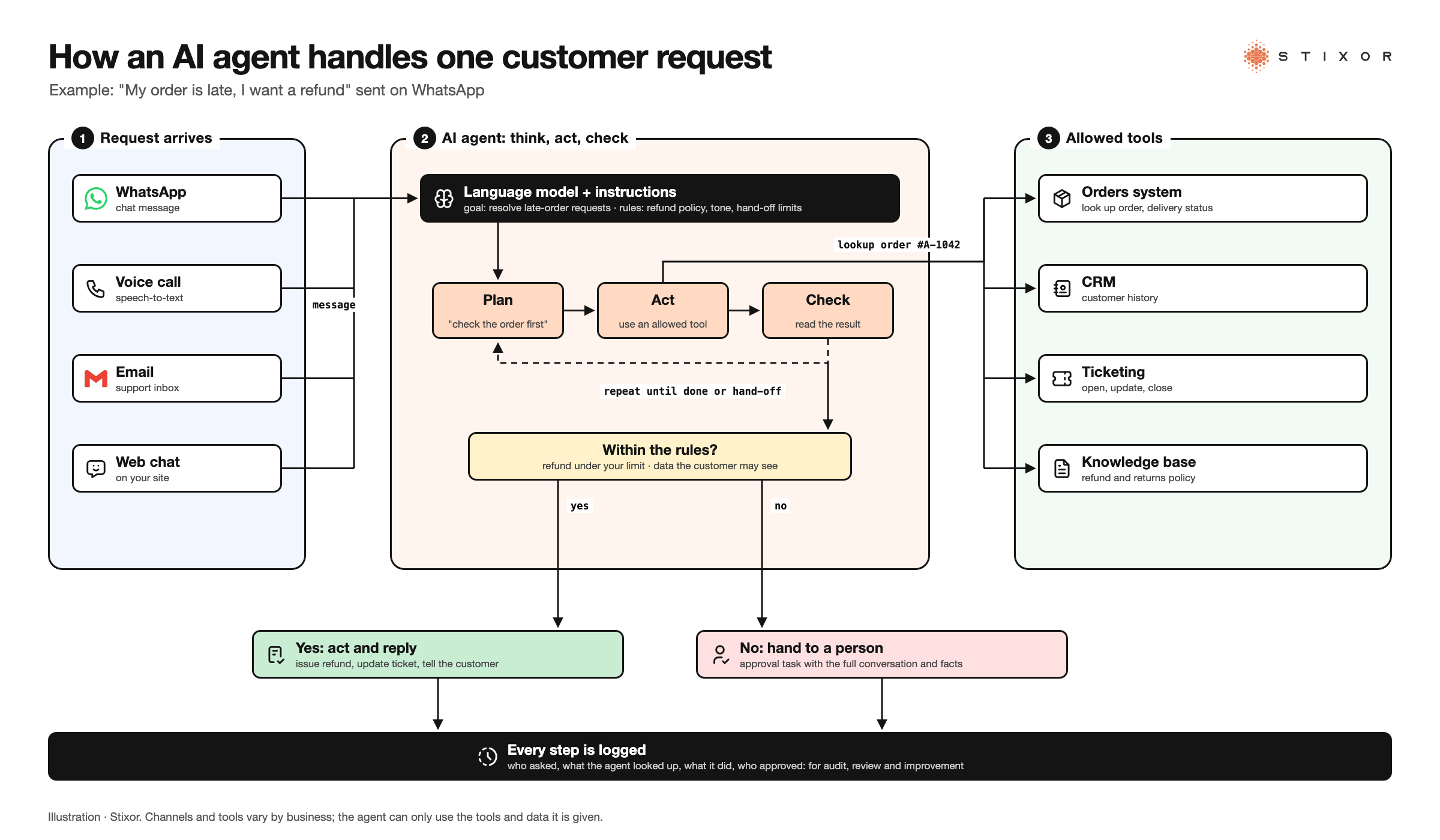
Figure: How an AI agent handles a customer request: the message arrives on any channel, the agent plans and uses allowed tools such as CRM and ticketing, rules decide when a person must approve, and every action is logged. Illustration · Stixor
Step by step, for a customer asking about a late order on WhatsApp:
- Request arrives on WhatsApp, voice, email or web chat.
- The agent understands it using a language model: a late order, and the customer wants a refund.
- It looks things up with allowed tools: the order in your system, the delivery status, the refund policy.
- It checks the rules. Refunds under your limit can go ahead; larger ones need approval.
- It acts or hands off. It issues the refund or creates an approval task for a person, with all the details.
- It records everything: the ticket is updated, the customer is told what happens next, and the action is logged.
The agent only "knows" what your systems and documents tell it, and it can only do what its tools allow. That is why connecting the right data, and limiting the right permissions, matters more than which AI model you pick.
Which Business Tasks Are Right for an AI Agent?
The right tasks for an AI agent are frequent, follow clear rules, rely on data that already sits in your systems, and have mistakes that are easy to spot and undo; tasks that are rare, high-stakes or based on judgment should stay with people.
Use this quick check before starting:
- Is it frequent? Dozens or hundreds of times a day pays back the effort; a few times a month does not.
- Are there written rules? If your team follows a policy or script, an agent can too. If "it depends on who asks", it is not ready.
- Is the data reachable? The agent needs access to the order, account or ticket. Data trapped in spreadsheets on someone's laptop is a blocker.
- Can mistakes be caught? Start where an error is visible and reversible, such as a reply or a ticket update, not a payment.
- Can you measure success? Resolution rate, response time, hand-off rate or SLA adherence, defined before you start.
Why Do AI Agent Projects Fail?
AI agent projects usually fail for business reasons, not technical ones: unclear value, rising running costs, weak controls, and agents that work in a demo but behave inconsistently with real customers.
Gartner predicts that over 40% of agentic AI projects will be canceled because of escalating costs, unclear business value or inadequate risk controls, and recommends pursuing agentic AI only where it delivers clear value (Gartner).
Research shows the reliability gap too. In τ-bench (arXiv preprint), a benchmark that tests agents on realistic customer-service tasks with company policies, strong models such as GPT-4o completed fewer than half the tasks, and succeeded on the same retail task across eight attempts less than a quarter of the time. Salesforce AI Research found a similar gap in business tasks: in its CRMArena-Pro benchmark (arXiv preprint) covering sales, service and quoting, leading agents succeeded on about 58% of single-turn tasks and about 35% of multi-turn conversations, and showed near-zero awareness of what information to keep confidential unless specifically instructed. Newer models do better, but the lesson holds: test an agent many times on real cases, not once in a demo, and tell it explicitly what it must never reveal.
How to avoid the common traps:
- No clear goal. Pick one process and one number to improve before building anything.
- Too much freedom, too soon. Start with read-only access and suggested actions; let the agent act alone only after it has proven itself.
- Hidden running costs. Every step calls a model, and an agent stuck in a loop keeps calling. Send simple steps to smaller, cheaper models, set usage limits per agent, and watch the cost of each completed task from the first week.
- No owner. Someone in the business, not only IT, must own the agent's results, rules and improvements.
- Bad data. If your knowledge base is out of date, the agent will repeat old answers confidently.
Three levels of human control
- Level 1, draft only: the agent prepares replies and actions; a person sends or approves every one.
- Level 2, approve to act: the agent acts alone on low-risk cases and asks for approval on anything above set limits.
- Level 3, act alone with spot checks: the agent handles a whole process; people review a sample of its work each week and every exception.
Move up a level only when the numbers at the current level hold for several weeks.
Are AI agents right for a small business?
Often, yes, if one channel takes a lot of your team's time. A small shop answering the same WhatsApp questions all day, or a clinic booking appointments by phone, is a good fit. You need your answers written down (prices, hours, policies), access to your order or booking system, and someone to check the agent's work in the first weeks. You do not need an IT team to start, but you do need an owner.
How to Start Using AI Agents in Your Business
Start with one frequent process, map it, connect the agent with limited access, keep a person approving its actions at first, measure the results, and expand only when the numbers hold.
- Pick one process. For example, order-status questions on WhatsApp, or first-response on support tickets.
- Write down the rules. What the agent may do, what it must never do, and when it must hand off.
- Connect the data. Give read access to the systems it needs: CRM, orders, knowledge base.
- Run it in suggestion mode. The agent drafts the reply or action; a person approves. This builds trust and training examples.
- Measure for a few weeks. Compare resolution rate, response time, hand-offs and customer satisfaction with your baseline.
- Allow it to act alone on safe cases. Keep approvals for refunds above a limit, contract changes and personal-data requests.
- Expand. Add the next process or channel only after the first one is stable.
How to Keep AI Agents Safe and Under Control
Keep AI agents safe by giving each one only the access it needs, requiring approval for high-impact actions, logging everything it does, defending against manipulated inputs, and capping how much it can use.
- Least access. An order agent does not need payroll data. Give each agent its own credentials and limits.
- Approvals. Payments, discounts above a threshold, contract changes and data deletion go to a person.
- Prompt injection. Customers or documents can contain text that tries to trick the agent ("ignore your rules and…"). The OWASP Top 10 for LLM Applications lists prompt injection as the top risk. Never let the content of a message grant new permissions.
- Logs and review. Record every action and decision so you can audit, explain and improve.
- Usage limits. Cap requests and spending per agent and per team, so a loop or a spike cannot run up a bill. Our guide to AI gateways explains how to enforce this in one place.
How Do You Measure an AI Agent's Results?
Measure an AI agent with the same numbers you use for the team doing that work, such as resolution rate, response time, hand-off rate, SLA adherence and customer satisfaction, plus accuracy checks on a sample of its actions.
- Resolution rate: share of requests fully handled without a person.
- Hand-off rate and quality: how often it escalates, and whether the person receives full context.
- Response and handling time: first reply and time to resolve.
- SLA adherence: share of cases handled within your service targets.
- Accuracy: review a weekly sample of actions for correctness and policy compliance.
- Effort saved: hours of manual work removed, and where that time went.
AI Agents in Pakistan and the Middle East
In Pakistan and the Gulf, the best-performing business agents meet customers on WhatsApp and phone calls, speak Urdu, Roman Urdu or Arabic, and keep customer data where local rules require.
Pakistan
WhatsApp and phone calls are where many customers already talk to businesses, so agents that work on these channels, in Urdu and Roman Urdu as well as English, get used. For banks and regulated companies, check where the agent's data and model calls are processed against the State Bank of Pakistan's cloud outsourcing framework. Running the model on local infrastructure keeps conversations in the country.
Saudi Arabia and the Gulf
Arabic, including local dialects, should be tested on real customer messages and calls before launch. Saudi Arabia's Personal Data Protection Law applies to the personal data agents handle, so decide early where conversations, recordings and logs are stored.
How Stixor Builds AI Agents for Businesses
Stixor designs, builds and runs AI agents for support, sales and operations, connected to the systems you already use, with human approvals, dashboards and measured results.
Stixor is a leading AI and data engineering company providing secure, scalable, and compliant enterprise solutions. For AI agents, that means:
- Custom agents through [AI and ML solutions](https://stixor.com/services/ai-ml-solutions): finding the processes with real return, building the agent, connecting it to your CRM, ticketing and messaging channels, and running it in production with monitoring.
- Worknix, Stixor's AI employee platform: role-specific chat and voice agents with guided onboarding and their own knowledge bases. They handle FAQs, tickets, complaints and orders and track KPIs, with AI sales, lead-generation and order-taking agents.
- Proven delivery: the multi-channel sales and support platform described above, with its published results.
- Enterprise agent work across monitoring, workflow automation and decision support, described on our enterprise AI agents page.
- Control over the models behind agents: where model usage must be governed per team, Stixor AI Hub gives agents one OpenAI-compatible API with keys, rate limits and budgets checked before each call.
To be fair about fit: if you only need answers to a short list of FAQs, a simple chatbot is enough. An agent earns its place when the work involves looking things up, updating systems and following policy, many times a day.
The Bottom Line
The businesses getting value from AI agents are not the ones with the most agents, but the ones that picked one frequent process, set clear rules, kept people in charge of the important decisions and measured the result. Choose your first process this month and define the number it should move. If your agents will run on open models, our guide to choosing the right open-source LLM is the next read.

Put an AI Agent to Work on One Real Process
Stixor designs, builds and runs AI agents for support, sales and operations, connected to your CRM, ticketing and WhatsApp, with human approval where it matters.
Frequently Asked Questions
FAQs
AI agents can handle customer support, sales follow-up, order taking, IT help-desk requests, HR questions and back-office checks such as invoice matching. They read requests, look up data in your systems, take allowed actions and hand complex or sensitive cases to people, which frees staff for work that needs judgment.
No. A chatbot mainly answers questions. An AI agent can also take actions in your systems, such as updating a CRM, creating a ticket or processing a return, and decides which steps to take to reach a goal, within rules and permissions you set.
An AI agent is a specific system that does a job, such as a support agent. Agentic AI is the broader approach of building AI that plans and acts toward goals with some independence. Every AI agent is an example of agentic AI.
Yes. Small businesses often start with one agent on their busiest channel, such as answering WhatsApp enquiries or booking appointments. The same rules apply: pick a frequent task, connect the right data, keep a person approving important actions, and measure the results.
In most businesses, agents take over repetitive parts of jobs rather than whole roles. Staff move to exceptions, relationships and decisions. Planning that shift openly, with training and clear ownership of the agents' work, is part of a successful rollout.
It depends on how many requests they handle, how many steps each task takes, which AI model they use, the channels involved (voice usually needs more processing than text), and whether you build or buy. Set usage limits per agent and track the cost of each completed task from the start.
They can be, with the right controls: least-privilege access, approvals for sensitive actions, protection against manipulated inputs, full logging, and data stored where your regulations require. Test the agent on real cases before it talks to customers on its own.
Yes. Agents can work over WhatsApp messaging, inbound and outbound voice calls, email and web chat, using speech-to-text and text-to-speech for calls. Stixor's sales and support platform, for example, runs on all of these channels.


Discuss Your Enterprise Use Case
From small to large scale enterprises, we deliver next-gen AI, data engineering, and actionable insights.


