
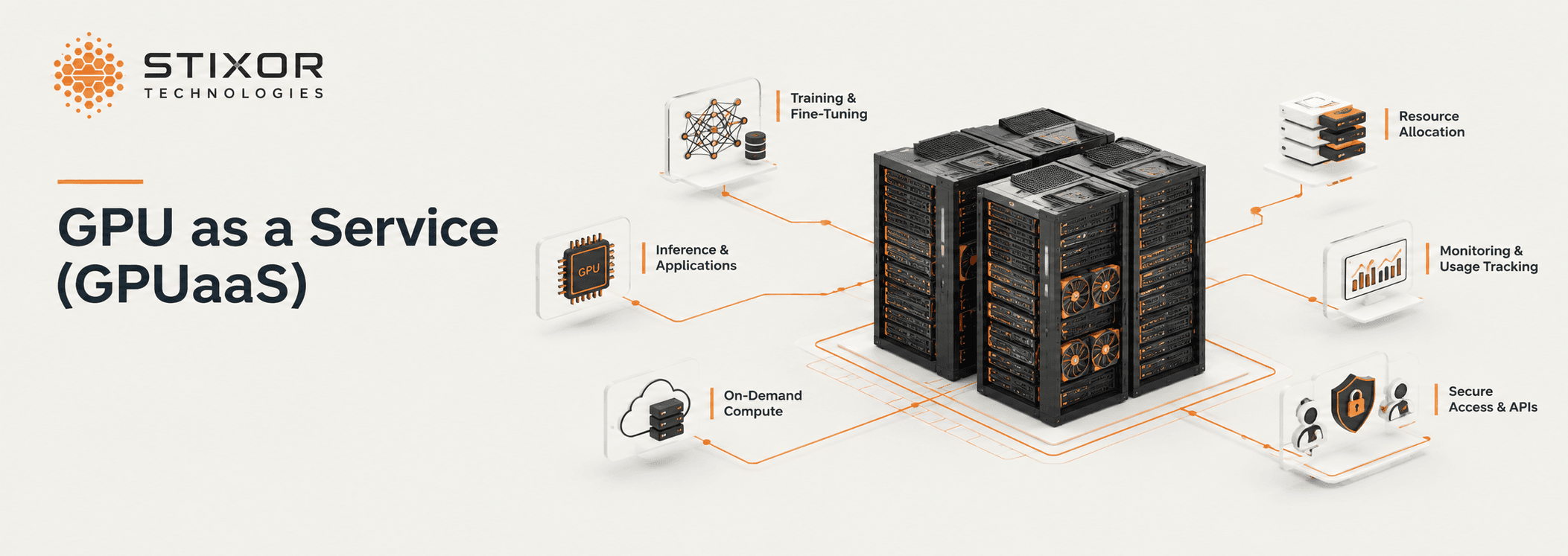
GPU as a Service (GPUaaS): How It Works and How to Choose the Right Model

Written by Muhammad Rizwan
October 27, 2026
GPU as a Service (GPUaaS) gives teams access to GPU computing power through a managed service, without requiring them to buy, install and operate every server themselves. Teams use it for AI training, AI inference, scientific simulation and rendering. They can rent capacity from a provider or turn GPUs they already own into a shared service.
Stixor delivers GPU as a Service through Stixor AI Hub, a multi-tenant, accelerator-agnostic AI platform. Data centers can use it to sell accelerator capacity and AI model access through one platform. Enterprises can share their own accelerators across teams and track usage for internal cost allocation or billing. The same platform also provides AI Platform as a Service (AI PaaS) for training and fine-tuning, and Model as a Service (MaaS) for accessing models through an API.
This guide explains how GPUaaS works, how GPUs can be shared, when to rent or buy, how data centers can commercialise their infrastructure, and what to evaluate before choosing a platform.
Definition: GPU as a Service is a way of delivering GPU computing on demand. A software layer manages a pool of GPUs, allocates capacity to workloads, separates users and records usage for reporting or billing. Users request capacity through a portal or API instead of purchasing hardware or waiting for IT to provision it manually.
Key Takeaways
- GPUaaS is a service model, not a location. It can run in a public cloud, a data center or an organisation's own server room.
- The software layer manages access and usage. It handles sharing, scheduling, quotas and metering.
- Sharing can improve GPU utilisation. Studies of large GPU clusters have found that GPUs assigned to jobs can remain idle for substantial periods.
- Renting and owning serve different needs. Renting suits short-term or uncertain demand, while ownership can suit steady, sustained workloads. Many organisations combine both.
- GPUaaS, AI PaaS and MaaS serve different purposes. GPUaaS provides compute, AI PaaS provides tools for building and running AI, and MaaS provides access to hosted models.
What Is GPU as a Service?
GPU as a Service makes GPU computing available on demand without requiring every user to own or manage the underlying hardware.
A graphics processing unit (GPU) performs many calculations in parallel. This makes GPUs useful for AI training, AI inference, scientific simulation and large-scale data processing. GPUaaS puts that computing capacity behind a service, allowing users to access whole GPUs, GPU slices, virtual machines or containers, depending on the provider and supported hardware.
GPUaaS commonly takes three forms:
- Public GPUaaS: A cloud or infrastructure provider rents GPU capacity to external customers.
- Internal GPUaaS: An enterprise turns its own GPUs into a shared service for its teams.
- Provider-operated GPUaaS: A data center operates the infrastructure and sells computing capacity to customers.
All three approaches aim to make GPUs easier to request, share, manage and account for.
GPUaaS vs. Owning GPU Servers
Buying a GPU server gives an organisation direct control over its hardware. It also makes the organisation responsible for procurement, power, cooling, maintenance, setup and capacity planning.
GPUaaS adds a service layer between users and the hardware. That layer manages who gets access to capacity, when workloads run and how usage is measured.
Ownership and GPUaaS are not opposites. An organisation can own its GPUs and still operate GPUaaS by providing self-service access, scheduling, usage limits and metering to its teams.
How Does GPUaaS Work?
GPU as a Service works by placing a software layer on top of a pool of GPUs. The software allocates capacity, separates users and workloads, and tracks usage.
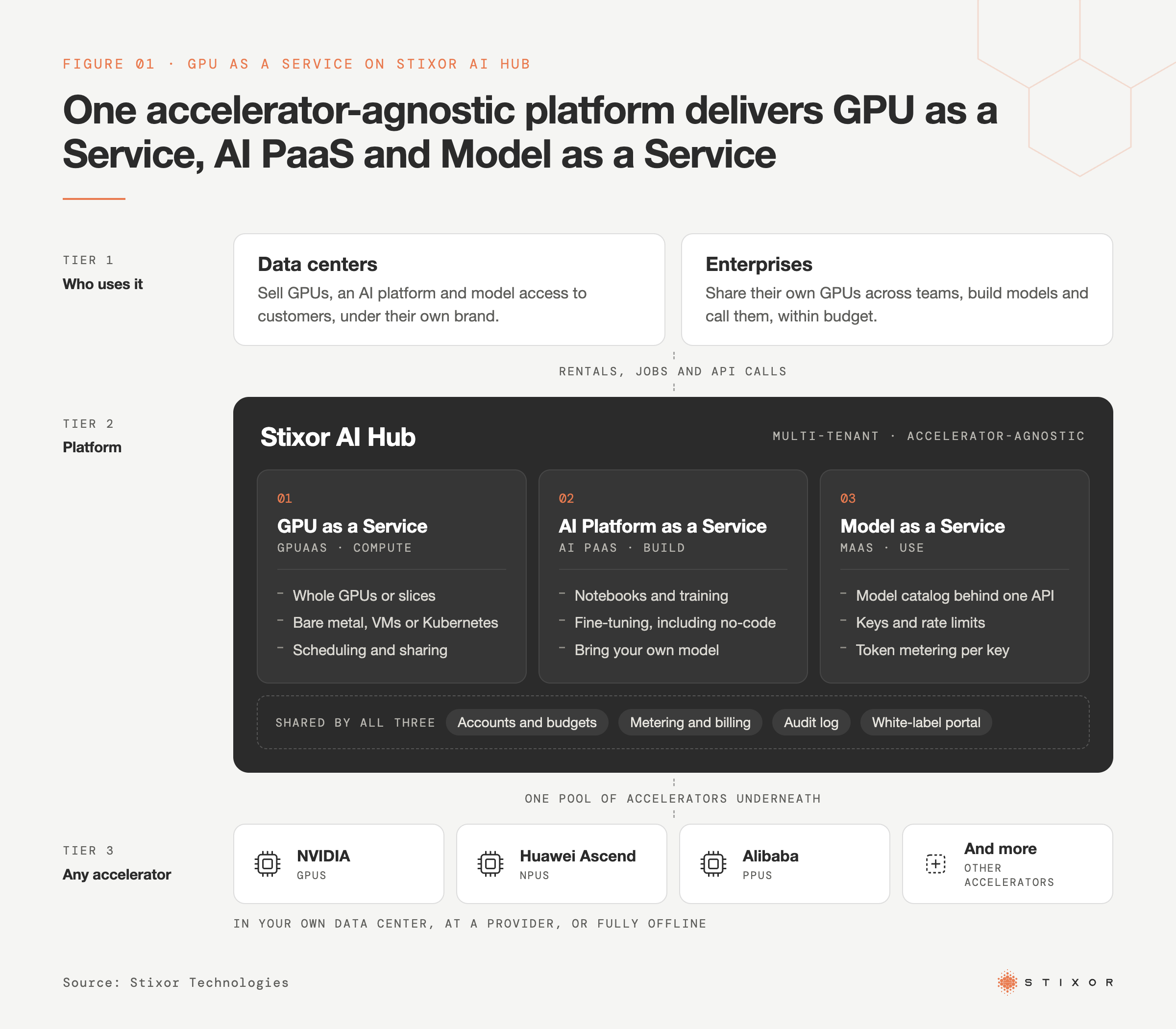
A typical service involves four layers.
A typical GPUaaS setup has six components.
1. Hardware
The infrastructure includes servers, accelerators, networking, storage, power and cooling. It can operate in an organisation's own data center, a colocation facility or a cloud environment.
Some platforms support additional accelerator types, such as Huawei Ascend neural processing units (NPUs). Each chip family requires compatible drivers and software.
2. Scheduling
A scheduler decides which workload runs on which accelerator and when. It applies rules for priorities, queues and quotas. Kubernetes, open-source software for running containers across multiple servers, is a common option for containerised workloads. Slurm is widely used to schedule large computing and training jobs.
3. Sharing
The platform allocates whole GPUs, hardware-partitioned slices or scheduled access to a GPU. The available methods depend on the accelerator and workload. The next section explains the main options.
4. Accounts and limits
Each team or customer receives an account with its own permissions, quotas and budget controls. Separation becomes especially important when multiple companies share infrastructure or workloads process sensitive data.
5. Monitoring and metering
The platform tracks accelerator utilisation, running jobs and usage by account. These records support internal cost reporting, customer billing and capacity planning. For commercial providers, accurate metering is essential to charging customers correctly.
6. Self-service
Users request capacity through a portal, API or command-line interface instead of submitting manual IT tickets. More comprehensive platforms also support workflows such as notebooks, training jobs and model deployment.
Whole GPUs, Shared GPUs or Direct Access: Which Should You Use?
Use a dedicated GPU for large or steady workloads. Share GPU capacity across smaller or intermittent workloads to reduce idle time.
Dedicated GPU: One workload receives an entire GPU. This suits large training jobs and inference services with sustained demand. It is straightforward to manage, but some of the GPU's capacity may remain unused when the workload does not need all of it.
Hardware partitioning: Supported GPUs can be divided into separate instances, each with allocated memory and compute resources. NVIDIA's Multi-Instance GPU (MIG), for example, can divide a supported GPU into as many as seven isolated instances. Availability and configurations depend on the GPU model. See NVIDIA's MIG documentation.
Time-sharing: Multiple workloads take turns using the same GPU under scheduling rules. This can suit small or occasional jobs. Unlike hardware partitioning, time-sharing does not provide the same hardware-level isolation because workloads use the same physical GPU resources at different times.
GPU passthrough: A virtual machine receives direct access to a physical GPU. This can provide performance close to bare-metal access, but passthrough alone does not divide a GPU among multiple virtual machines.
How to choose: Match the allocation method to the workload. Production workloads that require predictable performance may benefit from dedicated capacity. Notebooks, testing and smaller models may be suitable for shared capacity. The objective is to improve hardware utilisation without compromising important workloads.
Why Are Enterprises Turning Their Own GPUs Into an Internal Service?
Enterprises turn their GPUs into an internal service because separately allocated hardware can sit idle in one team while another team waits for capacity.
Imagine a company in which data science, research and product teams each have their own GPU servers. One team's servers may be busy during a project but underused at other times, while another team cannot access the capacity it needs. Internal GPUaaS pools those resources so teams can request available capacity under shared rules.
Research provides examples of this challenge. Microsoft studied its Philly GPU cluster in a paper presented at USENIX ATC 2019. The study found that GPUs assigned to deep learning jobs were busy about 52% of the time on average. Read the Microsoft study.
Alibaba studied its PAI cluster, which contained more than 6,000 GPUs, in research presented at NSDI 2022. The researchers found that GPU sharing could reduce the number of GPUs required by about half. Read the Alibaba study.
These findings come from specific clusters and should not be treated as universal benchmarks. They nevertheless illustrate why resource allocation and sharing matter alongside hardware performance.
Internal GPUaaS can deliver three practical benefits:
- Visibility: Teams can see who is using GPU capacity, when it is being used and how much remains idle.
- Shared capacity: Teams request resources through a common system rather than operating isolated infrastructure.
- Chargeback: Usage records help assign costs to the teams or projects that consume resources. This can be an internal budgeting process rather than an actual bill.
Start by measuring current GPU utilisation. That baseline helps determine whether pooling resources is worth the operational effort.
How Do Data Centers and Cloud Providers Make Money From GPUaaS?
Data centers generate GPUaaS revenue by packaging accelerator capacity into services customers can purchase, such as dedicated GPUs, GPU hours, reserved capacity, prepaid credits or AI model access. Their economics depend partly on how effectively they sell and manage available capacity.
Demand is increasingly driven by running AI models as well as training them. Gartner forecasts that worldwide spending on AI-optimised infrastructure as a service will grow 96% to $42.3 billion in 2026. Its forecast puts inference spending at $23.3 billion and training spending at $19 billion. Inference is expected to represent 55% of spending in 2026 and 59% in 2027. Source: Gartner, 10 August 2026.
Inference workloads can create ongoing demand across many customers, making efficient allocation and sharing important for providers.
Common ways to sell GPU capacity include:
Dedicated GPU rental: Customers pay for an entire GPU or server by the hour, month or contract period.
Pay-as-you-go capacity: Customers pay for measured usage. Providers should state the billing unit clearly because a GPU hour is not the same as a server hour.
Reserved or prepaid capacity: Customers commit to a period or amount of capacity, potentially in return for agreed access terms. Contracts should clarify availability, minimum commitments and cancellation conditions.
Managed AI services: Providers sell access to hosted models through an API or provide a platform for training and deployment, rather than selling only raw compute. GPUaaS sells computing capacity; MaaS sells model access.
Stixor AI Hub supports this service-provider model. Data centers can run it on their accelerator infrastructure and offer whole or sliced accelerator capacity, usage-based rentals, prepaid credits and model access through one platform.
Before launching a GPUaaS offering, operators should understand:
- The full cost of hardware and facilities.
- How much capacity they can realistically sell.
- How usage will be measured and billed.
- How customer workloads and accounts will be isolated.
- What customer support they can provide.
What differentiates their offer, such as location, supported accelerators, software or managed services.
Hardware is only one part of the business. The software used to allocate, isolate, meter and bill capacity is also central to operating a viable service.
Should You Rent GPUs, Buy Them or Run Your Own GPUaaS?
Rent GPUs when demand is short-term or uncertain. Consider buying when workloads are steady and predictable. If you already own GPUs that multiple teams need, operating them as an internal GPUaaS can improve access and accountability.
Renting makes sense when:
- You need capacity quickly.
- The workload is an experiment or short-term project.
- Demand changes significantly.
- You want to evaluate hardware before purchasing it.
- You lack the facilities or staff to operate GPU servers.
Buying makes sense when:
- Workloads are steady and predictable.
- You have suitable space, power and cooling.
- You have engineers to operate the servers.
- Data or operational requirements favour infrastructure you control.
- Long-term ownership costs are lower than ongoing rental.
Running your own GPUaaS makes sense when you already own GPUs and multiple teams need access to them. Owning servers alone does not create a service. You also need software for self-service, scheduling, access controls, limits and metering.
A hybrid approach can combine owned infrastructure for steady workloads with rented capacity for demand peaks or experiments. However, operating across environments adds requirements for networking, security and cost tracking.
Compare the cost of completing the workload, not just the hardware price or hourly rental rate.
Ownership costs can include financing, power, cooling, space, networking, storage, software, maintenance, staff time and idle capacity.
Rental costs can include compute charges, minimum commitments, storage, data transfer and egress fees, support, and the effort required to move data
What Should You Look for in a GPUaaS Platform?
Evaluate a GPUaaS platform based on how well it shares, isolates, measures and delivers resources for your actual workloads, not just on the GPU specifications.
Check these seven areas:
1. Supported accelerators: Which GPU and accelerator families, models, drivers and frameworks are supported? If you use different chip types, ask what changes when moving a workload between them.
2. Scheduling and sharing: Does the platform support queues, priorities, quotas and the sharing methods available on your hardware?
3. Isolation and access: How are users, credentials and workloads kept separate? Does the platform support single sign-on through your organisation's identity system?
4. Metering: Are usage records detailed enough for customer billing, internal cost allocation and auditing?
5. Self-service: Does the portal and API support the workflows your teams need?
6. Performance: Test the platform with a representative workload. Network and storage throughput, as well as communication between GPUs, can matter as much as accelerator specifications.
7. Deployment and commercial terms: Can the platform run in the cloud, on-premises or offline? Are billing units, minimum commitments and service levels clearly defined?
If you need more than compute, evaluate how the platform connects accelerator capacity to model training, deployment and serving.
GPUaaS, AI PaaS and MaaS: What Is the Difference?
GPUaaS provides compute. AI PaaS provides a platform for building and running AI on that compute. MaaS provides ready-to-use models through an API.
GPU as a Service (GPUaaS): Provides access to GPU computing capacity. Customers bring their code and run workloads such as training, inference and simulation.
AI Platform as a Service (AI PaaS): Provides software and tools for building, training, fine-tuning and deploying AI models. It suits teams developing and operating their own models.
Model as a Service (MaaS): Provides access to hosted AI models through an API, without requiring customers to operate the model-serving infrastructure themselves. It suits businesses adding AI capabilities to applications.
These are distinct but complementary service models. GPUaaS supplies the compute, AI PaaS supplies the development and deployment tools, and MaaS provides model access.
Stixor AI Hub brings all three together on the same pool of accelerators. A customer can access accelerator capacity, fine-tune a model and serve that model through an API within one platform and commercial environment.
How Does Stixor AI Hub Deliver GPU as a Service?
Stixor AI Hub is a multi-tenant, accelerator-agnostic software platform that turns accelerator infrastructure into GPU as a Service and adds AI PaaS and MaaS on the same capacity. This allows enterprises and data centers to manage compute, AI development and model access in one place.
Stixor AI Hub supports NVIDIA GPUs, Huawei Ascend NPUs, Alibaba PPUs and other accelerators on x86 or ARM servers. It can be deployed in an organisation's own data center, at a hosting provider or in a fully offline, air-gapped environment.
For GPU as a Service (GPUaaS)
- Whole-accelerator or sliced-capacity allocation, with each customer running its own container images.
- Bare-metal, virtual machine and managed Kubernetes delivery, alongside Slurm for large training jobs.
- Accelerator partitioning into halves or quarters, with multiple models or notebooks able to share one card.
- Priority scheduling that lets urgent work run first, while lower-priority jobs use spare capacity and pause when higher-priority work arrives.
- Accelerator-time pricing per slice-hour for notebooks, rentals and model serving, with usage measured by the second.
- Fleet management across sites, in software: health and utilization monitoring, draining servers for maintenance, rolling upgrades and capacity planning.
Stixor AI Hub is a software platform, not a hardware product or an AI model. It runs on accelerators the data center or enterprise already has, whether in its own facility, at a hosting provider or in a fully offline environment. Stixor does not sell the hardware.
For Model Access (MaaS)
- A model catalog behind one OpenAI-compatible API.
- Separate accounts and API keys for each team or customer.
- Request-rate and token-rate limits.
- Budgets and hard spending caps checked before each request runs.
- Token usage metered per API key.
- Prepaid or on-demand billing with invoice-ready usage records.
For Building AI (AI PaaS)
- Notebooks for development and experimentation.
- Training with customer-provided containers.
- LoRA, QLoRA and full fine-tuning, including a no-code option.
- Experiment tracking.
- A model registry with one-click deployment.
- Support for bringing your own model.
For Operating AI as a Commercial Service
- Different pricing for each customer and model, with price history.
- Billing periods that can be closed and finalised, itemised bills and invoices for each billing cycle.
- Customer requests for higher budgets, higher rate limits or different plans, with administrative approval or rejection.
- Built-in and custom roles, with two-factor authentication.
- The ability for customers to share their own models with other customers.
- An auditable log of sign-ins, changes and model calls. Events are linked to preceding events, and logs can be exported to CSV.
- Dashboards for latency, time to first response and spending by model.
- A model playground for testing, including document-based grounding
Who is Stixor AI Hub for? It suits enterprises that want to share accelerator capacity across teams and allocate costs, as well as data centers that want to sell GPU capacity, model access and AI platform services under their own brand through a white-label customer portal. For a short project requiring only a few GPUs, a straightforward rental may be sufficient.
Read How Stixor AI Hub Works for a closer look at the platform.
GPU as a Service in Pakistan
In Pakistan, choosing a GPUaaS model starts with understanding the rules that apply to the workload, then weighing local hosting against power costs, infrastructure and available skills.
Regulated sectors have specific requirements. Banks must follow the State Bank of Pakistan's cloud outsourcing framework, including BPRD Circular No. 01 of 2023. Public bodies should review the Ministry of IT and Telecom's accreditation criteria for cloud service providers.
Not every workload must remain in Pakistan. Requirements depend on the organisation, sector and data involved, so assess each use case with your compliance team.
Operational considerations also matter. Power, cooling and skilled staff can significantly affect the cost of running GPUs locally. Assess actual demand and expected utilisation before buying hardware, then compare local ownership with rental based on the cost of completing the workload.
GPU as a Service in Saudi Arabia
In Saudi Arabia, GPUaaS decisions should account for how the Personal Data Protection Law applies to each workload and whether the applicable requirements call for in-country infrastructure.
Saudi Arabia's Personal Data Protection Law (PDPL) became enforceable in September 2024. It establishes requirements for processing personal data, including transfers outside the Kingdom. See this Clyde & Co summary.
Workloads involving personal or regulated data may require particular hosting or transfer arrangements; other workloads may be treated differently. Assess each use case with qualified legal advice rather than assuming every workload must be hosted in-country.
When comparing providers, check supported accelerators, available capacity, local support, networking, security controls and pricing. If you plan to build AI services, also evaluate how compute connects to the platform and model layers.

Need GPU Compute for Your AI Workloads?
Explore Stixor’s GPU as a Service to support your AI training, inference, and compute requirements with flexible access to GPU infrastructure.
Frequently Asked Questions
FAQs
Not exactly. Cloud GPU hosting often means renting a GPU server or virtual machine. GPUaaS can go further by adding scheduling, sharing, account limits, monitoring and usage metering. Some services focus mainly on hosted servers, while others provide a more complete platform. Ask which parts of the infrastructure and operations the provider manages.
Renting can be more practical for temporary or variable workloads, while ownership may be worth considering when demand is consistent and the organization can operate the infrastructure efficiently. Compare the full cost over the same period, including hardware, power, cooling, maintenance, storage, networking, and staffing.
Yes, provided the service supports the required hardware and software. Training and inference can have different memory, performance, and networking requirements. Test representative workloads to confirm that the configuration meets your needs.
The terms overlap. A GPU server rental may provide a machine while leaving software installation, monitoring, and resource management to the customer. GPUaaS may also include self-service provisioning, scheduling, usage tracking, and managed environments. Compare the actual service rather than relying on its name.
Not necessarily. Some providers offer computing resources alone, while others include notebooks, training workflows, fine-tuning, experiment tracking, or model deployment. Confirm which tools are included and whether they require separate services or charges.
Stixor provides GPU as a Service and offers Stixor AI Hub, a software platform that supports computing resource management and AI services through MaaS and PaaS capabilities. GPUaaS provides computing capacity, while AI Hub supports the software workflows around that capacity.
No. Data residency depends on applicable rules and the full data flow, including backups, logs, support access, and any cross-border processing. Organizations should verify the actual arrangements and obtain an appropriate compliance review.
Yes. An enterprise can operate GPUaaS on GPUs it owns in its own data center. The organisation remains responsible for the hardware, power and cooling, while the software layer adds self-service access, sharing, limits and metering. Teams can then use the infrastructure as a shared service instead of relying on fixed, team-specific servers.


Discuss Your Enterprise Use Case
From small to large scale enterprises, we deliver next-gen AI, data engineering, and actionable insights.


